Claude Sidebar

by derek-larson14
5
4
3
2
1
Score: 64/100

Description

Category: Coding & Technical Tools

The Claude Sidebar plugin runs agent CLIs inside an Obsidian sidebar tab, turning the side pane into a working terminal instead of a launcher. It can start your default agent automatically, open multiple tabs at once and switch between providers such as Claude Code, Codex, Gemini, GitHub Copilot and other supported backends. Folder and file context menus let you open the agent in a chosen directory, send paths or selections, resume a conversation and start a YOLO session when needed. The plugin also exposes command palette actions for opening tabs, changing the default CLI and moving focus between the editor and the agent.

Reviews

No reviews yet.

Stats

443
stars
71,206
downloads
56
forks
75
days
56
days
56
days
45
total PRs
0
open PRs
12
closed PRs
33
merged PRs
57
total issues
0
open issues
57
closed issues
182
commits

RequirementsExperimental

  • Python 3

  • An agent CLI such as Claude Code or another supported backend

Latest Version

2 months ago

Changelog

Antigravity CLI replaces the Gemini CLI backend. Google's Antigravity CLI (binary agy) is now the Google-provider option in the CLI picker. If you had Gemini selected, you'll be moved to Antigravity automatically — both your default and any per-tab provider you'd pinned — rather than silently dropping back to Claude Code. Any Gemini-specific extra flags you had saved are left alone, not carried over, since they won't parse for agy.

Fixes

  • A terminal tab closed during startup workspace-restore could still finish its deferred init and start a shell on a view that no longer exists, leaving an orphaned PTY behind.
  • The terminal now tells you when the CLI you've selected isn't on your PATH, instead of just dropping you at a bare shell.

README file from

Github

Claude Sidebar

Run Claude Code (and other agent CLIs) in your Obsidian sidebar.

Built by Derek Larson - Pairs with Delegate commands →
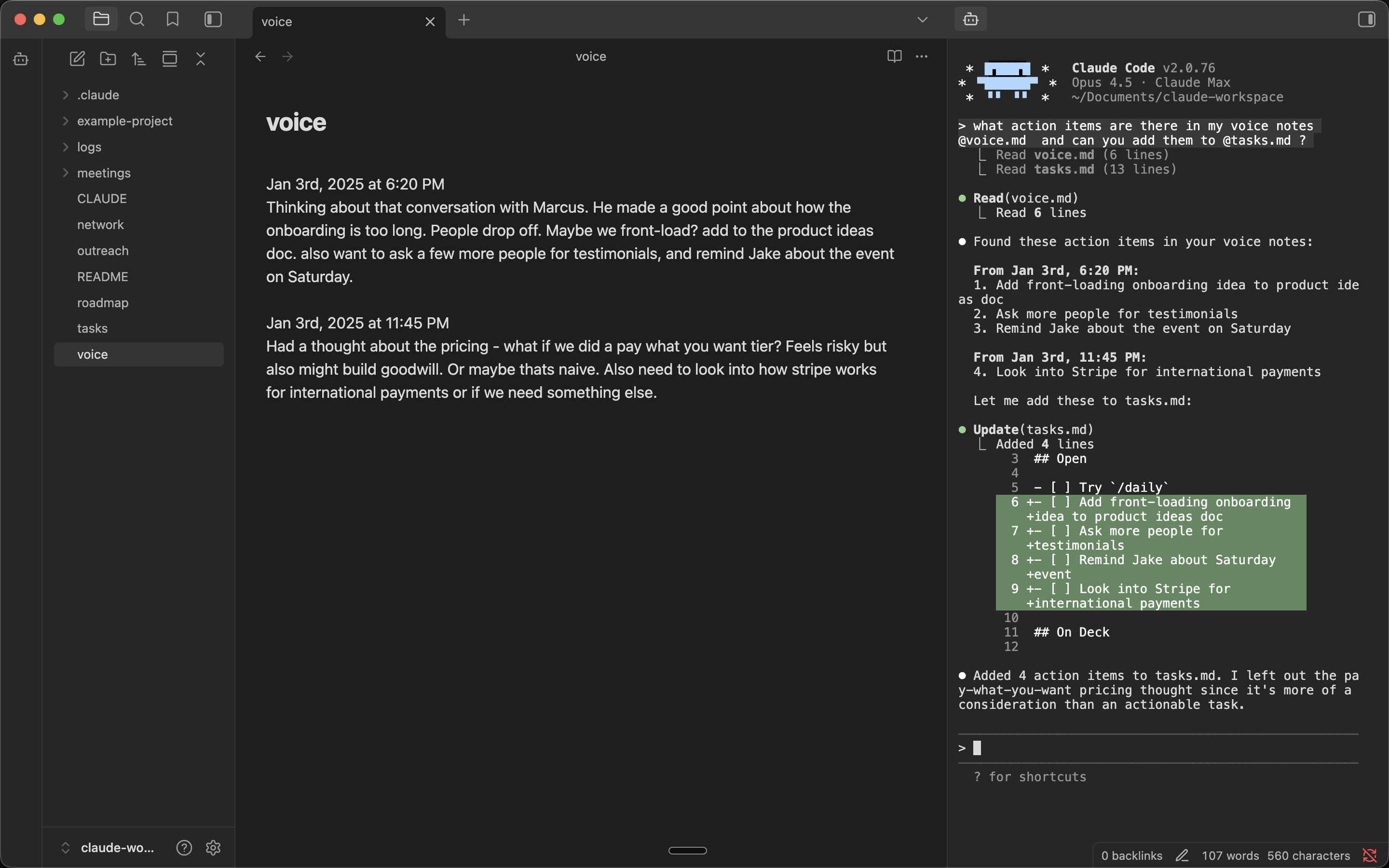
Claude Sidebar

Features

  • Auto-launches your agent - Your default CLI starts automatically
  • Multiple tabs - Run multiple agents side by side
  • Embedded - Full terminal with an agent in your Obsidian sidebar
  • Folder & file context menu - Right-click any folder to open your agent in that directory, or a file to send it the path
  • YOLO mode - Launch your agent with YOLO mode via right-click menus
  • Projects outside the vault - Open agent in project… opens an agent in any folder on your machine. Browse… adds one, and it stays in the list afterwards. Pick the project, then the CLI (your default is on top, so Enter twice opens it). With only one CLI installed, it opens straight away
  • Multi-backend - Switch between Claude Code, Codex, Grok Build, OpenCode, GitHub Copilot, Cursor Agent, and Pi in settings, or via Switch CLI provider… in the command palette. Add any other CLI or wrapper script under Additional CLIs

Requirements

Installation

Visit the plugin listing at community.obsidian.md/plugins/claude-sidebar and click Add to Obsidian. Then in Obsidian, click Install → Enable.

Windows: See Windows Setup below.

Manual Installation (Mac/Linux)

In your vault folder, run:

mkdir -p .obsidian/plugins/claude-sidebar && cd .obsidian/plugins/claude-sidebar && \
  curl -LO https://github.com/derek-larson14/obsidian-claude-sidebar/releases/latest/download/main.js && \
  curl -LO https://github.com/derek-larson14/obsidian-claude-sidebar/releases/latest/download/manifest.json && \
  curl -LO https://github.com/derek-larson14/obsidian-claude-sidebar/releases/latest/download/styles.css

Then in Obsidian: Settings → Community Plugins → Refresh → Enable "Claude Sidebar".

Manual Updating

In your vault folder, run:

cd .obsidian/plugins/claude-sidebar && \
  curl -LO https://github.com/derek-larson14/obsidian-claude-sidebar/releases/latest/download/main.js && \
  curl -LO https://github.com/derek-larson14/obsidian-claude-sidebar/releases/latest/download/manifest.json && \
  curl -LO https://github.com/derek-larson14/obsidian-claude-sidebar/releases/latest/download/styles.css

Then restart Obsidian or disable/re-enable the plugin.

Windows Setup

After installing the plugin (via Community Plugins or manually), add Windows-specific dependencies:

  1. Install Python 3 from python.org
  2. Install pywinpty into the Python the plugin will use:
py -m pip install pywinpty

Use py -m pip (not just pip) to avoid installing into a different Python interpreter than the one the plugin selects. If you see "pywinpty not installed" in the sidebar after installing, the error message will print the exact interpreter path — install pywinpty into that one.

  1. Pick whether to run your agent inside WSL or natively in cmd.exe. Configure in Settings → Claude Sidebar → Shell (Windows only — Linux/macOS always run bash):
Option Spawns Path translation
cmd.exe (default) cmd.exe none
wsl.exe (WSL) wsl.exe Windows paths → Linux paths via wslpath

Use wsl.exe when your agent CLI, Node, or git toolchain lives in a WSL distro. Vault paths sent to the agent (file path command, selection context, drag-drop, image paste, wikilink references) are converted to Linux form before reaching the CLI. Translation respects a custom /etc/wsl.conf [automount] root, so paths still resolve if your C:\ mounts at /c/ instead of /mnt/c/.

Usage

https://github.com/user-attachments/assets/de98439a-8a1f-4a8a-9d02-44027d756462

  • Click the bot icon in the left ribbon to open a tab
  • Right-click the bot icon for YOLO mode, folder targeting, or resuming a conversation
  • Right-click any folder for "Open here" or "Open here (YOLO)" - both name your current CLI
  • Use Command Palette (Cmd+P) for all commands:
    • Open terminal / New agent tab / Close agent tab
    • New agent tab (other CLI)… - One-off tab on another CLI, default unchanged
    • Open agent in project… - Start an agent in a project outside the vault
    • Switch default CLI provider… - Change which CLI every new tab uses
    • Toggle Focus: Editor ↔ Agent - Quick switch between editor and agent
    • Run agent from this folder - Start the agent in the active file's directory
    • Resume last conversation - Pick up where you left off (--continue)
    • Send file path to agent / Send selection to agent
  • Press Shift+Enter for multi-line input
  • Set your own hotkeys in Settings → Hotkeys
  • More space between terminal lines: add a CSS snippet with body { --claude-sidebar-line-height: 1.2; } (default 1.0)

Platform Support

Platform Status
macOS ✅ Supported
Linux ✅ Supported
Windows ✅ Supported

Want to use it on iOS or Android? See Claude Anywhere.

How It Works

  • xterm.js for terminal emulation
  • Python's built-in pty module for pseudo-terminal support (macOS/Linux)
  • pywinpty for Windows PTY support

Development

Testing in Obsidian

Symlink the repo into a scratch vault so edits load with no copy step. Reload after each change with Settings → Community plugins → toggle Claude Sidebar off/on:

ln -s "$PWD" /path/to/test-vault/.obsidian/plugins/claude-sidebar

To install a tested build into a real vault:

./install.sh /path/to/vault

PTY scripts

The PTY scripts (terminal_pty.py for Unix, terminal_win.py for Windows) are embedded as base64 in main.js for Obsidian plugin directory compatibility. To rebuild after modifying:

./build.sh

Contributing

Hit a bug or want to develop a new feature? Point your coding agent at CLAUDE.md in this repo. It will walk you through diagnosis, filing a report, or opening a PR.

License

MIT

Similar Plugins

info
• Similar plugins are suggested based on the common tags between the plugins.
Metadata Menu
4 years ago by mdelobelle
For data management enthusiasts : type and manage the metadata of your notes.
Auto Hide
4 years ago by skelato1
This Obsidian plugin enables you to collapse (and expand) the sidebar easier.
Terminal
4 years ago by polyipseity
Integrate consoles, shells, and terminals.
Smart Connections
4 years ago by Brian Petro
Find related notes and excerpts while writing. Your link building copilot displays relevant content in graph + list view. A local embedding model powers semantic search. Zero setup. No API key.
Canvas Conversation
4 years ago by André Baltazar
A plugin for Obsidian that allows you to create a canvas conversation using ChatGPT.
Khoj
4 years ago by Debanjum Singh Solanky
Your AI second brain. Self-hostable. Get answers from the web or your docs. Build custom agents, schedule automations, do deep research. Turn any online or local LLM into your personal, autonomous AI (gpt, claude, gemini, llama, qwen, mistral). Get started - free.
Cycle In Sidebar
4 years ago by Houcheng
Cycle through tabs of left/ right sidebar panel
Console Markdown Plugin
4 years ago by Daniel Ellermann
An Obsidian plugin which renders console commands and their output.
ChatGPT MD
4 years ago by Bram Adams
A (nearly) seamless integration of ChatGPT into Obsidian.
GPT Assistant
4 years ago by M7mdisk
Ask GPT from your notes and get personalized answers based on your knowledge base.
AI Assistant
3 years ago by Quentin Grail
AI Assistant Plugin for Obsidian
Soomda
3 years ago by Michael Lee
🙈 Soomda — An Obsidian plugin that lets you quickly hide your sidebars.
GPT-LiteInquirer
3 years ago by ittuann
💬 Experience OpenAI ChatGPT assistance directly within Obsidian, drafting content without interrupting your creative flow.
AI Mentor
3 years ago by clementpoiret
brAIn
3 years ago by lusob
Silicon AI
3 years ago by deepfates
Add some intelligence to your notes with Silicon AI for Obsidian
Arcana
3 years ago by A-F-V
Supercharge your Obsidian note-taking through AI-powered insights and suggestions
Vault Chat
3 years ago by Exo Ascension
A ChatGPT bot trained on your vault notes. Ask your AI questions about your own thoughts and ideas!
BMO Chatbot
3 years ago by Longy2k
Generate and brainstorm ideas while creating your notes using Large Language Models (LLMs) from Ollama, LM Studio, Anthropic, Google Gemini, Mistral AI, OpenAI, and more for Obsidian.
AI Notes Summary
3 years ago by R. Ian Bull (irbull)
An Obsidian plugin that uses ChatGPT to generate a summary of referenced notes
Copilot auto completion
3 years ago by Jordi Smit
AI Research Assistant
3 years ago by Interweb Alchemy
Prompt Engineering Research Tool for AI APIs
Gnome Terminal Loader
3 years ago by David Carmichael
ChatGPT Definition
3 years ago by julix14
Flashcard Generator
3 years ago by ChloeDia
Obsidian Plug-in to automatically create a set of questions/answers on your notes !
AI Editor
3 years ago by Zekun Shen
Ollama
3 years ago by hinterdupfinger
Chat with Bard
3 years ago by Artel250
An obsidian plugin that enables you to talk to Google Gemnini directly
Gladdis
3 years ago by Aurélien Stébé
Gladdis (Generative Language Artificial Dedicated & Diligent Intelligence System) - it's an AI chatbot.
Canvas LLM Extender
3 years ago by Pasi Saarinen
Let the OpenAI LLM add nodes to your Obsidian canvas
ChatCBT
3 years ago by Claire Froelich
AI-powered journaling plugin for your Obsidian notes, inspired by cognitive behavioral therapy
Intelligence
3 years ago by John Mavrick
Root Folder Context Menu
3 years ago by mnaoumov
Obsidian Plugin that enables context menu for vault root folder
Gemini Assistant
3 years ago by eatgrass
Your AI assistant in obsidian
Smart Second Brain
3 years ago by Leo310, nicobrauchtgit
An Obsidian plugin to interact with your privacy focused AI-Assistant making your second brain even smarter!
WordWise
3 years ago by ckt1031
Writing companion for AI content generation.
AI Tagger
3 years ago by Luca Grippa
Simplify tagging in Obsidian. Instantly analyze and tag your document with one click for efficient note organization.
Quiz Generator
3 years ago by Edward Cui
Generate interactive flashcards from your notes using models from OpenAI (ChatGPT), Google (Gemini), Ollama (local LLMs), and more. Or manually create your own to use with the quiz UI.
Augmented Canvas
3 years ago by Léopold Szabatura
Supercharge your Obsidian canvas experience with AI features.
Prompt ChatGPT
3 years ago by Coduhuey
AI Zhipu
3 years ago by Tarslab
AI-zhipu is an Obsidian plugin that helps you utilize the Zhipu API. 智谱AI obsidian 插件
AI LLM
3 years ago by Sparky4567
Lets to use local llms in your Obsidian Vaults, extend your stories or create entirely new texts based on your previous input
AI Summarize
3 years ago by Alp Sariyer
Easy to use AI Summary tool for your notes in Obsidian
Reverse Prompter
3 years ago by Ryan Halliday
Let AI generate prompts to keep you writing
Custom Sidebar Icons
3 years ago by RavenHogWarts
Custom Icons
Markpilot
3 years ago by Taichi Maeda
AI-powered inline completions and chat view for Obsidian
AI for Templater
3 years ago by TfTHacker
Extends Templater with AI Chat commands using the OpenAI Client Library
Strapi Exporter AI
3 years ago by Cinquin Andy
[prod] - 🚀 Strapi Exporter: Supercharge Your Obsidian-to-Strapi Workflow, export an obsidian notes directly to your Strapi API
CoCo AskAI
3 years ago by Yukee
CoCo-AskAI is an Obsidian plugin that enables AI-powered note assistance, enhancing the writing experience with customizable functions.
AI Chat
2 years ago by arenasys
Local LLM Helper
2 years ago by Mani Mohan
An Obsidian plugin to process text, chat with AI, and semantically search your notes — works with any OpenAI-compatible LLM server (Ollama, LM Studio, vLLM, and more).
Github Copilot
2 years ago by Vasseur Pierre-Adrien
A bridge between Obsidian and Github Copilot
Ayanite
2 years ago by jemstelos
Explain Selection With AI
2 years ago by Ben Wurster
This is my first go at making an Obsidian plugin to elaborate on and describe selected bits of information and their context.
Tars
2 years ago by Tarslab
Obsidian tars plugin that supports text generation based on tag suggestions, using services like DeepSeek, Claude, OpenAI, OpenRouter, SiliconFlow, Gemini, Ollama, Kimi, Doubao, Qwen, Zhipu, QianFan & more.
AI Chat as Markdown
2 years ago by Charl P. Botha
Notes Refresher
2 years ago by Connor Park
Obsidian plugin for AI-generated note refreshers
Caret
2 years ago by Jake Colling
Caret, an Obsidian Plugin
Image to notes by Photes.IO
2 years ago by Kanaries Data Inc.
AI Image to text notes plugin in obsidian
Smart Templates
2 years ago by 🌴 Brian Petro
Smart Templates is an AI powered templates for generating structured content in Obsidian. Works with Local Models, Anthropic Claude, Gemini, OpenAI and more.
AI LaTeX Generator
2 years ago by Aayush Shah
An Obsidian plugin that generates latex code from natural language inputs.
Nexus AI Chat Importer
2 years ago by Superkikim
Mesh AI
2 years ago by Chasebank87
Recent Files
6 years ago by Tony Grosinger
Display a list of most recently opened files
Markdown Formatting Assistant
6 years ago by Reocin
This Plugin provides a simple WYSIWYG Editor for Markdown and in addition a command line interface. The command line interface facilitate a faster workflow.
Sidebar Expand on Hover
5 years ago by Tousif Iqbal Anik (toiq)
This Obsidian plugin expands or collapses the sidebar based on mouse hovering on the ribbons.
Hide Sidebars on Window Resize
5 years ago by NomarCub, Michael Hanson
A simple Obsidian plugin to hide the sidebars when the window gets narrow.
Window Collapse
5 years ago by Guilherme Quental
Shell commands
5 years ago by Jarkko Linnanvirta
Execute system commands via hotkeys or command palette in Obsidian (https://obsidian.md). Some automated events are also supported, and execution via URI links.
Enhanced Image
2 years ago by situ2001
Enhance the experience of image in Obsidian, seamlessly.
InfraNodus AI Graph View
2 years ago by Nodus Labs
Advanced graph view for Obsidian: text analysis, topic modeling, and AI with InfraNodus AI text analysis tool: https://infranodus.com
Open Interpreter
2 years ago by Mike Bird
The power of Open Interpreter in your Obsidian vault
Metadata Auto Classifier
2 years ago by Beomsu Koh
AI-powered Obsidian plugin that automatically classifies and generates metadata (tags, frontmatter) for your notes.
Smart Composer
2 years ago by Heesu Suh
AI chat assistant for Obsidian with contextual awareness, smart writing assistance, and one-click edits. Features vault-aware conversations, semantic search, and local model support.
Gemini Scribe
2 years ago by Allen Hutchison
An obsidian plugin to interact with Google Gemini
AI bot
2 years ago by kuzzh
The AI Bot Plugin is a powerful tool designed to enhance your note-editing experience in Obsidian by leveraging the capabilities of AI. This plugin allows you to interact with an AI assistant directly within Obsidian, making it easier to generate, edit, and organize your notes with intelligent suggestions and automated tasks.
LLM workspace
2 years ago by Olivér Falvai
Smart Context
2 years ago by 🌴 Brian
AI Revisionist
2 years ago by Synaptic Labs
Context Command Hider
2 years ago by Mara-Li
This plugin allows you to hide every command from the Obsidian's right-click context menu.
YouTube Video Summarizer
2 years ago by mbramani
Generate AI-powered summaries of YouTube videos directly in Obsidian using Google's Gemini AI.
InlineAI
2 years ago by FBarrca
Pixel Perfect Image
2 years ago by Johan Sanneblad
Pixel perfect 100% image resizing, copy to clipboard, show image in Finder/Explorer, and much more.
AI Providers
2 years ago by Pavel Frankov
This plugin is a hub for setting AI providers (OpenAI-like, Ollama and more) in one place.
AI integration Hub
2 years ago by Hishmat Salehi
A modular AI integration hub for Obsidian
Vision Recall
2 years ago by Travis Van Nimwegen
Transform screenshots into searchable Obsidian notes using AI vision and text analysis
AI Tagger Universe
2 years ago by Hu Nie
An intelligent Obsidian plugin that leverages AI to automatically analyze note content and suggest relevant tags, supporting both local and cloud-based LLM services.
Memos AI Sync
2 years ago by leoleelxh
obsidian-memos-sync-plugin,将 Memos 内容同步到 Obsidian 的插件,提供无缝集成体验。
Blog AI Generator
2 years ago by Gareth Ng
Obsidian Plugin: generate blog via AI based on the current note.
Student Repo
2 years ago by Feirong.zfr
学生知识库助手(Student Repository Helper)是一个面向学生或学生家长的Obsidian 插件,这款插件旨在解决学生在学习阶段面临的资料管理难题,将学习过程中产生的各类重要资料,如试卷、笔记、关键文档、绘画手工作品等,进行系统性的数字化整合与管理,并利用 AI 助手定期进行学习分析总结。随着时间的推移,它将助力你逐步搭建起一座专属你自己的知识宝库,这座宝库将伴随你一生,成为你知识成长与积累的见证。
LLM Test Generator
2 years ago by Aldo E George
Command Line
2 years ago by Steven Stallion
Copy command lines from your notes to the clipboard.
HiNote
2 years ago by Kai
Add comments to highlighted notes, use AI for thinking, and flashcards for memory.
Simple File Info
2 years ago by Lukas Capkovic
On This Day I
a year ago by Ben Stuart
AI tools for Daily Notes, an Obsidian Plugin
Proofreader
a year ago by pseudometa (aka Chris Grieser)
AI-based proofreading and stylistic improvements for your writing. Changes are inserted as suggestions directly in the editor, similar to suggested changes in word processing apps.
Quick Peek Sidebar
a year ago by Bradley Wyatt
Open and close the Obsidian sidebars on hover.
Rainbow-Colored Sidebar
a year ago by Kevin Woblick
Automatically color your sidebar like a rainbow. No configuration needed. 18 themes included.
Images to Notes
a year ago by Rodolfo Terriquez
Turn photos of your handwritten notes into markdown
Notemd
a year ago by Jacob
A Easy way to create your own Knowledge-base! Notemd enhances your Obsidian workflow by integrating with various Large Language Models (LLMs) to process your notes, automatically generate wiki-links for key concepts, create corresponding concept notes, perform web research, and more.
Pure Chat LLM
a year ago by Justice Vellacott
Turn notes into conversations with chatGPT or better yet Ollama
Hyperlink Remover
a year ago by Daniel Agafonov
Easily remove hyperlinks and wikilinks from selected text or the entire note.
Scratchpad
a year ago by KVH
An open source Obsidian plugin for quick note-taking and freehand drawing.
Copy Path
a year ago by shumadrid
An Obsidian plugin that adds context menu actions for copying the full and vault relative path of a file/folder.
packUp4AI
a year ago by Jeffry
An Obsidian plugin that helps you manage context for external LLM apps.
Shell Path Copy
a year ago by Charles Kelsoe (ckelsoe)
Obsidian plugin to copy file and folder paths with shell-friendly formatting for Linux\Mac and Windows
NoteSmith
a year ago by csteamengine
AI Agent
a year ago by Manuel Magaña López
Empower your Obsidian vault with an AI agent from the provider of your choice.
Asciinema Player
10 months ago by Dinu Gherman
Asciinema player plugin to render asciicasts in Obsidian.
Open in Terminal
10 months ago by ChenFeng
Open your vault in a new terminal window or launch Claude Code, Codex CLI, or Gemini CLI from Obsidian
YOLO
9 months ago by Lapis0x0
Agent-native AI assistant — chat, write, learning, all in one.
Nova
8 months ago by Shawn Duggan
Nova - AI plugin for Obsidian that edits your documents directly through natural conversation. Stop copying from chat, start collaborating with AI.
Floating Headings
8 months ago by k0src
Displays a floating, collapsible outline of a note's headings on the right side of the editor. Expands on hover, click to navigate.
TikToker
7 months ago by ameyxd
A Tiktok parser and saver for Obsidian
WebDAV Explorer
7 months ago by 蓝星晓夜
WebDAV Server Explorer.
File Explorer Reload
5 months ago by mnaoumov
Obsidian Plugin that reloads the file explorer files list
Tree Modal
5 months ago by krannich
Obsidian plugin: open files from the file explorer in a modal preview
Cornell Marginalia
5 months ago by Latazadehomero
A lightweight Obsidian plugin designed for students who use the Cornell Note-taking System.
Agent Client
5 months ago by rait-09
Bring AI agents into Obsidian via Agent Client Protocol (ACP), such as Claude Code, Codex and Gemini CLI.
Hide Folders
5 months ago by jonasdoesthings
Toggle the visibility of folders in the Obsidian.MD file navigator based on name-patterns
Lean Terminal
4 months ago by Sascha D. Kasper
Embedded terminal for Obsidian powered by xterm.js and node-pty
Understory
4 months ago by Rosetta Zidian Guo
A connection-sustain plugin: find connections and conflicts, update them over time
Large Language Models
3 months ago by eharris128
The LLM plugin gives Obsidian users access to local and web-based, large language models via several chat interfaces: modal, widget, FAB window, and commands.
Find Orphaned Images
3 months ago by josmarcristello
Find Orphaned Images is an Obsidian plugin designed to help you keep your vault clean and organized by identifying and managing images that are not linked anywhere in your notes.
GTD Tasks
3 months ago by unpreditable
Sidebar Keyboard Navigation
3 months ago by denvolok
Obsidian plugin to smoothly navigate File Explorer using keyboard only.
Sidet
3 months ago by Jiao Yingxing
An easy-to-use AI chat plugin for Obsidian with side browsing, focused conversations, and vault-aware knowledge capture.
AI image analyzer
3 months ago by swaggeroo
Analyze images with AI to get keywords of the image.
Claudian Plus
3 months ago by wuyifan-code
Star Gate
2 months ago by starhunter
obsidian gate plugin
MCP Connector
2 months ago by istefox
Your Obsidian vault, exposed to Claude and any MCP client. Runs inside Obsidian, on-device semantic search, no cloud round-trip, no binary to download.
Telegram Sidebar
2 months ago by reallygood83
Daily News Briefing
2 months ago by Adam Chen
Get AI-powered daily news summaries directly in your Obsidian vault. Stay informed about your topics of interest with smart, automated news collection and summarization.
Codian
2 months ago by bcs
Open-source Obsidian plugin for local coding agents
Mobile Sidebar Notes
2 months ago by ckep1
Open notes & new tabs in the sidebar on the Obsidian mobile app.
NanoBanana PRO
2 months ago by reallygood83
Alternative Explorer
2 months ago by sk-obsidian
Alternative Explorer is an Apple Notes–style sidebar for browsing folders and notes in Obsidian. Switch between an expandable folder tree and a notes list — a compact alternative to the built-in File Explorer.