
README file from
GithubMCP Connector for Obsidian
[!WARNING] Known issue: on Obsidian 1.14.4 the window can go blank while this plugin loads. It affects macOS and Windows and is a crash of Obsidian's renderer inside Electron 43, not in this plugin's code. In my tests it happens in roughly one plugin load out of ten, at random. Restart Obsidian and enable the plugin again: that usually works. I saw no crash on Electron 39.8.3 (Obsidian installer 1.12.7), so I believe the cause is in the Electron and V8 build that Obsidian 1.14.4 ships. I have no workaround from the plugin side yet. Reported to Obsidian on their forum, tracked here in #597 and #609.



Your Obsidian vault, exposed to AI clients over the Model Context Protocol. The MCP server runs inside Obsidian, on loopback, with no binary to download and no cloud round-trip. Claude Desktop, Claude Code, Cursor, Cline, Continue, Windsurf and VS Code all connect to the same endpoint.
What's new in 3.0.0 · Quick start · Tools · Rendered search results · Adaptive tool loading · Per-client tokens · Prompts · Protocol · Clients · Troubleshooting · Security · For developers
How it works
Obsidian (Electron)                                 your AI client
┌─────────────────────────────────────┐
│ shared broker, hosted by one vault  │◄──HTTP──►   Claude Code, Codex, Cursor,
│  127.0.0.1:27200/v1/<route-id>/mcp  │  POST only  Cline, Continue, Windsurf,
└──────────────────┬──────────────────┘             VS Code
                   │ forwards by route
┌──────────────────▼──────────────────┐
│ MCP Connector plugin, every vault   │
│  ├─ MCP server (in-process)         │
│  ├─ 64 tools                        │
│  ├─ prompt renderer                 │
│  └─ on-device embeddings            │◄──stdio─►   Claude Desktop
└─────────────────────────────────────┘  via .mcpb shim
   127.0.0.1:27201-27212/mcp
Client configs point at the shared broker on 127.0.0.1:27200. One open vault hosts it inside Obsidian, every open vault registers a route with it, and it forwards each request to that vault's own port. A vault's port can change between restarts without breaking a saved config. If the hosting vault closes, another open vault takes over after a short outage. Details in ADR-0027
Four things follow from that shape:
- Nothing leaves your machine. The server binds to loopback only. Vault reads and writes go through Obsidian's own
app.vaultandapp.metadataCacheAPIs, so Obsidian's permission model still applies. - No binary ships from this repo. The server is plugin code running in Obsidian's renderer, which removes the supply-chain surface of downloading and executing a prebuilt executable.
- Semantic search is on-device. Transformers.js runs the embedding model locally. No API key, no Smart Connections requirement.
- Every request carries its own credentials. The transport keeps no session state, which is what makes per-client tool surfaces possible.
What's new in 3.0.0
[!IMPORTANT] 3.0.0 is a major release, and it changes how every client connects. The shared broker now runs inside Obsidian on port 27200 and serves Claude Code, Claude Desktop, Codex, Cursor and the rest from one stable address. Existing Codex entries return
401until you reinstall them from the new Codex menu. Read Upgrading from 2.x before you update.
Every release is announced on the Obsidian forum thread, where questions and ideas are welcome too.
| Change | Why it matters |
|---|---|
| One broker for every client | Copy buttons and the Claude Desktop sync now give http://127.0.0.1:27200/v1/<route-id>/mcp. The address survives vault port changes and the port swaps caused by opening vaults in a different order. If the hosting vault closes, another open vault takes over after a short outage. Each client's own bearer token reaches the vault, so per-client tokens and tool profiles apply as on a direct port. |
| No separate process | The detached Node.js broker and its executable in application data are gone. The broker is plugin code in Obsidian's renderer, so there is nothing outside Obsidian to start, update or kill. |
| A Codex menu on every token row | Copy the config.toml snippet, copy a codex mcp add command, install into your Codex config, or install into a project. An install shows a preview first, then writes with a backup, a lock, an atomic write and a read-back. |
| Safe Codex installs | The installer refuses an entry that belongs to another vault, so two equally named vaults cannot overwrite each other. It migrates entries written by 2.11 and 2.12, and keeps your tool approvals and policy keys. |
| Register one project | Set Project path in Access Control. Claude Code copies a local-scope claude mcp add command for that project, and Codex installs into the project's .codex/config.toml. A project install never writes your token: it reads OBSIDIAN_MCP_TOKEN. |
| All tools offer for Codex | Codex does not refetch the tool list during a session, so an install on an Adaptive token offers to switch it to All tools. It is unticked by default and applied only after a successful install. |
| Clear errors from the broker | When the broker cannot reach a vault, Broker connection shows Refused with the cause and what to change, and the copy buttons hand out the vault's direct URL meanwhile. |
| Codex needs no Node.js | Node.js is still needed for the .mcpb export and the mcp-remote path. |
Upgrading from 2.x
- Update the plugin in every open vault. If another open vault runs a different plugin version, a Notice asks you to update it.
- Codex: reinstall once. Open Codex on the token row and choose Install into user Codex config…. The installer finds your old entry, shows the migration in a preview and rewrites it with the new address and your row token. A pasted snippet replaces it just as well.
- Other clients: copy the config again if it names a vault port from 27201 to 27205, because that port now addresses a vault, not the broker. Vault ports now run from 27201 to 27212, and 27200 can no longer be set as a fixed port. A plain direct config on
http://127.0.0.1:27200/mcpkeeps working. - Replacing a token secret now also breaks a Codex entry for that token, as for any client that holds a pasted token. Reinstall after you replace one.
- macOS and Linux: a vault registers its route only while its
pluginsfolder, plugin folder anddata.jsonbelong to you and are not writable by others. If they are not, Broker connection shows Refused and says what to change. - Optional: delete the
obsidian-mcp-connector/broker-v2folder in application data. Nothing uses it any more.
The full list is in the 3.0.0 changelog. The design is recorded in ADR-0027 and ADR-0028.
What's new in 2.8 to 2.12
Five releases followed a code and protocol audit (docs/audit-2026-10-02.md). The tool count went from 52 to 64, writes got safer, and search got shorter and more precise.
| Change | Why it matters |
|---|---|
| 12 new tools (2.8.0, 2.9.0) | get_workspace_state, list_tasks, set_task_status, get_note_properties, update_note_properties, rename_tag, update_canvas_node and delete_canvas_node in 2.8.0. get_file_info, list_attachments, ensure_block_id and search_files_by_name in 2.9.0. |
| Safer writes (2.8.0, 2.9.0) | update_active_file, delete_vault_file and delete_active_file take expectedContent. delete_vault_directory has dry_run and trash, rename_heading has dry_run. delete_vault_file refuses a folder, and show_file_in_obsidian no longer creates a missing file unless you pass createIfMissing. |
| Search that fits a conversation (2.9.0 to 2.12.0) | search_vault_simple takes regex, caseSensitive and scope. search_vault_smart takes excerptLength and compact (2.10.0), and groupByFile (2.12.0), which keeps the best chunk of each note so limit counts notes. A full sentence ranks better than a list of keywords. |
| Rendered search view has an off switch (2.8.0) | Turn it off for the whole vault, or per token, for hosts that show the view fully expanded. |
| Client configs are named after the vault (2.10.0, 2.11.0) | Entries are obsidian_<vault>, with a hash for non-ASCII vault names. Claude Code gets a token-free .mcp.json entry and Codex can read the token from OBSIDIAN_MCP_TOKEN, so the secret stays out of committed files. |
| Copying a vault no longer shares credentials (2.10.0) | Make this copy independent and Replace all token secrets each change only what their label says. |
| Lighter and faster (2.8.0 to 2.11.0) | main.js went from 3.19 MB to 2.80 MB, settings are read once per request, and list_tasks pages with offset without reading every note. |
| Fixes worth knowing | The rendered view works in hosts that block blob: scripts (#538, @AS-prog). execute_template renders against the note it creates (#541). |
What's new in 2.0.x
2.0 is the release where this connector stopped waiting for the next MCP revision and started serving it. The protocol work is the substance, and the visible half is that search results now arrive as a list you can read instead of a wall of JSON.
| Change | Why it matters |
|---|---|
MCP revision 2026-07-28 is served, alongside the old one (2.0.0) |
Two protocol eras on one endpoint, one port, one token, classified per request. A client that speaks the new revision finds it by probing server/discover; a client that does not never sees it. Nothing you have configured needs to change. See Protocol status. |
| Search results render as a ranked list (2.0.0) | search_vault_smart and search_vault_simple publish an MCP Apps view: one row per hit with the path, the excerpt, and for the semantic search a similarity score and the heading. The text result is byte-identical to before, so clients without the extension see exactly what they saw. |
| Prompt-list changes are announced for real (2.0.0) | On the new revision, adding, deleting or renaming a note under Prompts/ tells listening clients to re-read the list. On the old revision the connector now says it cannot, which is the truthful answer. This retraction is what makes the number 2.0. |
| Per-token request counters (2.0.0) | The transport settings show how many requests each token served and on which revision, so a client that stopped working is a row whose count stopped moving. |
| A tool promoted by one client is announced to the others (2.0.0) | Promotion counters are vault-wide, so one client crossing the threshold widens every adaptive client's list. On the new revision the others are now told instead of serving a stale list. #419 |
| Windows bridge: no more mangled accents (2.0.1) | scripts/obsidian_mcp_bridge.py forces its stdio streams to UTF-8, so æ ø å ü and non-Latin scripts survive in both directions. Root-caused, with the fix, by @smollern. |
| Boolean arguments accept real booleans (2.0.0) | Six fields across five tools rejected a genuine JSON true, including delete_vault_directory.recursive. #444 |
search_vault_smart works under auto again (2.0.0) |
With Smart Connections installed it returned an empty result for every query, silently. #430 |
| Change | Why it matters |
|---|---|
| Per-client bearer tokens (1.0.0) | The vault holds up to 10 tokens, one per client. Claude Code can keep all 64 tools while claude.ai sees only the 13-tool Core set, from one vault and one server. |
| Per-token tool policy (1.0.0) | Profile, promoted tools and an optional hard allowlist all live on the token, not on the vault. |
| Rotation no longer restarts the transport (1.0.0) | Adding, renaming, regenerating or revoking a token takes effect on the next request. The port cannot drift and in-flight requests finish. |
.mcpb bundles are per token (1.0.0) |
Each bundle carries a token id and resolves that token's secret from the vault at connect time. Revoking the token fails the bundle closed instead of silently granting another client's access. |
| Note embeds in prompts (1.0.0) | ![[note]] in a prompt body is inlined before the prompt reaches the model, so no tool call per note. |
| Built-in-Node fix (1.0.1) | The Claude Desktop extension now works with Use Built-in Node.js for MCP left on. See #412. |
| Whole-request deadline in the shim (1.0.1) | A failing request answers inside 45 s with the reason instead of being cancelled at 60 s with nothing logged. |
| MCP SDK v2, error codes out of the reserved range (0.28.2, 1.0.1) | See Protocol status. |
Full history: CHANGELOG.md.
Quick start
- Install the plugin. Community store: Settings → Community plugins → Browse → MCP Connector. Or via BRAT with
istefox/obsidian-mcp-connector. - Open Settings → MCP Connector → Access control. A fresh vault already has one token, labelled Default.
- Wire your client from that token's row. Either .mcpb (Claude Desktop, drag and drop) or Copy config (everything else). Details in Connecting a client.
Ask the agent to call get_server_info to confirm the round trip. Requirements: Obsidian 1.7.2+, and Node.js only for the legacy mcp-remote path.
What it can do
64 tools: 61 vault tools plus 3 always-on meta-tools. All active by default.
| Family | Tools | Notes |
|---|---|---|
| Files | get_vault_file, get_vault_files, get_vault_file_partial, create_vault_file, create_vault_binary_file, append_to_vault_file, patch_vault_file, delete_vault_file, rename_vault_file, list_vault_files, get_file_info, list_attachments, create_vault_directory, delete_vault_directory |
get_file_info describes a file without reading it (kind, MIME, size, times, backlink and link counts, frontmatter/heading/tag/task counts for notes). list_attachments lists non-note files vault-wide, per folder or per note, with reference counts; unreferencedOnly finds orphaned attachments. get_vault_files reads up to 20 files per call. Text output is capped (default 100 KB) and truncation points at get_vault_file_partial. Renames go through fileManager.renameFile, so links survive. delete_vault_file takes an optional expectedContent precondition; delete_vault_directory takes dry_run (preview) and trash (recoverable delete). get_vault_file also returns an obsidian:// URI, see Linking out to Obsidian. |
| Active file | get_active_file, update_active_file, append_to_active_file, patch_active_file, delete_active_file, show_file_in_obsidian, get_workspace_state |
What the user is looking at right now. get_workspace_state lists every open tab (main area and pop-outs; sidebars on request) with its file, view type, editor mode, pin state and which one is active, plus the recently opened files. update_active_file and delete_active_file take an optional expectedContent precondition. show_file_in_obsidian errors on a missing file unless createIfMissing is set. get_active_file also returns an obsidian:// URI, see Linking out to Obsidian. |
| Search | search_vault_smart, search_vault_simple, search_vault, search_files_by_name, execute_dataview_query |
Semantic, plain-text with context windows (literal or regex, caseSensitive, restricted to a scope of files and folders), quick-switcher fuzzy on names and aliases, DQL or JsonLogic. Hits carry a 0-indexed line. search_vault_smart and search_vault_simple also carry a file-level obsidian:// URI per row, see Linking out to Obsidian. search_vault_smart takes excerptLength to shorten excerpts and compact to return only paths and scores, and groupByFile to keep the best chunk of each note so limit counts notes. |
| Structure | get_vault_overview, get_note_outline, list_tags, get_files_by_tag, get_recent_files, get_outgoing_links, get_backlinks, list_bookmarks, ensure_block_id |
get_vault_overview replaces the 3 to 5 calls a session spends getting oriented. ensure_block_id returns or creates the ^id of a block (by line or under a heading) and hands back the [[note#^id]] link, placed where Obsidian expects it. |
| Tasks | list_tasks, set_task_status |
list_tasks reads - [ ] / - [x] / - [/] items from Obsidian's metadata cache, vault-wide, per folder or per file, with the 0-indexed line. set_task_status flips one box in place, keeps indentation and text byte for byte, accepts a custom marker (/, -, >) and an expectedText precondition. |
| Frontmatter | get_note_property, set_note_property, delete_note_property, get_note_properties, update_note_properties, list_property_values |
Atomic, through processFrontMatter. get_note_properties returns the whole block as one object; update_note_properties sets and removes several keys in one write. |
| Maintenance | find_broken_links, find_orphaned_notes, search_and_replace, rename_heading, rename_tag |
search_and_replace and rename_tag default to dry_run. rename_heading rewrites every reference pointing at it, and previews the plan with dry_run. rename_tag renames inline tags (located through the metadata cache, so code blocks and URLs are left alone) and the tags/tag properties, nested tags included. |
| Periodic notes | get_or_create_daily_note, get_or_create_periodic_note, append_to_periodic_note |
Daily through yearly. Works with core Daily Notes and with Periodic Notes. get_or_create_daily_note also returns an obsidian:// URI, see Linking out to Obsidian. |
| Canvas | get_canvas, add_canvas_node, connect_canvas_nodes, update_canvas_node, delete_canvas_node |
Writes preserve every existing field, so canvases round-trip with clean diffs. update_canvas_node changes content, color, position or size of one node; delete_canvas_node removes a node and every edge attached to it. |
| Execution | execute_template, list_obsidian_commands, execute_obsidian_command |
Templater templates as tool calls. Commands are opt-in, see Command execution. |
| Other | fetch, get_server_info |
fetch returns Markdown via Turndown, paginated. |
| Meta | tool_catalog, activate_tool, activate_tools |
Always reachable, see below. |
Every tool declares MCP annotations, such as readOnlyHint, destructiveHint, idempotentHint and openWorldHint, so a client can skip confirmation on reads and gate it on writes. List and scan tools take a limit (default 200, clamped to 1000) and report truncated with the real total.
On outputSchema, deliberately absent. Almost no tool here declares one, and that is a decision rather than an omission. Once a tool declares an output schema, SDK clients reject every response from it that lacks structuredContent. Several of these tools return genuinely different shapes depending on what they find, so declaring a schema for them broke get_vault_file for five releases (0.27.2 through 0.27.6) before the rule was written down. A tool whose result shape is polymorphic gets no schema.
Semantic search providers. Native MiniLM-L6-v2 (~25 MB, default), Gemma 300M (768d, best for non-Latin vaults), Multilingual-E5-Base (768d), or Smart Connections if you already use it. Providers swap live while the previous one keeps serving. The index is sharded into 16 segments by path, so editing one note rewrites one segment. While a build is running, search_vault_smart returns a structured index_building error with filesIndexed, filesTotal and an estimated retryAfterSeconds.
Linking out to Obsidian
get_vault_file, get_active_file, get_or_create_daily_note, search_vault_simple and
search_vault_smart return an obsidian://open URI alongside their result, so a note found
through MCP can be linked from outside Obsidian — Mail, Slack, Things, Jira, anywhere a URI
scheme link works. A raw-text result carries it as a trailing URI: obsidian://... line after
the content; a JSON-shaped result carries it as a sibling uri key. The two search tools add a
file-level uri to every row.
get_vault_file, get_active_file and get_or_create_daily_note also take an optional
heading argument: when it names a heading in the note, the URI navigates straight to it
(file=Note.md%23Heading, the heading percent-encoded inside the file parameter's value, per
Obsidian's own URI grammar — never a bare # fragment after the query string). A heading that
does not match returns a heading_not_found error naming the heading and the path, instead of
falling back to a plain file URI. Use get_note_outline to discover a note's headings before
targeting one. The two search tools do not support heading — a semantic search result's
heading field can be null or ambiguous by construction, so their URI is always file-level.
Rendered search results (MCP Apps)
Both search tools publish a small HTML view alongside their text result, using the
MCP Apps ui:// resource extension. In a client that supports
it, a search comes back as a ranked list you can read: one row per hit, carrying the note's path,
the matching excerpt, and, for the semantic search, a similarity score and the heading the passage
sits under. A zero-match query renders an explicit empty state naming the vault it searched.
Four things about how this is built, because they are the parts that usually go wrong:
- The text result did not change, byte for byte. A client that knows nothing about MCP Apps sees
exactly what it saw before, with no stray output and nothing to configure. The row data rides in
the result's own
_meta, on the success branch only; when a tool errors, that key is absent and the view falls back to the text. - The
resourcescapability serves the view and nothing else. No vault content is reachable throughresources/*. Listing notes there would need a permission model designed from scratch, since the per-token allowlist and the kill switch are tool-level concepts, so it is deliberately out of scope. Decisions in ADR-0018. - Clicking a row asks the client to open the note in Obsidian, and the client decides. Claude
Desktop currently declines to follow an
obsidian://link out of a tool result. When that happens the row reveals the note's vault-relative path instead, so the information is never lost. This is host policy and not something this plugin can change from its side. - The line number is shown, never used as a jump target.
obsidian://openhas no line parameter, and under Smart Connections the semantic provider resolves no line at all.
If your client renders the view fully expanded and it buries the conversation (reported for claude.ai), turn it off under Settings → MCP Connector → MCP Tools → Rendered search results (MCP Apps). The search tools then return the text result only, for every token. Each token can override that choice either way in its Tool Loading panel, so a desktop client can keep the view while a web client does without it.
Adaptive tool loading
Every advertised tool costs context tokens on every session: the client downloads each tool's full JSON schema before the model says a word. All 64 active is roughly 10K tokens or more per session. Adaptive loading cuts that without putting any tool out of reach.
Profiles
Set per token in Settings → MCP Connector → Tool Loading.
| Profile | Advertised | Use when |
|---|---|---|
| All (default) | 61 vault tools + 3 meta-tools | You want maximum capability and do not care about the schema cost. |
| Core | 13 core tools + 3 meta-tools + whatever you promoted | You want the smallest, most predictable surface. |
| Adaptive | The same, and it promotes tools you use often on its own | You want the surface to converge on how you actually work. |
Core is: get_server_info, get_active_file, update_active_file, append_to_active_file, get_vault_file, list_vault_files, create_vault_file, search_vault, search_vault_simple, list_tags, get_note_property, set_note_property, get_or_create_daily_note.
Promotions are honoured in both Core and Adaptive, so a tool you pinned stays pinned whatever the profile. Automatic promotion by call frequency is the one thing Core does not do.
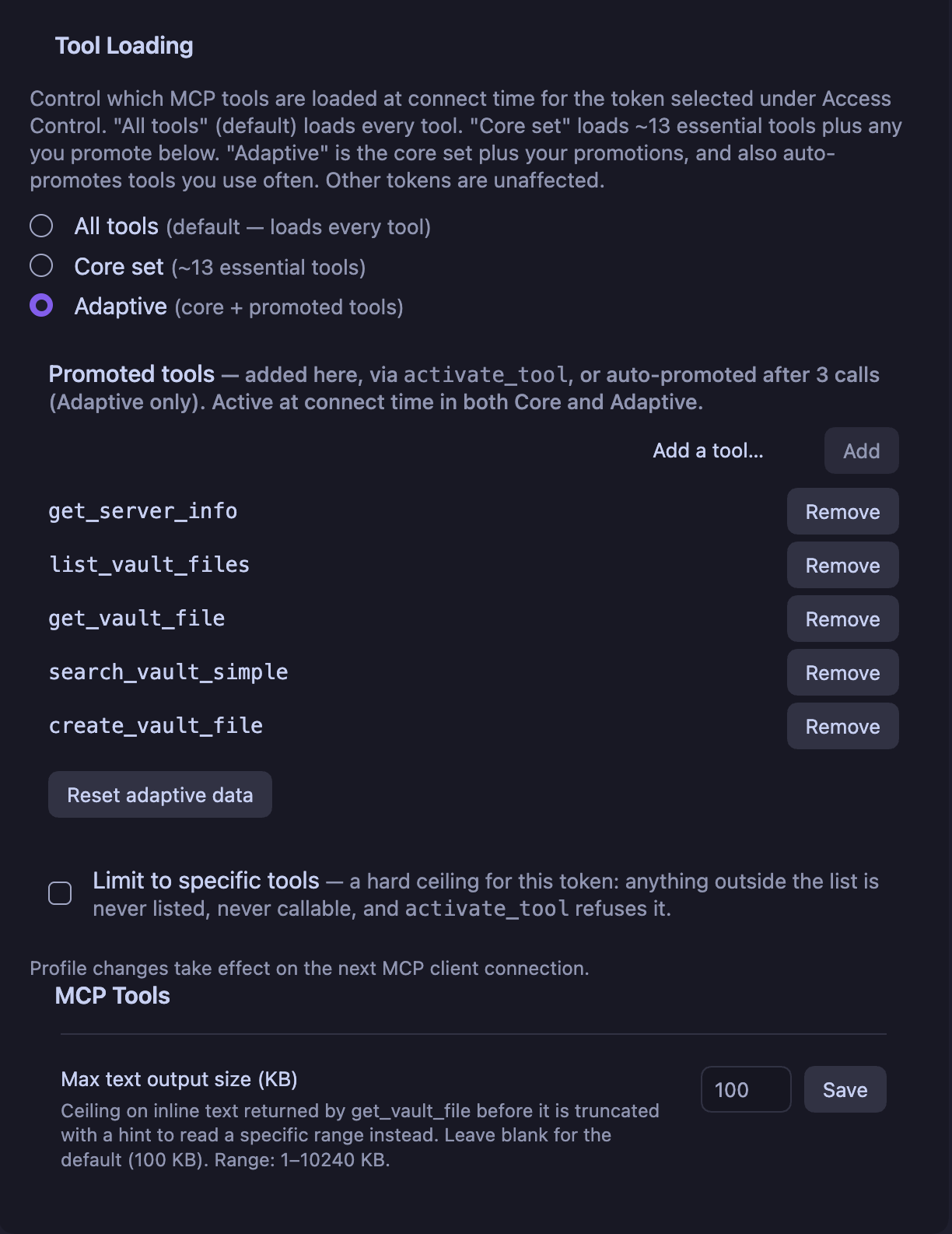
Tool Loading, per token. The promoted list is editable by hand, activate_tool writes into it, and frequency promotion fills it in over time. Reset adaptive data clears counters and promotions without touching the profile.
The three meta-tools
tool_catalog(read-only, always active): the full inventory with each tool's status (active,inactive,promoted), call count and description. The model always knows what exists, whatever the profile.activate_tool: promotes one inactive tool by name, usable immediately, no reconnect.persist: truewrites it to that token's promoted list. Obsidian shows a notice each time, so a surface never widens silently.activate_tools: promotes several at once and refreshes the client's tool list only once.
In Adaptive mode the plugin counts calls per tool. At 3 calls a non-core tool is promoted and stays. Counters are vault-wide by design, because how often a tool is used describes the vault, not the client that happened to call it. The Tool Loading panel lists promoted tools, removes any of them, and resets counters without touching your profile.
Two independent off switches
A tool can be dark for two unrelated reasons, and the difference is deliberate:
userDisabled— you switched it off under Tools available. It is invisible to every token and no client can discover it or talk its way past it.- adaptive-inactive — the profile has not promoted it yet. Calling it returns a recoverable error naming the activation path, never "Unknown tool", so the model can fix its own problem in one step.
Does this violate the tools/list stability rule?
MCP revision 2026-07-28 says the advertised set must not vary per-connection or as a side effect of other requests on the connection, while it may vary by the authorization presented. Adaptive loading satisfies it, and the reasoning is written down in ADR-0015: registry state is process-global and token-scoped, never connection-scoped, so two clients presenting the same token get the same list, and a promotion is a vault state change (like a settings edit), not a property of one connection. notifications/tools/list_changed is what the clause points at for exactly this case.
Does a mid-session change cost prompt cache?
It can, depending on the client. Anthropic's prompt cache covers the tool definitions first, then the system prompt, then the messages. If a client keeps MCP tool schemas in that prefix and re-sends a changed list, everything after the change is written to the cache again instead of read from it.
Measured on 2026-10-08 with headless Claude Code 2.1.294 against a mock server that answers activate_tool and sends list_changed the way this plugin does:
| Client setup | Turn after the refresh |
|---|---|
| Tool search on (the Claude Code default) | The client re-listed and the cache stayed intact, with 100 to 300 tokens created per turn |
| Tool search off, schemas in the prefix | 42,779 tokens written and none read. The unchanged control wrote about 71 and read about 42K |
This is one run per setup, on Haiku, against a mock and not the plugin itself. Other clients are not measured.
What follows for you:
- Profile All never changes the list, so it never triggers this.
- Automatic promotion at 3 calls sends no notification on the 2025 protocol wire, so a running session keeps its list until the client re-lists. A client with a
subscriptions/listenstream on the 2026 revision is told. activate_toolandactivate_toolsnotify, and only when the model calls them. Preferactivate_toolswhen several tools are needed, because it refreshes once.- For a long session on a client that keeps tool schemas in the prefix, use All, or promote with
persist: trueand start a new conversation.
Per-client tokens
The vault holds a list of tokens, not one. The token on the request identifies the client, which is the only client identity a stateless transport carries. Each row in Access control shows the label, the profile in force, how many tools that token reaches, and per-row controls: show and copy the secret, copy a client config, export a .mcpb, replace the secret, revoke. A row that feeds the Claude Desktop config sync carries a badge saying so. Up to 10 per vault.
There is deliberately no vault-wide export. A credential always leaves the plugin naming the client it belongs to.
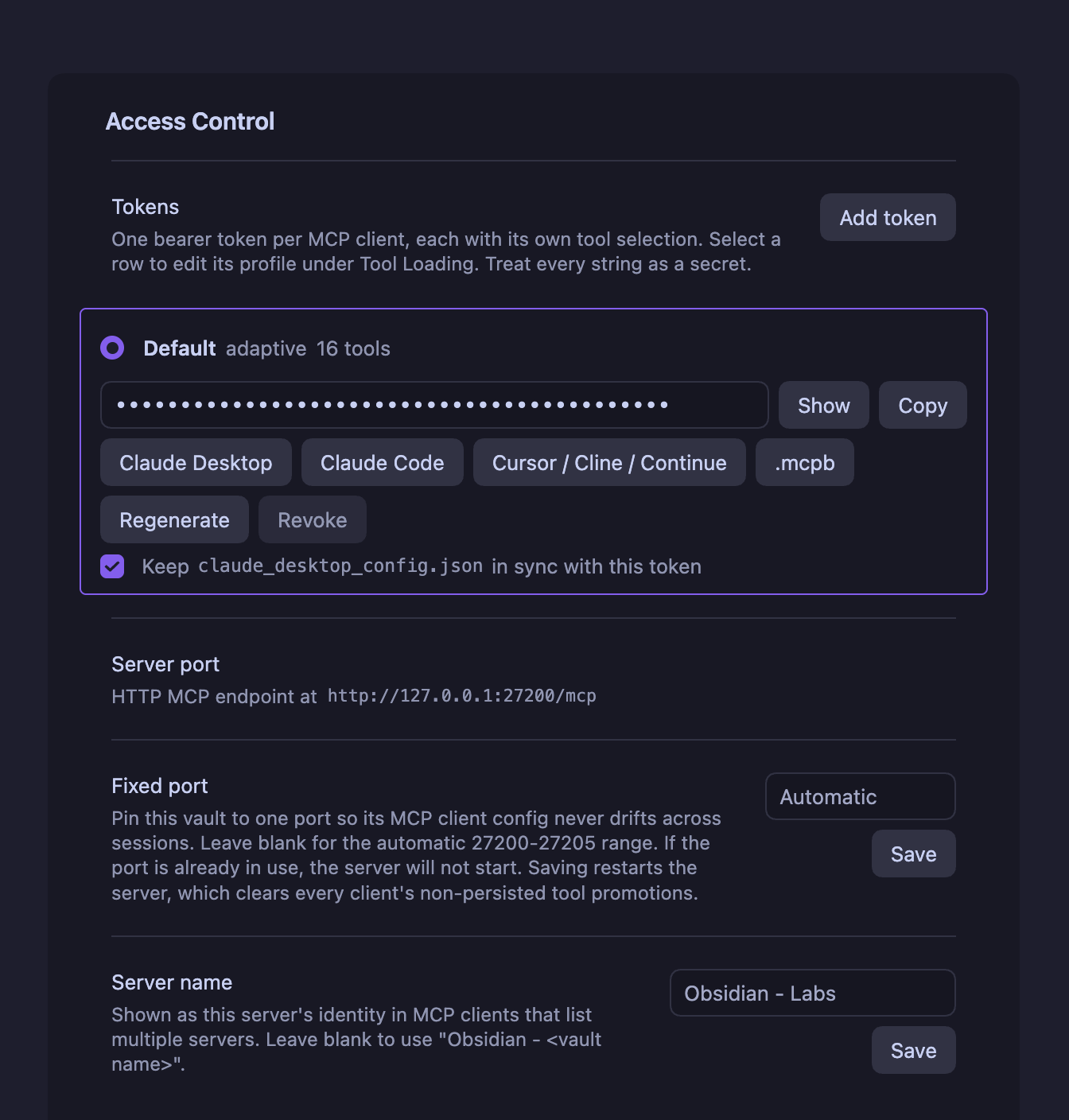
One row per client. The label, profile, role badges and tool count are on the row, and the buttons under the secret each produce a config for one client family, all authenticating as this token. Below the list: The broker connection status, vault copy and reset controls, the server port with the vault's own endpoint and the URL client configs use, the request counts and Fixed port. A blank fixed port means the automatic 27201-27212 range, where the vault tries its last port first, and client configs use the shared broker on 27200. A fixed port is one port with no fallback, and client configs then address it directly. Port 27200 is reserved for the broker and cannot be set. Saving a fixed port restarts the server, which clears non-persisted promotions. Server name, further down, is how this vault identifies itself in a client that lists several servers
| Action | Effect |
|---|---|
| Add token | New row, own profile, own promoted list, own allowlist. Labels are cosmetic and may repeat. |
| Replace secret | Replaces the secret, keeps id, label and policy. Clients you set up by hand get 401 until updated. Installed .mcpb bundles resolve by id and pick it up on their own, and the Claude Desktop sync rewrites its entry when this token owns it. A Codex entry for this token needs copying or installing again |
| Revoke | Deletes the token. That client's configs, bundles and bridge configs stop working; every other token is untouched. |
Both actions are unrecoverable. The string is stored nowhere else and nothing in the plugin can print it again.
Limit to specific tools (off by default) turns a token's checklist into a hard ceiling: a tool outside it is never advertised, cannot be called, and activation refuses it by name instead of dead-ending. An empty list is legal and means the three meta-tools only. The profile itself is deliberately not a ceiling, since Core exists so activate_tool can widen it.
Upgrading from 0.28.x needs nothing: your existing token becomes row one, labelled Default, byte-for-byte the same string, carrying your current profile and promoted list.
Prompts
Author MCP prompts as plain markdown in a Prompts/ folder at the vault root. No extra plugin needed; the renderer runs in-process. Clients surface them as slash commands or attachments.
---
tags:
  - mcp-tools-prompt
description: Summarize my recent daily notes on a given topic
---

Summarize my notes from the past **<% tp.mcpTools.prompt("days", "How many days back") %>** days
about **<% tp.mcpTools.prompt("topic", "The subject") %>**.

Here is the brief they should be read against:

![[Projects/Q3 brief]]

Give me the three recurring themes and one action item.
- The
tp.mcpTools.prompt(...)line declares a parameter and is stripped from the output. Inject the value with{{days}},{{topic}}, as many times as you like. - An inline
#mcp-tools-prompthashtag works instead of frontmatter. Both spellings of the frontmatter tag are accepted. - Embeds are inlined after parameters are filled, so
![[{{note}}]]lets the client pick the note.![[note|alias]],![[note#Heading]]and![[note#^blockid]]all work. Depth 1, at most 32 KB across at most 20 embeds per render. An embed that cannot resolve keeps its token and gains a comment saying why, so nothing disappears quietly. - Other Templater expressions pass through verbatim; the server does not evaluate them.
Full contract: docs/features/prompt-system.md.
Command execution
Off by default. When enabled, the agent can run Obsidian commands from the command palette, and only those you authorize.
list_obsidian_commandsis read-only discovery and always safe.execute_obsidian_commandis gated. On the allowlist it runs. Off the allowlist, Obsidian shows a modal with Deny / Allow once / Allow always and the HTTP call waits up to 30 s for your answer. Master toggle off means every call is denied with no modal.- Deny by default, no wildcards, no auto-population, per vault.
- A command whose id or name looks destructive (
delete,purge,reset,wipe, and similar) gets a red warning and Allow always is disabled. A nudge, not a gate. - Hard limit 100 calls/minute server-side, plus a configurable soft warning at 30/minute.
- The last 50 decisions are kept in a ring buffer under Recent invocations, exportable as RFC 4180 CSV (
timestamp,commandId,decision,reason).
Protocol status
The connector serves two MCP revisions from one endpoint. 2026-07-28, the revision that moves
MCP to a stateless request/response core, and the 2025-11-25-and-earlier line that every shipping
client still negotiates. Same port, same URL, same bearer token. Each request is classified on its
own, from one read of its body, so adopting the new revision took nothing away from the old one and
no configured client, generated bundle or bridge config needed touching. Decisions in
ADR-0016.
One thing to know if you are implementing against this: the new revision is not reachable through
initialize. A client finds it by probing server/discover, and falls back to the handshake on
its own if that method is absent. The SDK's LATEST_PROTOCOL_VERSION is the handshake offer and by
construction can never name the 2026 revision, so it tells you nothing about whether a server serves
it.
2026-07-28 direction |
Status here |
|---|---|
Stateless core, no protocol-level sessions, no Mcp-Session-Id |
Never had them. Every request carries its own credentials, which is what makes per-token tool surfaces possible in the first place. |
GET/DELETE on the MCP endpoint answer 405 |
By design. There is no server-initiated stream on the legacy era at all. |
subscriptions/listen replaces the GET stream |
Served. A client that opens one is acknowledged, gets a subscription id, and receives the notification types it opted into. |
notifications/tools/list_changed |
Delivered two ways: on the caller's own POST response, and fanned out to every open listen stream that asked for it, so a promotion triggered by one client reaches the others. |
notifications/prompts/list_changed |
Honoured on the new revision, declared unavailable on the old one, where a POST-only transport structurally cannot deliver it. See ADR-0017. |
resources/* capability |
Declared, and it serves ui:// application resources only. No vault content is reachable through it, deliberately: the per-token allowlist and the kill switch are tool-level concepts and none of them reaches a resource surface. |
Removed methods answer 404 / -32601 on the new era |
Confirmed by the conformance suite for initialize, ping, logging/setLevel, resources/subscribe and resources/unsubscribe. A claim-less client carries no envelope, classifies legacy, and keeps being served. |
-32000–-32019 is a legacy range new code should avoid |
The .mcpb shim and the Windows bridge report local failures as -33000, below the reserved range entirely. |
| Per-request authorization may scope the tool set | Exactly what per-client tokens do. |
| Tool-set stability clause | Analysed and satisfied, see ADR-0015. |
Measured, not asserted. The server-stateless suite from the official conformance harness runs
against a headless build of this connector and reports 26 of 28. It went from 7 of 27 over the
course of this work. The two that stay red need a fixture tool shipped in every user's vault purely
so a test can mutate the tool list, and this project will not ship one; they are named in a
four-entry baseline that is maintained by hand and never regenerated from a failing run, so a check
that starts failing gets investigated rather than absorbed. The job runs nightly rather than per PR,
because it clones and builds the suite from source at a pinned ref.
What is still open. Retiring the legacy era is a decision with a measured trigger rather than a plan: the legacy request counter has to sit at zero for two minor releases or 60 days. It is nowhere near. Until then both eras are served, and the counters in the transport settings are how you watch that number.
Connecting a client
Every client is wired from its own row in Access control. Whichever button you use, the snippet or bundle authenticates as that row's token and no other.
The copy buttons point every config at the shared broker, http://127.0.0.1:27200/v1/<route-id>/mcp, and fill in this vault's route for <route-id>. That address stays valid when the vault's own port changes. A vault with a Fixed port gets http://127.0.0.1:<port>/mcp instead. Server port under the token list shows the URL in use. The examples below use the broker form. The buttons are disabled while a vault location change is unresolved, see Codex
Copied configs and the Claude Desktop sync name the entry after the vault: obsidian_ followed by the vault name's words in lowercase, joined by _, so vault "My Vault" becomes obsidian_my_vault. The .mcpb export uses the same words joined by -, such as obsidian-mcp-connector-my-vault. Configs from several vaults can sit in one client file without replacing each other. A vault name with no ASCII letters or digits falls back to obsidian
Claude Desktop
Claude Desktop speaks stdio, so it needs a bridge. The .mcpb extension is the supported path and needs no Node install of your own.
- Click .mcpb on the token's row.
- Drag the file onto Claude Desktop.
- It installs with no prompts and appears under Settings → Extensions.
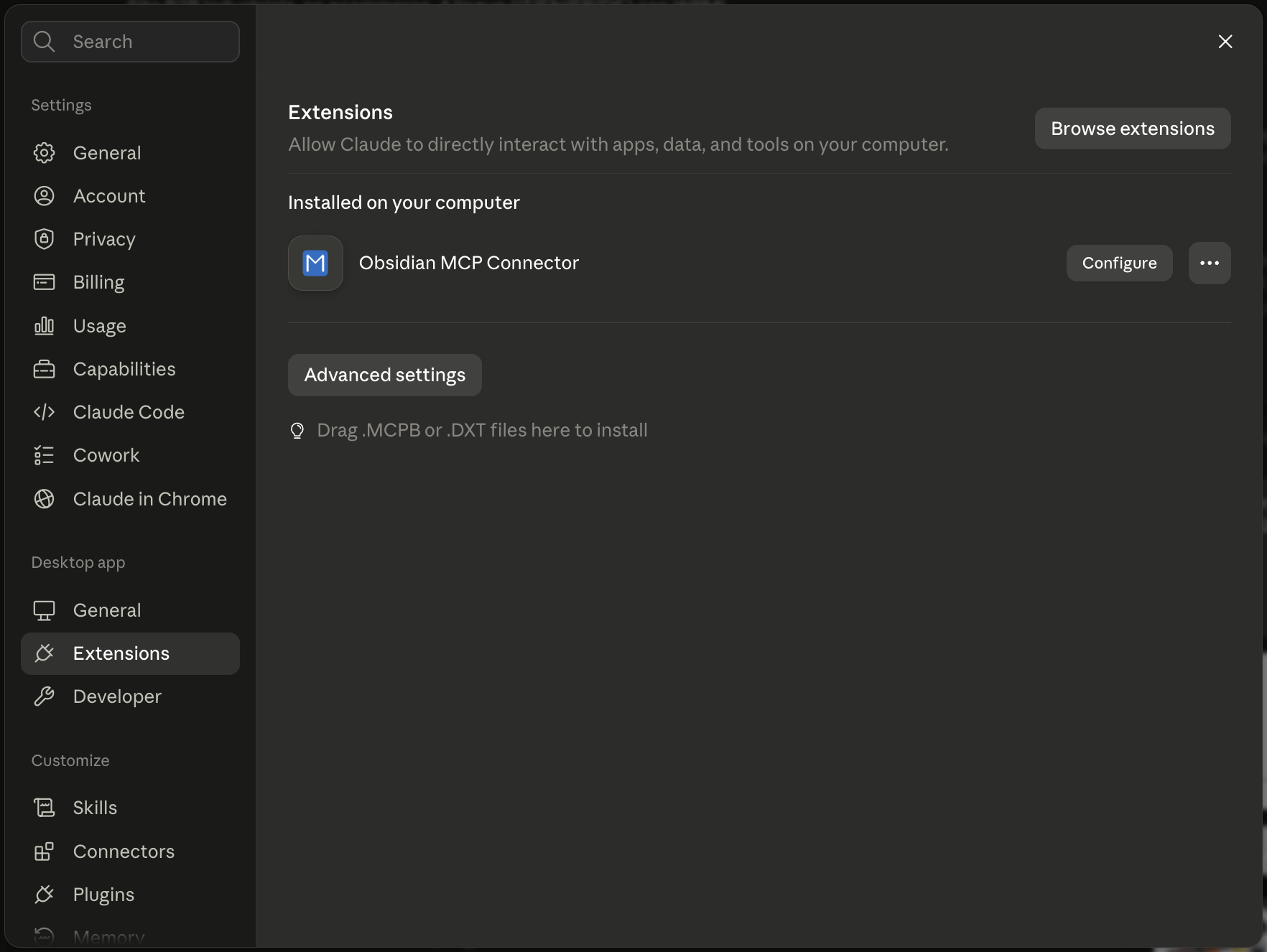
Installed. Claude Desktop's own Extensions pane takes the .mcpb by drag and drop, with no config file to edit and no Node install of your own.
The bundle resolves that token's secret and the live port from the vault at connect time, so regenerating the secret or changing the port needs no re-export. Revoking the token fails it closed with an error asking for a fresh export, which is the point. A bundle exported before 1.0.0 predates the token id and follows whichever token is currently first, so re-export once after upgrading.
The releases page carries no .mcpb, and that is deliberate. Every bundle has your vault's path, your config folder's name and one token's id written inside it, which is what lets it connect with nothing to fill in and fail closed when you revoke that token. A build made on a CI runner knows none of those, so the only place a correct bundle can come from is the button above. Releases up to and including 2.0.1 do have one attached; it takes a different route, asks you to paste a token and a port by hand, and depends on npx and a network fetch. Use the export instead.
Needs Node.js on the PATH that Obsidian inherits. The plugin detects it and offers a one-click Homebrew install on macOS.
{
  "mcpServers": {
    "obsidian_my_vault": {
      "command": "npx",
      "args": ["-y", "mcp-remote", "http://127.0.0.1:27200/v1/<route-id>/mcp",
               "--header", "Authorization: Bearer YOUR_TOKEN"]
    }
  }
}
Claude Desktop on the token's row copies this config with the vault's route and token filled in. Paste it into claude_desktop_config.json (Settings → Developer → Edit Config) and restart the app fully, Cmd+Q on macOS. Or tick Keep claude_desktop_config.json in sync with this token on the row: at most one token owns the file, a .backup is written before each rewrite, and revoking the owner removes the entry rather than pointing it at someone else. The sync writes the same URL as the copy button and writes it again when you save a fixed port
mcp-remote hangs for 60 s on connect on Windows (geelen/mcp-remote#296), against unrelated MCP servers too. Use the bundled scripts/obsidian_mcp_bridge.py, standard library only:
Update the bridge if you are on a copy older than 2.0.1. Before that release it read and wrote its stdio streams using whatever encoding your Windows locale preferred, usually not UTF-8, so any file name, folder name or note content containing a character outside plain ASCII was corrupted in both directions: a note at Personer/Person - Søren Møller-Nielsen.md was looked up as Personer/Person - Søren Møller-Nielsen.md and reported missing. The bridge now forces both streams to UTF-8 before reading anything. If you set PYTHONUTF8=1 or PYTHONIOENCODING=utf-8 in your client config to work around it, you can keep or drop it; the bridge no longer depends on either.
{
  "mcpServers": {
    "obsidian": {
      "command": "python",
      "args": ["C:\\Users\\you\\obsidian_mcp_bridge.py", "http://127.0.0.1:27200/v1/<route-id>/mcp"],
      "env": { "OBSIDIAN_BEARER_TOKEN": "paste-your-token-here" }
    }
  }
}
Take the URL from Server port or from any config copied from the token's row, so the vault's route is filled in. Full setup: docs/windows-post-only-bridge.md.
Claude Code
Native HTTP transport, registered through the CLI. Claude Code on the token's row copies this command; run it in a terminal:
claude mcp add --transport http --scope user obsidian-mcp-connector http://127.0.0.1:27200/v1/<route-id>/mcp --header "Authorization: Bearer YOUR_TOKEN"
The copied command already carries the vault's route and the token
--scope user makes the vault available in every project; drop it for the default local scope (this project only). To register it for one project only, set Project path in Access Control to that project's absolute path. Codex's project install uses the same setting. The button then copies a command that enters the directory first and uses local scope:
cd '/home/me/project' && claude mcp add --transport http --scope local obsidian_my_vault http://127.0.0.1:27200/v1/<route-id>/mcp --header "Authorization: Bearer YOUR_TOKEN"
The path is single-quoted, so it cannot contain a single quote or a line break, and it cannot contain [, ], * or ?, which PowerShell's cd treats as wildcards. && skips the registration when the cd fails, and needs a POSIX shell or PowerShell 7+ (Windows PowerShell 5.1 does not support it). User and local scope are both stored in ~/.claude.json, which the CLI owns, so do not hand-edit it. To share the server with a team without sharing the secret, commit a project-scoped .mcp.json at the repository root and let each person export the token. Claude Code (.mcp.json, no token) on the token's row copies this entry with the token as a ${OBSIDIAN_MCP_TOKEN} reference; Claude Code asks you to approve a project .mcp.json the first time it loads it:
{
  "mcpServers": {
    "obsidian_my_vault": {
      "type": "http",
      "url": "http://127.0.0.1:27200/v1/<route-id>/mcp",
      "headers": { "Authorization": "Bearer ${OBSIDIAN_MCP_TOKEN}" }
    }
  }
}
The URL names this vault's route, so the committed entry reaches this vault only. A teammate with a different vault needs an entry copied from a token row in that vault
Claude Code defers MCP tools behind its own tool search by default. The plugin marks tool_catalog, activate_tool and activate_tools as always loaded (_meta["anthropic/alwaysLoad"]), so the model can still find out what exists, and raises Claude Code's inline result threshold for get_vault_file and the two search tools (_meta["anthropic/maxResultSizeChars"]), so a large note is not written to a file and replaced by its path. A per-server "alwaysLoad": true in the same entry loads every tool up front instead.
Cursor, Continue, Windsurf, VS Code
Cursor / Continue / VS Code copies the generic "type": "streamable-http" payload these accept. Check each client's docs for the file location and wrapping keys.
Cline
Cline copies the same entry with "type": "streamableHttp", the spelling Cline's config reader expects. Given streamable-http or no type at all, Cline falls back to legacy SSE, which this server does not serve.
Codex
Codex is configured like any other client: Its entry uses the client endpoint URL, normally this vault's route http://127.0.0.1:27200/v1/<route-id>/mcp, and the token of the row it comes from.
The broker forwards that token unchanged, so the row's tool profile and revocation apply.
Port changes do not require a Codex config change, and Codex starts no helper process.
The connection needs no Node.js installation
Codex on a token row opens a menu with four actions:
- Copy config.toml snippet copies the entry for you to paste into Codex's
config.toml - Copy codex mcp add command copies
codex mcp add '<name>' --url '<url>' --bearer-token-env-var OBSIDIAN_MCP_TOKEN. The Codex CLI has no flag for a static header, so this entry always reads the token fromOBSIDIAN_MCP_TOKEN. The command writes the user config of the Codex home your shell sees - Install into user Codex config… writes the entry into
config.tomlin your Codex home - Install into project… writes it into
.codex/config.tomlunder the Project path set below the token list
Every action is disabled while the vault has no client address, like the copy buttons. Keep this vault open, then restart Codex after a config change.
An install never runs on its own. It first shows a preview: The file, whether the Codex home came from CODEX_HOME or the default, whether the entry is added, replaced or migrated, the entry name and URL, and whether the token is written into the file or read from OBSIDIAN_MCP_TOKEN. Nothing is written until you confirm. The installer then copies an existing file to config.toml.backup-<time>-<id> next to it, holds a short-lived config.toml.obsidian-mcp.lock, writes atomically, keeps CRLF line endings and a byte order mark, and reads the result back. It refuses a config.toml that is a link or not a regular file, and layouts it cannot edit safely, such as inline, dotted or array server tables, and then asks you to copy the snippet instead. A file that changed after the preview is refused too, so you review the install again. Replacing an entry keeps its tool approvals, enabled and disabled tools, timeouts and other policy settings, and its tools and oauth tables.
When the row's token uses the Adaptive profile, the preview offers to switch it to All tools (value all), unticked by default. Codex logs tools/list_changed but does not refetch the catalog, so a tool that activate_tool promotes reaches a Codex session only after it reconnects. The switch is applied only when you tick it and the install succeeds. A Core token gets no offer. Codex also has no MCP prompts support, so the vault's #mcp-tools-prompt notes are invisible to it.
Entry names and equally named vaults. The entry is named like every other client config, for example obsidian_my_vault for "My Vault". Before replacing an existing entry under that name, the installer reads the route in its URL. An entry on this vault's route is replaced. One on another vault's route is refused with a message naming the file and the entry, so two vaults with the same name cannot overwrite each other. An entry it cannot attribute, such as a command entry or another server, is refused as well. This includes an older entry that points straight at a port (http://127.0.0.1:<port>/mcp) and reads its token from an environment variable, as every project entry does, once that port is no longer the one being installed: it has no token for the installer to compare, so it cannot be told apart from another vault's. Remove the entry or rename its key in config.toml, then install again. A pasted snippet or a codex mcp add entry has no such check, and two equally named vaults pasted into one config.toml make Codex reject the file. Renaming one entry's key fixes it.
Entries from earlier versions. Entries written by 2.11 and 2.12 may be named obsidian_<route-id> or obsidian_<vault>_<route-id>, point at 127.0.0.1:27206, or send a credential the broker no longer swaps, and then fail to connect or get 401. An install moves such an entry to the current name, the current address and the row token, keeping its policy settings, as long as it is still under a name the plugin wrote: The current name, or a name ending in the route ID without hyphens. Under any other name it moves only when its URL names this vault's route on the address being installed. An entry you renamed that still points at 127.0.0.1:27206 is neither moved nor touched, so remove or edit it yourself. The new name changes the server name inside Codex's tool names, so references to it elsewhere need a manual update. An earlier entry next to a current one is refused with both names, so you can keep one.
The token. By default a user-config entry carries the token in an http_headers block. To keep it out of config.toml, tick Keep the token out of Codex's config.toml below the token list: The entry then reads bearer_token_env_var = "OBSIDIAN_MCP_TOKEN", and you export that variable with the row's token before starting Codex. It is off by default, and per session, because a Codex launched from a GUI may not inherit your shell's environment, and the connection would then fail to authenticate. Every entry in this form reads the same variable, so two vaults in one Codex cannot both use it. Entries set startup_timeout_sec = 30 instead of Codex's 10 s default, unless an installed entry already sets its own. Replacing the row's secret or revoking the token breaks the entry until you copy or install it again.
Project installs. Project path, below the token list, is the setting Claude Code uses too. A project entry always reads the token from OBSIDIAN_MCP_TOKEN, because the file may be committed, and installing over an entry with a literal token removes the token. A .codex that is a link is refused. Codex loads .codex/config.toml only for a project you have marked trusted, and the Notice after a project install says so. The entry's URL names this vault's route, which exists only on this machine, see SECURITY.md. Backups are untracked files that git add -A would commit, so add .codex/config.toml.backup-* to the project's .gitignore.
Where the Codex home is. The installer follows Codex's own rule: CODEX_HOME when Obsidian's environment sets it to an absolute, existing folder, otherwise .codex in your home folder, created on a confirmed install when missing. A relative or missing CODEX_HOME disables the user install, because Codex refuses it too, and the copy actions still work. An Obsidian started from the Dock on macOS does not inherit a CODEX_HOME exported in a shell profile, so check the path in the preview.
Windows and WSL. On Windows the user install targets %USERPROFILE%\.codex\config.toml, the home of native Windows Codex and the Codex app, or CODEX_HOME. The plugin never looks inside WSL. A Codex CLI in WSL reads its Linux home unless WSL sets CODEX_HOME=/mnt/c/Users/<user>/.codex, and it reaches 127.0.0.1:27200 on Windows only with WSL's mirrored networking mode, on Windows 11 22H2 and later.
Claude Code and Codex compared:
| Claude Code | Codex | |
|---|---|---|
| Authentication | The row's token | The row's token |
| Tool profile and revocation | Follow the token | Follow the token |
| Stable broker URL | Yes | Yes |
| User-level registration | Copied claude mcp add --scope user command |
Copied snippet or codex mcp add command, or an install into the user config.toml |
| Per-project registration | Project path: a local-scope command for that project, or a copied project .mcp.json |
Project path: an install into the project's .codex/config.toml |
| Token-free option | .mcp.json with ${OBSIDIAN_MCP_TOKEN} |
bearer_token_env_var = "OBSIDIAN_MCP_TOKEN", always for a project and for codex mcp add |
| The plugin writes the client's config | No, the Claude Code CLI owns it | Only on a confirmed install |
| MCP prompts | Not covered here | No |
The row's token sits in config.toml unless Codex reads it from OBSIDIAN_MCP_TOKEN, as with any client config that holds a token.
The broker and the vault servers bind to localhost.
The broker runs in the first open vault that binds port 27200 and lives as long as that vault's plugin. There is no separate process, no idle exit and no executable in application data.
When the hosting vault closes, another open vault takes over after a short outage.
Bun is not required at runtime.
See ADR-0027 for the in-process broker and the accepted local port-owner risk, ADR-0028 for the Codex menu and installer, and ADR-0021 for the original Codex design.
The connection status distinguishes connected, retrying, stopped and route-conflict states. Routes are held only in broker memory. If another open vault runs a different plugin version, a Notice asks you to update the plugin in every open vault
If a vault location changes, This vault was moved appears under Connection. Choose it to keep the vault's broker route. The copy buttons on every token row stay disabled until you confirm the move or make the copy independent, because the saved route may still belong to the original vault. For a copied vault, choose Make this copy independent in the copy. It replaces every token secret, gives the vault a new broker route and turns off the Claude Desktop sync in that vault, without editing any client config file. Afterwards, copy fresh configs, including Codex, from the copy's token rows for the clients that should use it. Keep the original vault's entries. Below it, Replace all token secrets replaces every client token secret in an existing vault while preserving token labels, tool permissions and the broker route. Update clients where you pasted a secret, including Codex. If Claude Desktop sync is on, use Replace secret on its token afterwards to update its config
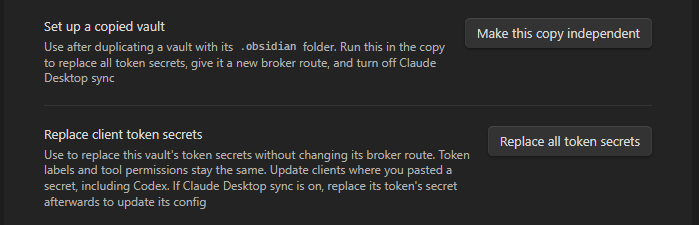
Legacy settings bind to their current location on first upgraded use, so a pre-upgrade copy opened alone cannot be identified automatically
Verifying
Your client should list the tools your token's profile allows, plus any prompts tagged #mcp-tools-prompt. For request-level inspection without a model in the loop:
npx -y @modelcontextprotocol/inspector
# point it at the URL under Server port, such as http://127.0.0.1:27200/v1/<route-id>/mcp, with your bearer token
To check that an open vault hosts the shared broker, request its health endpoint. It answers with the broker's name and protocol version:
curl http://127.0.0.1:27200/_obsidian_mcp_broker/health
# {"name":"obsidian-mcp-discovery-broker","version":3}
Headless mode
obsidian-mcp-headless serves a vault folder over MCP from a plain Node process, so a server with no desktop and no Obsidian can use the same tools. Tool names and response shapes match the plugin, so client setups carry over. It needs Node 24.11 or newer, the first Node 24 LTS release.
Install and connect
Download obsidian-mcp-headless.js from the latest GitHub release or build it with bun run build:headless (the file lands in packages/obsidian-plugin/dist/headless/). Put it on your PATH:
install -m 755 obsidian-mcp-headless.js ~/.local/bin/obsidian-mcp-headless
Then register it with your client. The client starts the server itself over stdio, so there is no port and no token:
claude mcp add obsidian -- obsidian-mcp-headless /path/to/vault
For Codex, add this to config.toml:
[mcp_servers.obsidian]
command = "obsidian-mcp-headless"
args = ["/path/to/vault"]
Without PATH, give the absolute path of the file instead: node /absolute/path/to/obsidian-mcp-headless.js /path/to/vault. The vault path can also come from the OBSIDIAN_VAULT environment variable. Stdio sessions get every headless tool. Logs go to stderr and stdout carries only protocol messages. The server exits when the client closes stdin, and on SIGINT or SIGTERM.
What works
These tools are served, 52 in all with the three adaptive-loading meta-tools (51 with --no-semantic):
- Files:
list_vault_files,get_vault_file,get_vault_files,get_vault_file_partial,create_vault_file,create_vault_binary_file,append_to_vault_file,patch_vault_file,delete_vault_file,rename_vault_file,create_vault_directory,delete_vault_directory,search_and_replace,get_file_info,list_attachments,get_recent_files,get_vault_overview - Search:
search_files_by_name,search_vault_simple,search_vault_smart(see Semantic search), andsearch_vaultwith JsonLogic queries (a Dataview query returnsdataview_not_installed) - Properties and tags:
get_note_property,get_note_properties,set_note_property,delete_note_property,update_note_properties,list_property_values,list_tags,get_files_by_tag,rename_tag - Structure and tasks:
get_note_outline,rename_heading,ensure_block_id,list_tasks,set_task_status - Links:
get_outgoing_links,find_broken_links,get_backlinks,find_orphaned_notes - Canvas:
get_canvas,add_canvas_node,connect_canvas_nodes,update_canvas_node,delete_canvas_node - Periodic notes:
get_or_create_daily_note,get_or_create_periodic_note,append_to_periodic_note(see Vault settings) - Web:
fetch(see Fetch) - Server and loading:
get_server_info,tool_catalog,activate_tool,activate_tools
Not served, because they need the desktop app or a plugin: every workspace, active-file, command, Dataview, Templater and bookmark tool.
The server reads tags, links, headings, blocks and tasks with its own parser, which follows Obsidian's rules closely but is not Obsidian's. Edits made outside the server (an editor, a sync client, git pull) are picked up by a file watcher within a fraction of a second. Folders whose name starts with a dot, such as .obsidian and .git, are neither read nor written, and a path that leads outside the vault folder is refused. Symlinks inside the vault are ignored. A tool that trashes a file or folder moves it to .trash/ in the vault. If a file is edited elsewhere while a tool is editing it, the tool fails with a message to retry instead of overwriting that edit. On Linux and macOS a file whose name contains a backslash is not served.
search_files_by_name ranks with its own fuzzy scorer, which follows Obsidian's quick switcher in spirit (in-order characters, contiguous runs and word starts rank higher) but gives different scores, although the tool description still says Obsidian's. rename_vault_file moves a file or folder and rewrites the links to it in every other note: wikilinks, embeds, markdown links (URL-encoded and <angle bracket> paths too) and frontmatter links, each keeping its own style, with subpaths and aliases intact. Relative links inside a moved note are recomputed so they still reach the same files. It also updates canvases (file nodes that name the moved file or a file under a renamed folder, and links in text nodes). A .base file is never changed, because its filters are expressions. Every base that links to the moved file or names its path is listed in a warnings list on the result, so you can check it by hand. Reference-style markdown links ([x][ref]) are not updated. If the move succeeds but a note cannot be rewritten, the error names that note. The link style is taken from each link, not from Obsidian's Files & Links settings.
Vault settings
The server reads a few of the vault's Obsidian settings once, when it starts. A change to any of them needs a restart, and nothing watches .obsidian. A missing file means Obsidian's defaults. A file that is there and cannot be used (a symlink, which is never followed, a file over 1 MB, one that cannot be read, or one that is not valid JSON) is also treated as missing, and the server says so on stderr at startup, naming the file and the reason. The tools themselves still never read or write dot-folders.
- Excluded files:
userIgnoreFiltersin.obsidian/app.json. An entry is a path prefix (Private/) or, wrapped in slashes, a regular expression tested against the vault-relative path (/\.png$/). Excluded files stay in the vault but are left out of the tools that honour the setting in the plugin too, such assearch_files_by_name,list_tasks,list_attachments,get_recent_filesand semantic search. An invalid expression excludes nothing. Ifapp.jsoncannot be used, nothing is excluded, so read the startup warning. - Daily and periodic notes: the tools run the same library as the plugin, over the vault's settings, so notes are created where the plugin would put them. The core Daily notes plugin is read from
.obsidian/core-plugins.jsonand.obsidian/daily-notes.json. The Periodic Notes plugin is read from.obsidian/community-plugins.jsonand.obsidian/plugins/periodic-notes/data.json, and the Calendar plugin (weekly notes only) from.obsidian/plugins/calendar/data.json. A plugin counts only when it is enabled, and an enabled Periodic Notes section replaces the core plugin's settings for that period. Folder, date format and template apply. With no plugin enabled, a note is created empty at the vault root, named by ISO date. A folder that the tools hide (mcpTools.excludedFoldersin HTTP mode) is never read or written by these tools either. - Templates: a template is a note in the vault, found the way Obsidian finds a link target. The library substitutes
{{date}},{{time}},{{title}},{{yesterday}},{{tomorrow}}and the weekday placeholders of weekly notes. It does not run Templater, so Templater syntax stays as written, and a template that cannot be read gives an empty note. A template inside a dot-folder cannot be read. - Time: dates and week numbers use the server's timezone and an English calendar, so weeks start on Sunday in
gggg-[W]wwformats.
Fetch
fetch returns a page as Markdown or HTML. Its own check refuses non-http(s) URLs and localhost and private-network host names, as in the plugin. Headless adds checks on the connection itself, because a host name can point anywhere. It refuses localhost, *.localhost and the trailing-dot forms, and it resolves the name and refuses it if any address is loopback, private, link-local, CGNAT, multicast, documentation, benchmarking or reserved, in IPv4 or IPv6 and in the IPv4-mapped forms of both. The connection goes to the address that was checked, so a second DNS answer cannot swap it, and every redirect (at most 5) is checked again. A response over 10 MB (compressed or not) is cut off, and a whole call takes at most 40 seconds. The request carries a plain obsidian-mcp-headless user agent.
Semantic search
search_vault_smart ranks notes by meaning, with the same native model the plugin uses by default (Xenova/all-MiniLM-L6-v2), run on the CPU. It is on by default and nothing is set up when the server starts. Pass --no-semantic to leave the tool out.
The first call sets the feature up and downloads about 36 MB once (the model at 8-bit precision, about 23 MB, and the ONNX runtime files, about 13 MB), then builds the index in the background. Until the index is ready the call returns an index_building error with progress and an estimated retry time, so call again a few seconds later. After that, calls answer from the index, notes you edit are embedded again as they change, and a restart skips every note that has not changed and drops notes that were renamed or deleted meanwhile. Building the first index of 50 notes took about 23 seconds in our test, and the server's peak memory was about 0.55 GB with the model loaded.
- Where files live:
$XDG_CACHE_HOME/obsidian-mcp-connector/or, without it,~/.cache/obsidian-mcp-connector/.models/andort-1.26.0/are shared by all vaults, and<vault name>-<hash>/embeddings/is the index of one vault. The index keeps note paths and headings in clear text, so the folders are created with mode0700and the index files with0600. Delete the folder to start over. - What is downloaded and checked: the two ONNX runtime files come from the same jsDelivr URL the plugin uses and are checked against a SHA-256 pinned in the server before they are used. The model comes from Hugging Face without a pinned revision, like the plugin. A request that gets no response within 30 seconds is abandoned. If a download fails, for example offline, that call fails and the next call tries again.
- CPU: indexing keeps one core busy. It runs on the server's own thread, one text at a time with a turn for other requests in between, so other tool calls are still answered meanwhile, with pauses of up to about 0.4 seconds in our test.
- One server per index: the first search takes an exclusive lock on a small file in the cache folder (through Node's built-in SQLite), and only then touches the index. If another headless server already holds it,
search_vault_smartreturnssemantic_search_unavailableand a later call tries again. The operating system holds the lock, so a server that exits or is killed frees it at once, and nothing needs cleaning up. In HTTP mode the folders listed inmcpTools.excludedFoldersare never indexed. - Shutdown: on SIGINT, SIGTERM or the end of stdin the server waits at most 5 seconds for the indexer to stop, then exits and says so on stderr.
- Weights: the headless server loads the 8-bit quantized model (23 MB, against 90 MB at full precision), so scores differ slightly from the plugin's native provider.
- Not available: the plugin's other providers (EmbeddingGemma, multilingual E5, Smart Connections), its semantic search settings and any GPU backend.
HTTP service mode
For an always-on server that several clients share, run it over HTTP:
obsidian-mcp-headless /path/to/vault --http --port 27124
obsidian-mcp-headless /path/to/vault --http --print-token
The server binds 127.0.0.1 only and requires a bearer token. --print-token prints the token and exits, creating it on first use. The token lives in a state file outside the vault, $XDG_CONFIG_HOME/obsidian-mcp-connector/<vault name>-<hash>.json (or under ~/.config), with mode 0600. --data FILE picks another file, which must be outside the vault, and --port defaults to the first free port from 27201. The token starts on the All tools profile, as the first token of a fresh vault does on the desktop, so every tool the server serves is listed from the first call.
To reach it from another machine, forward the port over SSH instead of exposing it:
ssh -L 27123:127.0.0.1:27124 server
A minimal systemd user unit, saved as ~/.config/systemd/user/obsidian-mcp-headless.service:
[Unit]
Description=Obsidian MCP headless server

[Service]
ExecStart=%h/.local/bin/obsidian-mcp-headless %h/vault --http --port 27124
Restart=on-failure

[Install]
WantedBy=default.target
Enable it with systemctl --user enable --now obsidian-mcp-headless. On a machine without a login session, run loginctl enable-linger $USER once so the unit starts at boot.
Troubleshooting
| Symptom | Cause and fix |
|---|---|
401 on every call |
The token matches no row, usually after a secret was replaced or a token revoked. Copy the current string from that row, or add a new token if the row is gone. |
ECONNREFUSED 127.0.0.1:<port> |
Nothing listens there. On port 27200, open a vault with the plugin enabled, since the shared broker runs inside Obsidian. Any other port comes from a fixed port or an older direct config: compare it with Server port in Access control, or copy the config again from the token's row. Claude Desktop reads its config only at launch, so quit fully (Cmd+Q) and reopen after a change |
| Notice: "Port 27200 is used by another program or by a vault server…" | A vault running an older MCP Connector version, a vault whose fixed port is 27200, or an unrelated program holds the broker port. Update or close that vault, change its fixed port, or stop the program. Direct vault ports keep working meanwhile, and the plugin keeps retrying |
| Notice: "Another open vault runs the shared broker with a different MCP Connector version" | Update the plugin in every open vault |
| Broker connection: Refused | The broker refused the vault's registration, and the message names the cause and what to change. On macOS and Linux the broker admits a vault only when its plugins folder, its plugin folder, .obsidian/plugins/mcp-tools-istefox by default, and the data.json in it belong to you and are not writable by others or by a group other than your own primary group. chmod go-w on each removes that write access. A data.json over 1 MB is refused on every system. The route reconnects on its own once the cause is fixed, and the copy buttons give the vault's direct URL meanwhile |
| Connection says Vault location changed after updating from 2.11 or 2.12, and the broker never registers | The plugin folder is a link, such as a development checkout or a synced folder. 3.0.0 saved its location in a different form from 2.x and took the vault for a moved copy. Update to 3.0.1, which recognizes the old form and replaces it on the next start. On 3.0.0, choose This vault was moved if this is the same vault, or Make this copy independent if it is a copy |
404 route not found on /v1/<route-id>/mcp |
The vault that owns this route is not open, or its route changed through Make this copy independent. Open that vault, or copy the config again from its token row |
409 on http://127.0.0.1:27200/mcp |
The config's token exists in more than one open vault, usually a copied vault. In the copy, use Make this copy independent, then copy the client config again from the right vault's token row |
Codex cannot connect to 127.0.0.1:27206, or gets 401 after an upgrade |
The broker moved to port 27200 and no longer swaps a Codex credential. On the token row Codex should use, choose Codex → Install into user Codex config…: The install migrates the old entry to the current address and that row's token, keeping its policy settings. Then restart Codex |
Claude Desktop: Failed to connect, command not found |
Only affects the mcp-remote path. Settings → Claude Desktop integration reports whether node and npx are on the PATH Obsidian inherits, and installs Node for you on macOS. |
| 60 s hang on Windows, then "Could not attach" | mcp-remote bug. Switch to the POST-only bridge. |
| 60 s hang on macOS with Use Built-in Node.js for MCP on | Fixed in v1.0.1. Update, re-export the .mcpb, reinstall once; the setting can stay on. On 1.0.0 and earlier, turn the setting off and restart fully. (#412) |
.mcpb disconnected most of the time |
Fixed in v0.26.0, which stopped baking the port and token into the manifest. Update and re-export once. |
First search_vault_smart is slow |
Expected: ~25 MB model download, cached afterwards. A content-length warning in DevTools is harmless. |
On the built-in-Node path Claude Desktop does not write the connector's own stderr to mcp-server-Obsidian MCP Connector.log, so the startup banner and per-request lines are missing there even when everything works. To collect them, run the extension's server/index.js directly, or turn the setting off for the test. The plugin's own log is the diagnostic log below.
Diagnostic log
The plugin writes what it does to a log file in its own folder: MCP requests, protocol negotiation, server start and stop, the shared broker route, semantic search start-up and tool errors with their stack.
- Where it lives:
<vault>/.obsidian/plugins/<plugin folder>/diagnostic.log. The plugin folder ismcp-tools-istefoxby default. Settings → MCP Connector → Diagnostics shows the full path, and Show in folder opens it in your file manager. - How big it gets: 5 MB per file, 5 files, about 25 MB. When the file is full it is renamed to
diagnostic.1.logand the oldest ofdiagnostic.1.log…diagnostic.4.logis dropped. - What is removed from it, where known: bearer tokens, tool argument values (only their names), note content, and absolute paths, which are written as
<vault>,<plugin>or<home>. A tool argument value shorter than 4 characters can survive inside a tool's error message. - What can be in it: vault-relative note paths in some failure lines, such as an indexing error naming the note it could not read. Review a copied tail before you post it publicly.
- Level: INFO by default. Switch Log level to DEBUG while you reproduce a problem, which adds every
tools/list,initializeandserver/discoverrequest, then back to INFO. The change applies at once and survives a restart. - Attaching it to an issue: click Copy last 200 lines and paste them into the issue, or attach
diagnostic.logitself. Clear log deletes the file and its rotated copies after asking.
The log is a plain file in the vault, so a vault synced through iCloud or another service syncs it too. The plugin no longer writes to Obsidian's developer console, with one exception: when the log file itself cannot be written, it prints a single warning there for each run of failures.
Security
- Loopback only. The bind address is hardcoded to
127.0.0.1. The shared broker listens on 27200, and each vault takes the first free port in 27201-27212, starting with its last port, unless you pin one. Bearer auth is required on every request, and a miss is a bare 401 that reveals nothing about which tokens exist. The broker forwards your client's bearer token to the vault unchanged, so the vault checks it exactly as on a direct port - No binary. Nothing prebuilt is downloaded or executed.
- Tokens are local. Generated per install, stored in the vault's
data.json, revealed only on demand in settings, up to 10 per vault. - The shared broker trusts the local port owner. If another local process binds
127.0.0.1:27200first, it receives the bearer tokens your clients send there. That is the same trust model as a process squatting a direct vault port, on one fixed port that is easier to target. The plugin reports a foreign listener in a Notice but cannot authenticate the broker to clients, so ADR-0027 records this as an accepted local-process risk - Vault access is Obsidian's. Every read and write goes through
app.vault, under Obsidian's own permission model. Concurrent writes go throughVault.process()plus a process-wide write mutex, so two MCP writes to one file cannot lose an update. - Command execution is opt-in and per vault.
- Folders can be hidden from every tool at once. Settings → MCP Connector → Hidden folders removes a folder from reads, writes, listings, the link graph, tag counts and prompts, vault-wide, and makes it behave exactly like a folder that does not exist — never a distinguishable "access denied". It is a guardrail against a client wandering somewhere it shouldn't, not encryption: see SECURITY.md for what it does and does not cover.
Report vulnerabilities through SECURITY.md, never in a public issue.
For developers
Bun monorepo, feature-based. Full contract in docs/project-architecture.md. Every failed tool call is isError: true with a JSON body { error, errorCode, ... }; the code vocabulary is docs/error-codes.md.
packages/
├── obsidian-plugin/   # plugin: MCP server, tools, transport, settings UI (Svelte)
│   ├── src/features/  # each feature owns services/, components/, colocated *.test.ts
│   └── scripts/       # connectorShim.js (the .mcpb shim), generators, bench
├── shared/            # ArkType schemas and types shared with the shim
└── test-site/         # SvelteKit harness, dev only, never shipped
bun install
bun run check         # tsc --noEmit across packages (does NOT type-check .svelte)
bun test              # 1700+ unit tests, colocated
bun run format:check  # CI enforces this; the other gates pass without it
bun run build         # production bundle
bun run release       # build + zip (no .mcpb — that is a per-token export from the plugin)
bun run build:headless  # the headless server, one file under packages/obsidian-plugin/dist/headless/
bun run test:headless   # build it and smoke-test the real file under Node
Full gate before calling anything done: bun run check && bun test && bun run format:check.
Design invariants
These are the ones worth knowing before you change anything:
- The transport is stateless and POST-only.
GET /mcpreturns 405 on purpose. No server-initiated stream exists, soinitializestate is never available to a later request. notifications/tools/list_changedrides the caller's own POST response with that call'srelatedRequestId. Activation calls switch their response to SSE for it. There is no fan-out and no broadcast path.- The registry is global truth; the token supplies a resolved
ToolScope. Credentials live in themcpTransportslice, policy intoolLoading.profiles[tokenId], joined by id. The registry never dereferences a token id. A missing policy entry resolves to today's behaviour rather than locking a client out. - Precedence:
userDisabled> per-token allowlist > profile + promoted > always-active meta-tools. - Settings are sliced, and every write goes through
SettingsStore.updateSliceunder a process-wide mutex.data.jsonis shared by every feature, so an unserialized read-modify-write clobbers a neighbour. Returning the input unchanged means NO_CHANGE and skips the write. - A polymorphic tool must not declare an
outputSchema. SDK clients reject every response lackingstructuredContentonce one is declared. This costget_vault_filefive releases. - The
.mcpbshim is a separate process against an already-distributed bundle. Itsdata.jsonread contract stays backward-compatible, and it fails closed on an unknown token id. Falling back to a default credential would turn a revocation into a grant.
Adding a tool
- Write
src/features/mcp-tools/tools/myTool.tsexporting a schema and a handler, plusmyTool.test.tsbeside it. - Register it in
src/features/mcp-tools/index.tswithregistry.register(myToolSchema, handler). - Declare annotations in
toolAnnotations.ts. Read-only tools that lie about it cost users a confirmation prompt they should not see. - Decide whether it belongs in
CORE_SET(src/features/adaptive-tool-loading/constants.ts). Most tools do not.
Working on the shim
packages/obsidian-plugin/scripts/connectorShim.js is the real source. src/features/mcp-client-config/assets/connectorShimSource.ts is generated from it:
bun packages/obsidian-plugin/scripts/gen-shim-source.ts
Editing the shim without regenerating ships the old one, silently. The shim is zero-dependency CommonJS and must start under both loaders: node server/index.js and the host import() that Claude Desktop uses with built-in Node. That is ADR-0013, and getting it wrong was #412.
Where decisions live
docs/architecture/ holds the ADRs and is authoritative. The load-bearing ones: 0013 the pure-Node .mcpb shim, 0014 per-client tool profiles, 0015 the tools/list invariant, 0010 split registry disable states, 0009 structured output. Per-issue specs are in docs/specs/.
Svelte components sit outside tsc --noEmit, so UI changes need a real vault to verify. Community-plugin review lints src/** only and forbids eslint-disable on obsidianmd/* rules, which is why non-plugin code lives outside src/.
Contributing
Read CONTRIBUTING.md first. Fork, branch from main, keep PRs scoped, run the full gate, open the PR. Conventional Commits.
Support
Open an issue for bugs and feature requests. Changelog: CHANGELOG.md and Releases.
Also by istefox: istefox-dt-mcp, an MCP server for DEVONthink 4 on macOS. Preview-then-apply with audit log and selective undo, optional local RAG, .mcpb bundle. Local-only, MIT.
License
MIT. For background on the protocol itself, see the MCP introduction.