Custom Sidebar Icons

by RavenHogWarts
5
4
3
2
1
Score: 63/100

Description

Category: Customization & UI

The Custom Sidebar Icons plugin allows you to personalize your Obsidian workspace by assigning unique icons to documents and folders. Whether you're pulling images from an online URL, referencing local file paths, or leveraging built-in Lucide icons, it provides various ways to visually distinguish your vault's contents. You can even embed SVG tags or Base64-encoded images to refine your setup. Once configured, the plugin helps you quickly identify sections or notes through easily recognizable symbols, eliminating the need to rely on standard text labels. This can be especially beneficial if you manage many nested folders or complex structures and want a more visual approach. With the ability to blend custom icons into your usual workflow, you gain an organized and aesthetically pleasing interface that makes navigating your vault more intuitive.

Reviews

No reviews yet.

Stats

31
stars
13,701
downloads
1
forks
919
days
58
days
58
days
91
total PRs
1
open PRs
8
closed PRs
82
merged PRs
16
total issues
1
open issues
15
closed issues
100
commits

Latest Version

2 months ago

Changelog

2.5.0 (2026-08-21)

✨ 新增功能 (Features)

  • 修改 TabHeaderIconHandler 解析优先级 (1f96ab6)
  • 新增 标签页 图标替换 (b72751a)

🐛 问题修复 (Bug Fixes)

  • FileExplorerIconHandler 只在 file-explorer-context-menu 来源时加菜单项 (2075ae3)
  • 更新 tabHeader 逻辑 (6d08552)

♻️ 重构 (Refactor)

  • 优化翻译文本 (aed31df)
  • 更新 i18n 文本说明 (26468ad)
  • 替换侧边栏图标库图标为 book-image (e8bd225)

README file from

Github

English | 中文

Custom Icons

Icons for every surface of your Obsidian workspace — files and folders, tab headers, bookmarks, ribbon actions, community plugin settings — plus a built-in icon library backed by the full Iconify catalogue.

GitHub Socialify

Icon surfaces

Each surface is a tab under Settings → Custom Icons with its own on/off switch. Native icons are hidden rather than removed, so disabling a feature restores Obsidian's own appearance.

Surface What you can do
File explorer A default folder icon and a fallback file icon; per-extension rules (batch add, compound suffixes such as excalidraw.md win over md); named extension groups with presets (images, video, audio, documents, archives, code); per-item overrides via right-click in the tree; optional inheritance so subfolders and unmatched files follow the nearest ancestor folder. Overrides follow renames and are cleaned up on delete.
Tab headers Sidebar tool tabs and editor tabs, popout windows included. Two-level resolution: a per-tab override wins, a per-view-type mapping is the fallback. Right-click an active tab to set or reset.
Bookmarks All six bookmark kinds (file, folder, group, search, graph, URL). Per-item overrides win over a per-kind default; items are keyed by a stable id, so renaming or moving a bookmark keeps its icon.
Ribbon Icons for the left ribbon actions, identified by tooltip text, restorable to the original at any time.
Community plugins Give plugins that ship without an icon one (a fix for Obsidian 1.11+): a shared default, a random icon per plugin or for all at once, and icons in settings search results (Obsidian 1.13+).

Colours are set alongside every icon, and batch actions (randomize, clear) apply to whatever the current filter shows.

Icon library

Open it from the ribbon button or the command "Open custom icon library".

  • Icon packs — install whole sets from the built-in Iconify catalogue (220+ sets), or from any npm package that ships loose SVG files (path globs, popular presets included). Preview before installing; enable, disable, re-download or uninstall at any time. Packs are stored in the plugin folder and work offline once installed.
  • My SVG — paste SVG source or upload .svg files in bulk (file names become icon IDs). Organize into groups, sort, multi-select, and export/import the library as JSON to move it between vaults.
  • Lucide — browse every Lucide icon bundled with the plugin, with a filter separating the ones Obsidian already ships from the extras.
  • All — search Lucide, your own SVGs and every installed pack at once, grouped by source.

Favorites, recently used and grid density are remembered across sessions and shared with the icon picker used throughout the plugin.

Library icons are registered as ordinary Obsidian global icons with the ID CI-<icon-id>, take effect immediately without a reload, and can be used by any other plugin.

Usage
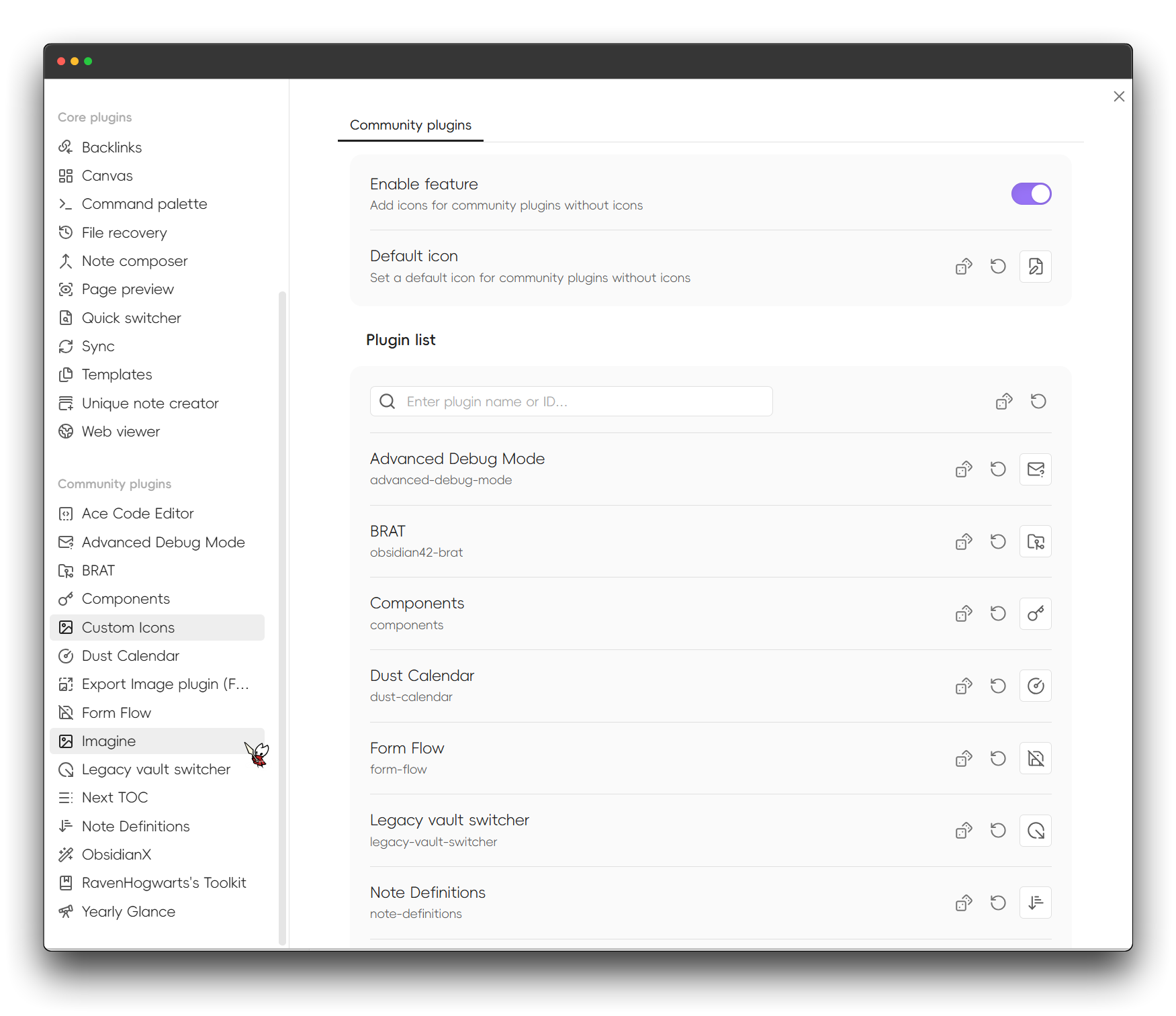
Usage

Icons are configured in two places: the settings tabs above, and in place — right-click a file, folder, bookmark or an active tab header. If anything looks wrong, run "Reapply all icons" from the command palette to re-register and reapply everything.

Experimental

Always load this plugin first keeps this plugin at the front of the community plugin load order, so other plugins never render before its icons are registered. It only reorders entries, never adds or removes them, and takes effect on the next restart.

Installation

Community plugin market

Click to install, or open Settings → Community Plugins, search for "Custom Icons" and install.

BRAT (beta versions)

  1. Install BRAT
  2. Click "Add Beta plugin" in BRAT settings
  3. Enter Raven-Pensieve/obsidian-custom-icons

For plugin developers

Custom Icons exposes a cross-plugin API (contract v1) on its plugin instance. Copy docs/custom-icons-api.d.ts into your own repository — there is no npm package, deliberately: no build coupling, and the runtime guard is the version field anyway.

const provider = app.plugins.getPlugin("custom-sidebar-icons")?.api;
if (provider?.version === 1) {
    provider.renderTo(el, "CI-mdi-home");   // the only way to draw the Lucide extras
    provider.describe("CI-mdi-home");       // source, short name, pack id
    provider.catalog();                     // all candidates, grouped by source
    provider.openPicker({ onPick });        // reuse this plugin's icon picker
}

// Required: icon sets change without the plugin list changing
this.registerEvent(
    this.app.workspace.on("custom-icons:changed", () => this.invalidate()),
);

Do not cache the API reference (the plugin can be disabled and re-enabled), and do not split CI-<packId>-<name> yourself — both segments may contain hyphens, so ask describe().

Inline Icons is a reference consumer: it renders icons inside note bodies using this registry.

FAQ

My icon shows blank inside another plugin

Obsidian's setIcon renders once. If that plugin rendered its icon before Custom Icons loaded, the spot stays blank. In order:

  1. Run "Reapply all icons";
  2. Reopen the affected view;
  3. Enable Settings → Experimental → "Always load this plugin first" and restart — this is the root fix, since community plugins load in the order of the array in .obsidian/community-plugins.json;
  4. Reload that plugin, or restart Obsidian.

Upgrading from 0.x

v1.0 was a breaking remaster; the classic pre-1.0 features have all been reimplemented natively since, and the plugin no longer generates CSS snippets. The old CSS-based configuration, including the auto-generated CustomIcon-AutoGen snippet, is neither used nor migrated. Delete that snippet from your vault and set your icons up again in the settings page.

License

GPL-3.0 — see LICENSE.

Star History

Star History Chart

Acknowledgements

Similar Plugins

info
• Similar plugins are suggested based on the common tags between the plugins.
Icon Shortcodes
5 years ago by AidenLx
Obsidian Plugin: Insert emoji and custom icons with shortcodes
Auto Hide
4 years ago by skelato1
This Obsidian plugin enables you to collapse (and expand) the sidebar easier.
Cycle In Sidebar
4 years ago by Houcheng
Cycle through tabs of left/ right sidebar panel
Material Symbols
4 years ago by Cristoph Berane
Callout Manager
4 years ago by eth-p
An Obsidian.md plugin that makes creating and configuring callouts easy.
Soomda
3 years ago by Michael Lee
🙈 Soomda — An Obsidian plugin that lets you quickly hide your sidebars.
Iconoir Icons
3 years ago by @gapmiss
A plugin for creating customized icons in Obsidian.md
Pathfinder 2E Action Icons
3 years ago by Thiago Coutinho
Obsidian plugin for easily insertind the Pathfinder 2E Action icons
Additional Icons
3 years ago by Matthew Turk
Add additional iconsets to Obsidian
Metadata Icon
3 years ago by Benature
change metadata entry icon
Iconic
2 years ago by Holo
Customize your icons and colors directly from the Obsidian UI, including tabs, files & folders, bookmarks, tags, properties, and ribbon commands.
Recent Files
6 years ago by Tony Grosinger
Display a list of most recently opened files
Icons
6 years ago by Camillo Visini
Add icons to your Obsidian notes – Experimental Obsidian Plugin
Markdown Formatting Assistant
6 years ago by Reocin
This Plugin provides a simple WYSIWYG Editor for Markdown and in addition a command line interface. The command line interface facilitate a faster workflow.
Icon Swapper
5 years ago by mgmeyers
Allows swapping out Obsidian's icons
Sidebar Expand on Hover
5 years ago by Tousif Iqbal Anik (toiq)
This Obsidian plugin expands or collapses the sidebar based on mouse hovering on the ribbons.
Hide Sidebars on Window Resize
5 years ago by NomarCub, Michael Hanson
A simple Obsidian plugin to hide the sidebars when the window gets narrow.
Window Collapse
5 years ago by Guilherme Quental
Iconize
5 years ago by FlorianWoelki
Simply add icons to anything you want in Obsidian.
CalloutX
2 years ago by br4in
An Obsidian plugin that allows you to view, manage, and customise callout icons in your vault.
Image Preview on Icon Hover
2 years ago by rama1997
Plugin for Obsidian that add image popups when hovering over various icons in the user interface
Note Favicon
2 years ago by mdklab
Obsidian plugin – Show Favicon from Metadata
Simple File Info
2 years ago by Lukas Capkovic
Quick Peek Sidebar
a year ago by Bradley Wyatt
Open and close the Obsidian sidebars on hover.
Rainbow-Colored Sidebar
a year ago by Kevin Woblick
Automatically color your sidebar like a rainbow. No configuration needed. 18 themes included.
Scratchpad
a year ago by KVH
An open source Obsidian plugin for quick note-taking and freehand drawing.
My SVGs
9 months ago by Omar Badawy
An Obsidian plugin that Registers your own SVGs into Obsidian's global icon library for use with other plugins or however you want.
Mermaid Icons
8 months ago by toshs
Obsidian plugin enabling the use of icons in Mermaid diagrams.
Floating Headings
8 months ago by k0src
Displays a floating, collapsible outline of a note's headings on the right side of the editor. Expands on hover, click to navigate.
TikToker
7 months ago by ameyxd
A Tiktok parser and saver for Obsidian
WebDAV Explorer
7 months ago by 蓝星晓夜
WebDAV Server Explorer.
Tree Modal
5 months ago by krannich
Obsidian plugin: open files from the file explorer in a modal preview
Cornell Marginalia
5 months ago by Latazadehomero
A lightweight Obsidian plugin designed for students who use the Cornell Note-taking System.
Hide Folders
5 months ago by jonasdoesthings
Toggle the visibility of folders in the Obsidian.MD file navigator based on name-patterns
Find Orphaned Images
3 months ago by josmarcristello
Find Orphaned Images is an Obsidian plugin designed to help you keep your vault clean and organized by identifying and managing images that are not linked anywhere in your notes.
GTD Tasks
3 months ago by unpreditable
Sidebar Keyboard Navigation
3 months ago by denvolok
Obsidian plugin to smoothly navigate File Explorer using keyboard only.
Sidet
3 months ago by Jiao Yingxing
An easy-to-use AI chat plugin for Obsidian with side browsing, focused conversations, and vault-aware knowledge capture.
Claude Sidebar
2 months ago by derek-larson14
Run Claude Code, Codex, and other agent CLIs in Obsidian
Telegram Sidebar
2 months ago by reallygood83
Pinned Tabs
2 months ago by NameIsKyro
Chrome-style compact pinned tabs for Obsidian with custom icons, smooth movement, and accidental-close protection.`
Mobile Sidebar Notes
2 months ago by ckep1
Open notes & new tabs in the sidebar on the Obsidian mobile app.
Alternative Explorer
2 months ago by sk-obsidian
Alternative Explorer is an Apple Notes–style sidebar for browsing folders and notes in Obsidian. Switch between an expandable folder tree and a notes list — a compact alternative to the built-in File Explorer.