Markdown Formatting Assistant

by Reocin
5
4
3
2
1
Score: 55/100

Description

Category: Note Enhancements

The Markdown Formatting Assistant plugin is a game-changer for Obsidian users who need to format their Markdown, HTML, and Latex content quickly and efficiently. With this plugin, you'll have access to easy-to-use snippets, a color picker that saves your favorite colors, and a suggestion window with shortcuts to make formatting a breeze. Plus, the plugin's side panel allows you to customize the order and expansion of sections, making it easy to organize your content just the way you like it. Whether you're writing articles, creating notes, or building diagrams, this plugin is sure to streamline your workflow and save you time.

Reviews

No reviews yet.

Stats

285
stars
121,733
downloads
34
forks
2,088
days
770
days
1,433
days
11
total PRs
2
open PRs
0
closed PRs
9
merged PRs
77
total issues
50
open issues
27
closed issues
0
commits

Latest Version

4 years ago

Changelog

Version: 0.4.1 Added Callouts-Support

README file from

Github

Markdown Formatting Assistant

Formatting one click or one keystroke away a side panel, a search window and a toolbar of your own — for Markdown, HTML, LaTeX, tables and callouts

Obsidian 1.0 or newer · desktop and mobile · 12 interface languages · free and open source

  • Side panel with seven sections you can reorder, fold and switch off, its buttons lined up left, centre or right.
  • Alt+Q searches about 160 snippets by name, in your language or in English. Alt+C does the same for the 26 callouts.
  • Hotkeys for every Text Edit action and every callout, bound wherever you like.
  • Toolbar above the note, off by default: any command in your vault, in the order you choose.
  • Colour picker that colours selected text in one click, and remembers recent and saved colours.
  • 12 languages, following Obsidian's own by default.
  • Works from the keyboard and with screen readers.

Written by Reocin, who handed maintenance over in 2026; versions from 0.5.0 on are maintained by Mark Karte and Claude, in this same repository.

Installation

In Obsidian open Settings → Community plugins, choose Browse, search for Markdown Formatting Assistant, then Install and Enable.

To install by hand, download main.js, manifest.json and styles.css from the latest release into <vault>/.obsidian/plugins/obsidian-markdown-formatting-assistant-plugin/ and enable the plugin.

Side Panel

Open it with the ribbon icon on the left, or with the command Open Markdown Formatting Assistant, which can be given a hotkey like any other. It opens in the right sidebar; Side Pane Side in the settings moves it to the left — press the ribbon icon again after changing it.

The panel follows the width of its pane, so the button grid reflows when you drag the pane wider or narrower. It works on mobile too.

The buttons are centred unless you choose otherwise: Panel button alignment in the settings lines them up on the left or the right instead — the swatches, the table picker and the links under each section with them. An open panel changes straight away.

With text selected, formatting buttons — bold, a tag, a callout and the like — wrap it rather than replace it. With nothing selected, they insert at the cursor.

Arranging the sections

Drag a section by its header to move it, and click the arrow to fold it. The order and the folding are remembered. A section you never use can be switched off in the settings.
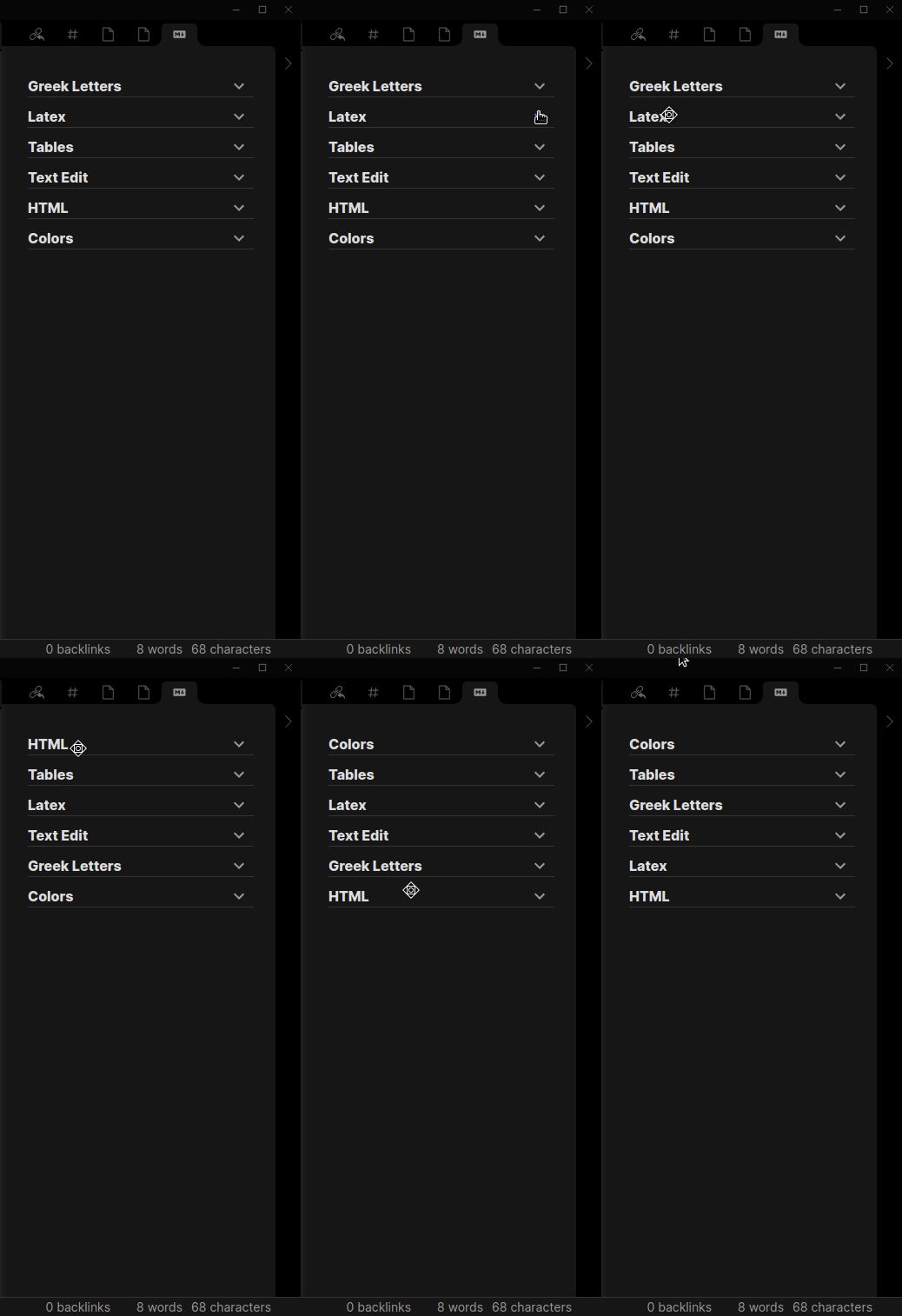
Dragging a section header to a new position in the side panel

Text Edit

Headings H1 to H6, bold, italic, underline, strikethrough, highlight, inline code, code and mermaid blocks, links, internal links, images, quotes, and bulleted, numbered and task lists. Pressing a heading button on a line that already has that heading removes it.

Quotes and lists work on whole lines, so it does not matter where in the line you started the selection or left the cursor. A selection that covers part of several lines converts all of them; blank lines in between are left alone, and a bullet added inside a quote goes after the > rather than in front of it. Pressing the same button again takes the markers off.

Tables

Pick a size from the grid — up to 6 rows by 6 columns, counting the header — and the table is inserted with its columns already lined up in the source. The alignment buttons below the grid set the delimiter row to none, left, centre or right, and the choice is remembered for the next table.

A table dropped in the middle of a line moves onto a line of its own, and whatever followed the cursor is pushed below it rather than glued onto the last row.
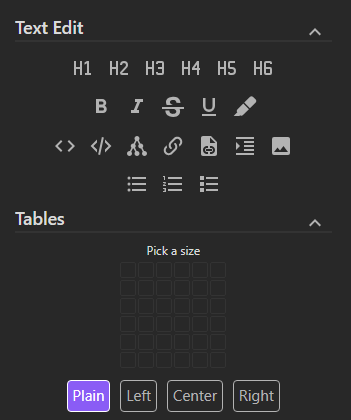
The Text Edit and Tables sections of the side panel

HTML

<a> <abbr> <b> <br/> <center> <details> <dfn> <div> <em> <font> <hr/> <i> <img> <kbd> <mark> <p> <pre> <span> <strong> <sub> <summary> <sup> <table> <tbody> <td> <tfoot> <th> <thead> <tr> <u>

Two things that are not tags but are written as HTML because Obsidian has no Markdown for them: a page break for PDF export, and text alignment — left, center, right and justify.
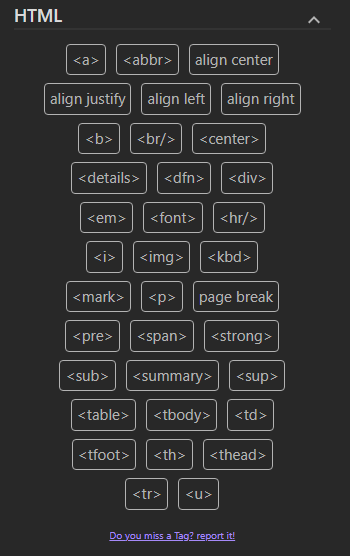
The HTML section of the side panel

Latex

LaTeX only works inside an equation, $...$ or $$...$$.

69 operators. The 33 on the panel are the everyday ones: fractions, powers and indices, \sqrt, \sum, \int, \prod, \lim, \partial, \infty, trigonometric functions and brackets. The other 36 — relations, set and logic symbols, arrows, \nabla, \binom, \overline, blackboard bold and so on — are only in the Alt+Q window, where they can be found by name. A panel showing all of them would be a wall of symbols to read through every time.
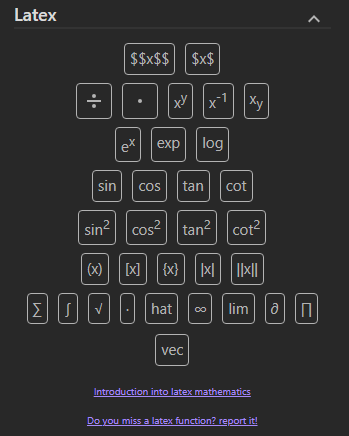
The Latex section of the side panel

Greek Letters

Like LaTeX, Greek letters only work inside an equation.
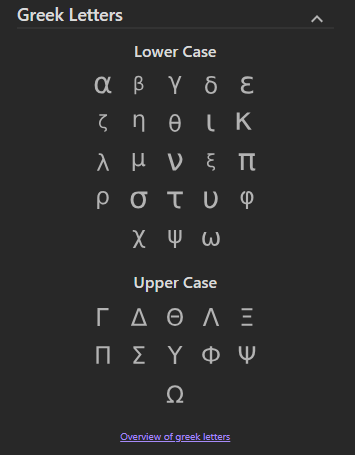
The Greek Letters section of the side panel

Callouts

26 callout types, each inserting the corresponding Obsidian callout block.

The heading is written in your interface language, so a note reads > [!note] Заметка rather than showing Obsidian's English default. The keyword inside the brackets always stays English — that is what Obsidian matches on to pick the icon and the colour. Turn Write callout headings off if you would rather type the heading yourself.

Selected text becomes the body of the callout, and a selection spanning several paragraphs stays inside it: the quote marker is repeated on every line.
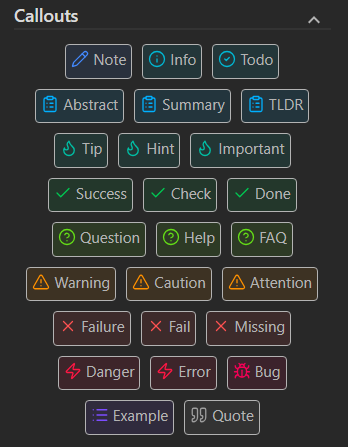
The Callouts section of the side panel

Search windows

Alt+Q opens a search over every snippet in the Text Edit, HTML, LaTeX and Greek sections — about 160 of them. Type a few letters of the name and press Enter; it works wherever the cursor is and whether or not text is selected, so your hands never leave the keyboard. Names match in your interface language and in English alike, so warning and Предупреждение find the same thing.

Alt+C is the same window for callouts.

Tables and colours are on the panel only.
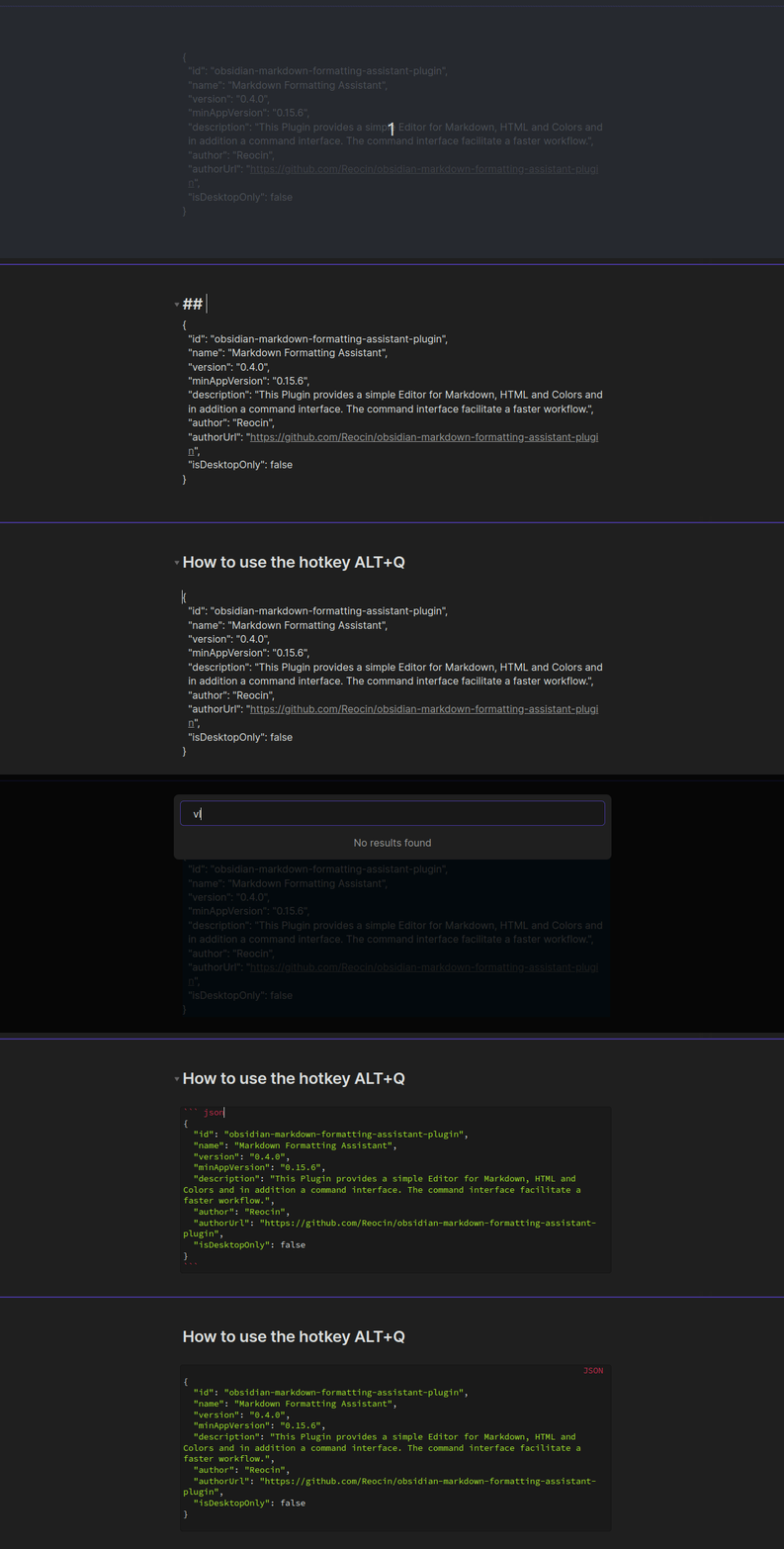
Typing a few letters in the Alt+Q window and inserting the suggestion

Both keys can be changed under Settings → Hotkeys: search for Open Command Selector or Open Callouts Selector.
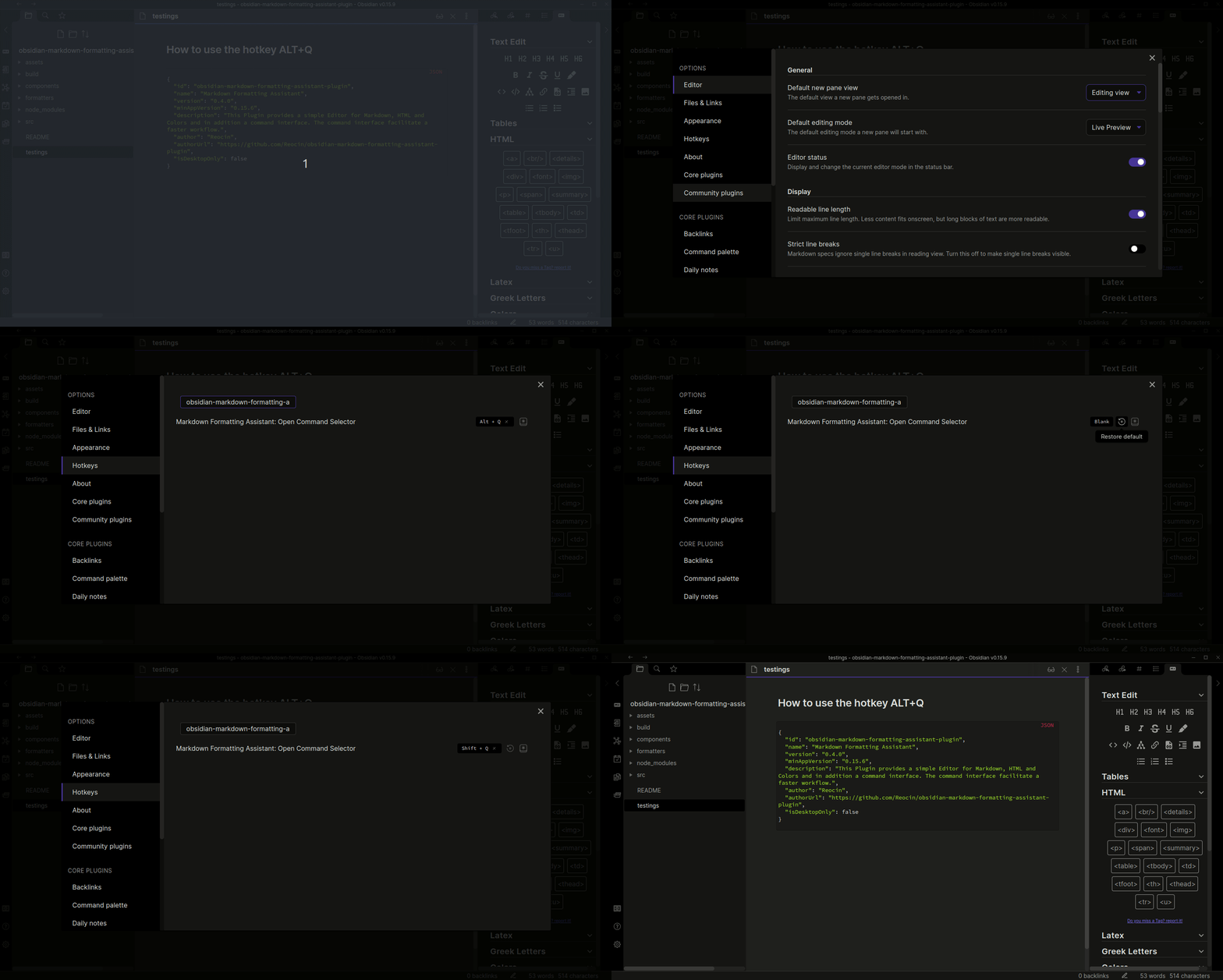
Changing the Alt+Q hotkey in Obsidian's hotkey settings

Hotkeys for individual commands

Every Text Edit action and every callout is registered as an Obsidian command, so you can bind a key to any of them under Settings → Hotkeys. Search for the plugin's name to see the whole list. Nothing is bound out of the box apart from Alt+Q and Alt+C, so no existing shortcut of yours is taken over.

That covers headings, bold, italic, underline, strikethrough, highlight, inline code, code and mermaid blocks, links, images, quotes, the three list kinds, and the 26 callouts. Cmd+1 for H1 and Cmd+2 for H2 is a common arrangement.

The side panel itself has a command too, so it can be opened without reaching for the ribbon icon.

The HTML, LaTeX and Greek sections are deliberately left out. Between them they hold another 138 entries, and a hotkey list is not a useful place to look for \alpha — the Alt+Q window is, and it searches all of them.

Toolbar above the note

A row of buttons at the top of the editor, so the side panel can stay closed. It is off until you turn it on under Settings → Markdown Formatting Assistant → Toolbar above the note, because it takes a strip of room from the note.

A button is an Obsidian command and nothing else. That is what makes the row worth assembling: any command in your vault can go on it — Obsidian's own, this plugin's, and other plugins' alike. Add them with the search field, drag the rows to put them in the order you work in, and remove the ones you never press.

It starts with everyday formatting: headings, bold, italic, strikethrough, highlight, inline code, quote, the three list kinds and a link. Nothing about that set is special; clear it out and build your own.

The buttons can sit at the left of the row, in the middle, or at the right — whichever suits where your eyes already are.
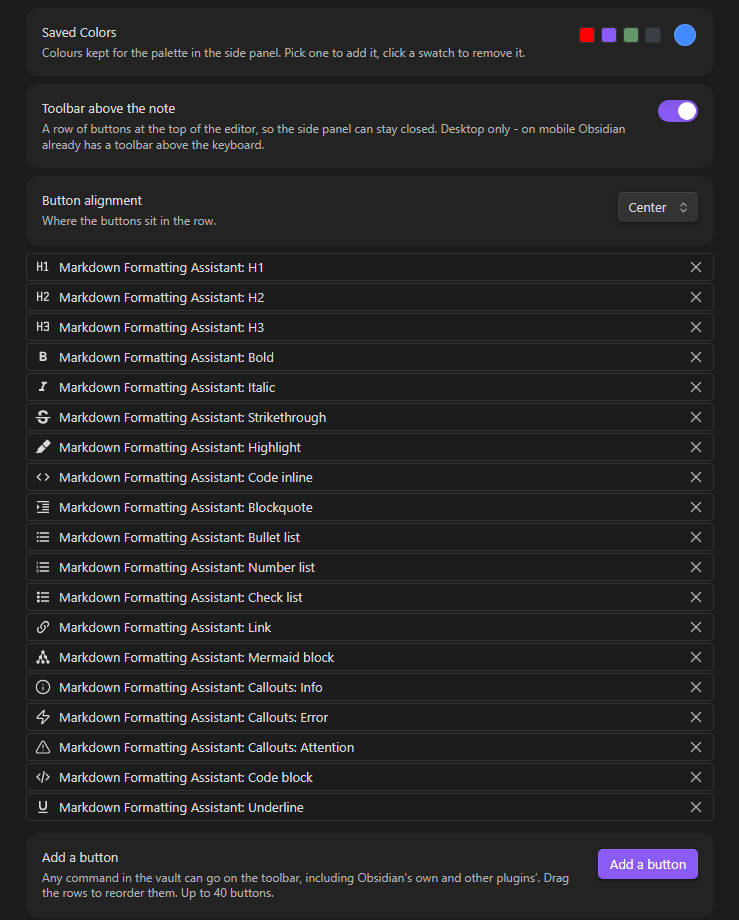
The toolbar settings: the list of commands on it, their alignment, and the button to add more

The bar appears only while you are editing, since every button writes to the note, and it wraps rather than scrolls, so a narrow pane costs a row of height instead of hiding half the buttons.

Desktop only. On mobile Obsidian already puts a toolbar above the keyboard, and a second one would only be in the way.

The toolbar is inserted into the editor's own container, because Obsidian publishes no place to put one. That is the first thing to check if a future Obsidian release moves it or loses it.

Color Picker

Picking a colour

Select a Color opens the colour picker. When you close it, the colour is used straight away — on the selection if there is one, at the cursor if not — and is also copied to the clipboard.

Last used colors holds the last 10 colours picked, until Obsidian is closed. Save Color keeps the current colour for good under Saved Colors, which can also be edited in the settings.

Click any swatch to use that colour again. Right-click a swatch to remove it, and drag saved colours to change their order.
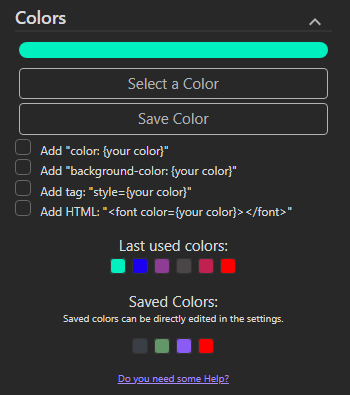
The Colors section of the side panel, with recent and saved colours

Colouring selected text

Select some text and click a colour — recent, saved, or freshly picked — and the selection is wrapped so it takes that colour. One click, no options to tick first.

Ticking background-color gives you a background instead, in a <span>, since a <font> tag can only set the colour of the text.

Inserting a colour code

With nothing selected, the checkboxes decide what the click writes at the cursor. They describe a piece of code to paste into a tag you are already writing, which is why they do not apply when there is a selection — there is only one thing "colour this text" can mean.

Ticked Written at the cursor
nothing #ff0000
color color: #ff0000
background-color background-color: #ff0000
both color: #ff0000; background-color: #ff0000
style, with either of the above style="background-color: #ff0000"
HTML <font color="#ff0000"></font>, whatever else is ticked

Languages

The interface is available in 12 languages: English, Беларуская, Deutsch, Español, Français, Italiano, 日本語, 한국어, Português, Русский, Українська and 简体中文.

By default the plugin follows the language Obsidian itself is set to. You can pick a specific one under Settings → Markdown Formatting Assistant → Language; it takes effect after Obsidian is restarted.

Only what you read is translated. The callout keyword inside > [!note] stays English, because that is what Obsidian matches on. The search windows match both the translated name and the original English one.

Translations other than English and Russian have not been reviewed by native speakers yet — corrections are very welcome. A language lives in a single file under src/locales/, and adding a new one means writing that file and adding one line to src/locales/index.ts.

Keyboard and screen readers

Tab reaches every button in the side panel, Enter and Space press it, and the focused one is visibly outlined. Every button has a name, which a screen reader announces and which shows as a tooltip on hover — most of them hold a drawing rather than text, so without it there would be nothing to announce.

Settings

  • Language — default: same as Obsidian. Any of the 12 supported languages. Takes effect after a restart.
  • Side Pane Side — default: right. Which sidebar the panel opens in.
  • Panel button alignment — default: center. Left, center or right: where the buttons in the panel's sections sit, together with the swatches, the table picker and the links under each section. Takes effect at once.
  • Write callout headings — default: on. Writes the callout's name as its heading, in your language. The keyword inside [!note] stays English either way.
  • Toggle section Section — default: all on. Every section of the side panel can be switched off. Takes effect after a restart.
  • Toolbar above the note — default: off. Which commands appear on it, in what order, and whether they sit left, centre or right. Desktop only.
  • Saved Colors — the saved colours as swatches next to a colour picker. Pick a colour to add it, click a swatch to remove it. The order is the one the panel shows them in.
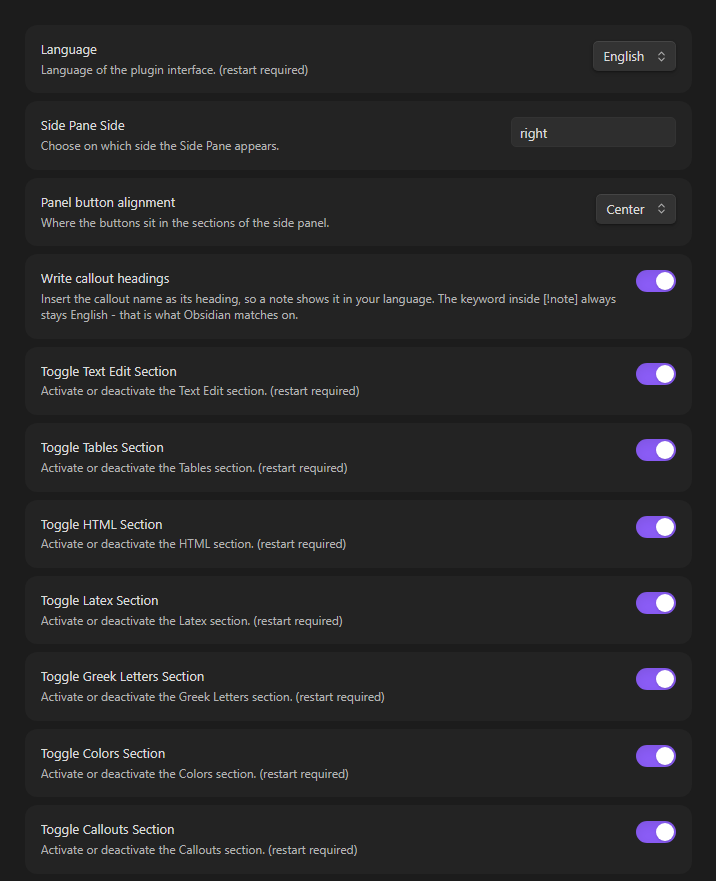
The plugin's settings tab

Feedback

Found a bug, or missing a tag or an operator? Please open an issue. The panel links there too.

Development

npm install
npm run build

The build lands in build/ and contains everything Obsidian needs: main.js, manifest.json and styles.css. Copy them into <vault>/.obsidian/plugins/obsidian-markdown-formatting-assistant-plugin/ to try it out.

npm test
npm run typecheck

The tests run on Node's own TypeScript support, so there is no test framework to install — Node 22.18 or newer is enough. They cover the text and cursor arithmetic, the list and quote markers, colour markup, the consistency of the twelve translation files, the stylesheet against the class names the code uses, the accessibility of the panel's buttons, and the links to this repository.

Run npm run typecheck as well as the build. Rollup reports a clean build for code that tsc rejects, so a green build on its own means very little here.

Changelog

See CHANGELOG.md.

License

MIT. The plugin declared MIT in its package.json from its first commit but never shipped the licence text, so LICENSE states it explicitly and credits both authors.

Similar Plugins

info
• Similar plugins are suggested based on the common tags between the plugins.
Quoth
5 years ago by Eric Rykwalder
Wrap with shortcuts
5 years ago by Manic Chuang
Wrap selected text in custom tags with shortcuts.
Multi-Column Markdown
5 years ago by Cameron Robinson
A plugin for the Obsidian markdown note application, adding functionality to render markdown documents with multiple columns of text.
Copy as HTML
5 years ago by Bailey Jennings
A simple plugin that copies the selected text to your clipboard as HTML
Excel to Markdown Table
5 years ago by Ganessh Kumar R P
An Obsidian plugin to paste data from Microsoft Excel, Google Sheets, Apple Numbers and LibreOffice Calc as Markdown tables in Obsidian editor.
Marjdown shortcuts
5 years ago by Jules Guesnon
🪨 Obsidian plugin that allows to write markdown from commands
Creases
5 years ago by Liam Cain
👕 Tools for effectively folding markdown sections in Obsidian
Quiet Outline
5 years ago by the_tree
Improving experience of outline in Obsidian
Enveloppe
4 years ago by Mara-Li
Enveloppe helps you to publish your notes on a GitHub repository from your Obsidian Vault, for free!
Filename Emoji Remover
4 years ago by Yüksel Tolun
A simple plugin for the note taking app Obsidian that will rename your files to remove emojis in their names.
ExcaliBrain
4 years ago by Zsolt Viczian
A graph view to navigate your Obsidian vault
Obsidian GoLinks
4 years ago by David Brownman (@xavdid)
Turn go/links into clickable elements in Obsidian
Hard Breaks
4 years ago by Börge Kiss
↩ A plugin for Obsidian that adds functionality to force hard line breaks
Heading Shifter
4 years ago by kasahala
Easily Shift and Change markdown headings.
Literate Haskell
4 years ago by James Jensen
An obsidian plugin for integrating .lhc files into your PKM.
Auto Hide
4 years ago by skelato1
This Obsidian plugin enables you to collapse (and expand) the sidebar easier.
Blockquote Levels
4 years ago by Carlo Zottmann
A plugin for Obsidian (https://obsidian.md) that adds commands for increasing/decreasing the blockquote level of the current line or selection(s).
Table Generator
4 years ago by Boninall
A plugin for generate markdown table quickly like Typora.
Editing Toolbar
4 years ago by Cuman
An obsidian toolbar plugin, modified from the Cmenu plugin
qmd as md
4 years ago by Daniel Borek
A plugin for Obsidian that enables editing and compiling `qmd` Quarto files.
Ordered List Style
4 years ago by erykwalder
Awesome Flashcard
4 years ago by AwesomeDog
Handy Anki integration for Obsidian.
Dirtreeist
4 years ago by kasahala
Render a directory Structure Diagram from a markdown lists in codeblock.
Obsidian Handlebars Template Plugin
4 years ago by Sean Quinlan
This is a plugin for Obsidian adding support for the Handlebars template engine in Obsidian notes
Markdown to Jira Converter
4 years ago by muckmuck
An obsidian.md plugin, which provides a markdown to jira markup converter
Obsidian markdown export
4 years ago by bingryan
This plugin allows to export directory/single markdown to a folder. support output format(html/markdown/text)
Writing
4 years ago by johackim
Write and format your next book directly from Obsidian
Obsidian Clipper
4 years ago by John Christopher
Obsidian plugin that allows users to clip parts of a website into their obsidian daily note (or new note)
Toggle Case
4 years ago by automattech
Obsidian plugin to toggle between `lowercase` `UPPERCASE` and `Title Case`
Image Captions
4 years ago by Alan Grainger
Add captions to images with inline Markdown and link support. The caption format is compatible with the CommonMark spec and other Markdown applications.
Cycle In Sidebar
4 years ago by Houcheng
Cycle through tabs of left/ right sidebar panel
Console Markdown Plugin
4 years ago by Daniel Ellermann
An Obsidian plugin which renders console commands and their output.
Advanced Slides
4 years ago by MSzturc
Create markdown-based reveal.js presentations in Obsidian
Heading Level Indent
4 years ago by svonjoi
obsidian plugin for hierarchical structuration of document content based on heading levels
Marp
4 years ago by JichouP
Plugin to use Marp with Obsidian
Callout Integrator
4 years ago by
A plugin for Obsidian to allow the integration of long blocks of text into callouts.
ChatGPT MD
4 years ago by Bram Adams
A (nearly) seamless integration of ChatGPT into Obsidian.
Image Upload Toolkit
4 years ago by Addo Zhang
An obsidian plugin for uploading local images embedded in markdown to remote store and export markdown for publishing to static site.
LaTeX to unicode converter
4 years ago by fjdu
Convert LaTeX commands into unicode sequences
Avatar
4 years ago by froehlichA
An obsidian plugin for displaying an avatar image in front of your notes.
Soomda
3 years ago by Michael Lee
🙈 Soomda — An Obsidian plugin that lets you quickly hide your sidebars.
Links
3 years ago by MiiKey
manipulate & manage obisidian links
PubScale
3 years ago by piriwata
An obsidian plugin for insert your note into a PlanetScale table
Interlinear Glossing
3 years ago by Mijyuoon
An Obsidian plugin for interlinear glosses used in linguistics texts.
Confluence to Obsidian
3 years ago by K
import confluence space into obsidian
Recipe Grabber
3 years ago by seethroughdev
File Include
3 years ago by Till Hoffmann
Importer
3 years ago by Obsidian
Convert your data to Markdown files you can use in Obsidian. Works with Apple Notes, OneNote, Evernote, Notion, Google Keep, and many other formats.
Markdown Link Space Encoder
3 years ago by Ron Kosova
Obsidian plugin to automatically encode spaces to %20 in Markdown-style links
SupSub
3 years ago by Wjgoarxiv
::SupSub enables wrapping selected text with `<sup>` or `<sub>` tags::
Markdown Blogger
3 years ago by Alexa Fazio
Allows developers to push markdown notes to their local blog, portfolio, or static site. Works with Astro.js, Next.js, and any other framework configured to render markdown pages.
Markdown Tree
3 years ago by carvah
Introducing a powerful plugin that revolutionizes directory tree creation. With its intuitive Markdown-inspired coding style, this plugin empowers users to effortlessly and swiftly construct intricate directory trees.
Auto Front Matter
3 years ago by conorzhong
Markdown to Slack Message
3 years ago by Woongshik Choi
Postfix
3 years ago by Bhagya Nirmaan Silva (@bhagyas)
A postfix plugin for Obsidian
Floccus Bookmarks to Markdown
3 years ago by mddevils
Sheets Extended
3 years ago by NicoNekoru
Plugin that adds features to tables in obsidian including merging, vertical headers, and custom css
Pickly PageBlend
3 years ago by Dmitrii Mitrichev
The easiest way to share your Obsidian notes
Change Case
3 years ago by David Brockman
Plugin to let you change the case (camelCase, snake_case, etc) of the current selection.
Text Conversions
3 years ago by Juan D Frias
Text conversions for Obsidian
Recipe view
3 years ago by lachholden
View your Obsidian notes as interactive recipe cards while you cook.
Markdown table checkboxes
3 years ago by DylanGiesberts
Obsidian plugin. Allows for the usage of checkboxes inside markdown tables.
MagicCalendar
3 years ago by Vaccarini Lorenzo
An obsidian plugin that exploit a natural language processing engine to find potential events and sync them with iCalendar
Discord Message Formatter
3 years ago by Emile Durkheim
Obsidian.md plugin that lets you copy Discord conversations and perfectly formats them to Obsidian Markdown!
Markdown Image Caption
3 years ago by Hananoshika Yomaru
Generate image caption easily. Completely markdown-based.
Global Markdown Encryption
3 years ago by shlemiel
a plugin for encrypting obsidian markdowns in-memory, single password based.
Slackify Note
3 years ago by Jeremy Overman
File Cleaner Redux
3 years ago by husjon
A plugin for Obsidian to help clean up files in your vault
Autocorrect Formatter
3 years ago by b-yp
A plugin running on Obsidian that utilizes autocorrect to format Markdown content.
Image Helper
3 years ago by Chongmyung Park
Context menu to convert a image to another format in reading view in Obsidian.md
Highlight Helper
3 years ago by Chongmyung Park
Helper to collect highlight in Obsidian
Strip Internal Links
3 years ago by Adi Ron
A simple Obsidian plugin to strip internal links from files
Reason
3 years ago by Joshua Pham
Digest your Obsidian notes
Better Order List
3 years ago by Boninall
My Bible
3 years ago by GsLogimaker
Your own customization bible in your personal vault!
Task list
3 years ago by Ted Marozzi
A simple obsidian plugin enabling better task management via lists.
GitHub Sync
3 years ago by Kevin Chin
Sync Obsidian vault to personal GitHub
Simple File Push
3 years ago by Kim Hudaya
Simple file push blog plugin
Quadro
3 years ago by Chris Grieser (aka pseudometa)
Obsidian Plugin for social-scientific Qualitative Data Analysis (QDA). An open alternative to MAXQDA and atlas.ti, using Markdown to store data and research codes.
Yesterday
3 years ago by Dominik Mayer
Obsidian plugin providing Yesterday journaling support
Cooklang
3 years ago by Roger Veciana i Rovira
Foodiary
3 years ago by vkostyanetsky
Food tracker plugin for Obsidian
Mehrmaid
3 years ago by huterguier
Rendering Obsidian Markdown inside Mermaid diagrams.
Slurp
3 years ago by inhumantsar
Slurps webpages and saves them as clean, uncluttered Markdown. Think Pocket, but better.
Custom Sidebar Icons
3 years ago by RavenHogWarts
Custom Icons
Enhanced Copy
3 years ago by Mara-Li
A obsidian plugin that allows to copy in markdown in reading view or canvas read-only view, creating profile and transform the text during copy.
Slides Extended
3 years ago by Erin Schnabel (original: MSzturc)
Create markdown-based reveal.js presentations in Obsidian
heti
2 years ago by Moeyua
ii
2 years ago by Wilson
The main feature of this plugin is to quickly insert common Markdown code and HTML code, including Sup, Sub, Audio, Video, Iframe, Left-Center-Right Alignment, Variables, Footnotes, Callout, Anchor Points, HTML Comments and so on.
Docxer
2 years ago by Developer-Mike
🚀 Boost your productivity by previewing and converting Word files easily to markdown.
Prettier
2 years ago by GoodbyeNJN
Interactive Code Blocks
2 years ago by Student Assistenten Team Deeltaken
Spoilers
2 years ago by Jacobtread
Spoiler blocks for Obsidian
Asciidoc Reader
2 years ago by voidgrown
Obsidian plugin for reading AsciiDoc files
Dataview Serializer
2 years ago by Sébastien Dubois
Obsidian plugin that gives you the power of Dataview, but generates Markdown, making it compatible with Obsidian Publish, and making the links appear on the Graph.
Dataview Publisher
2 years ago by UD
Output markdown from your Dataview queries and keep them up to date. You can also be able to publish them.
Remove Newlines
2 years ago by Elias Jaffe
A plugin for Obsidian.md which removes newlines and blank lines from selected or pasted text.
AI Chat as Markdown
2 years ago by Charl P. Botha
Better Markdown Links
2 years ago by mnaoumov
Obsidian plugin that adds support for angle bracket links and manages relative links properly
Note Linker with Previewer
2 years ago by Nick Allison
Obsidian Plugin to find and Link notes
Heading Toggler
2 years ago by Lord Turmoil
Toggle heading levels in Obsidian
Marker PDF to MD
2 years ago by L3N0X
Make use of different AI models to convert your pdfs into markdown with perfect ocr, latex formulas, tables, images and more! Supports Mistral AI OCR (free) and self hosted variants!
Inline spoilers
2 years ago by logonoff
Adds Discord-like syntax for inline spoilers.
Recursive Copy
2 years ago by datawitch
Import GitHub Readme
2 years ago by Chasebank87
Advanced Tables
6 years ago by Tony Grosinger
Improved table navigation, formatting, and manipulation in Obsidian.md
Recent Files
6 years ago by Tony Grosinger
Display a list of most recently opened files
Markdown prettifier
6 years ago by pelao
A markdown prettifier for obsidian
Mind Map
6 years ago by James Lynch
An Obsidian plugin for displaying markdown notes as mind maps using Markmap.
Mochi Cards Exporter
6 years ago by kalbetre
Mochi Cards Exporter Plugin for Obsidian
Code block from selection
6 years ago by Dmitry Savosh
Obsidian plugin. Adds code block for the selected text.
Format Hotkeys
6 years ago by Ansel Santosa
Google Docs style formatting hotkeys for Obsidian
Extract url content
6 years ago by Stephen Solka
Plugin to extract markdown out of urls
Admonition
6 years ago by Jeremy Valentine
Adds admonition block-styled content to Obsidian.md
Table Extended
6 years ago by AidenLx
Extend basic table in Obsidian with MultiMarkdown table syntax
mdx as md
5 years ago by Nikolay Kozhukharenko
Edit mdx files in Obsidian.md as if they were markdown
Markdown Furigana
5 years ago by Steven Kraft
Simple Markdown to Furigana Rendering Plugin for Obsidian
Auto pair chinese symbol
5 years ago by renmu123
中文符号自动补齐
Sidebar Expand on Hover
5 years ago by Tousif Iqbal Anik (toiq)
This Obsidian plugin expands or collapses the sidebar based on mouse hovering on the ribbons.
Smart Typography
5 years ago by mgmeyers
Converts quotes to curly quotes, dashes to em dashes, and periods to ellipses
Enhancing Mindmap
5 years ago by Mark
obsidian plugin editable mindmap,you can edit mindmap on markdown file
Paste Mode
5 years ago by Jacob Levernier
Obsidian Notes plugin for pasting text and blockquotes to the cursor's current level of indentation.
cMenu
5 years ago by Chetachi
An Obsidian.md plugin that adds a minimal text editor modal for a smoother writing/editing experience ✍🏽.
Markdown Attributes
5 years ago by Jeremy Valentine
Add attributes to elements in Obsidian
Multi-line Formatting
5 years ago by nmady
Format Obsidian text over an entire selection, even if that selection has paragraph breaks in the middle!
Hide Sidebars on Window Resize
5 years ago by NomarCub, Michael Hanson
A simple Obsidian plugin to hide the sidebars when the window gets narrow.
Emoji Shortcodes
5 years ago by phibr0
Emoji Shortcodes - Obsidian Plugin | Adds Support for Emoji Shortcodes to Obsidian
Window Collapse
5 years ago by Guilherme Quental
ReadItLater
5 years ago by Dominik Pieper
OzanShare Publish
5 years ago by Ozan Tellioglu
This plugin allows you to publish your markdown notes with a single click directly from your Obsidian vault.
Tweet to Markdown
5 years ago by kbravh
An Obsidian.md plugin to save tweets as Markdown files.
Copy as LaTeX
5 years ago by mo-seph
Quick plugin to be able to copy/paste from Obsidian/Markdown into a Latex document
CardBoard
5 years ago by roovo
An Obsidian plugin to make working with tasks a pleasure (hopefully anyway).
CookLang Editor
5 years ago by death_au/cooklang
Edit and display Cooklang recipes in Obsidian
Remove HTML Tag
2 years ago by ChenPengyuan
Immersive Translate
2 years ago by imfenghuang
Immersive Translate For Obsidian
Quarto Exporter
2 years ago by Andreas Varotsis
Export Obsidian notes to Quarto-compatible QMD files.
Copy Section
2 years ago by skztr
Obsidian.md plugin adding a Copy button to the top of Headed sections
Advanced Copy
2 years ago by leschuster
An Obsidian plugin to copy Markdown and transform it into HTML, Anki, or any custom format. Create custom profiles with versatile templates tailored to your workflow.
Callout Toggles
2 years ago by Aly Thobani
An Obsidian plugin to quickly add, change, or remove callout wrappers in your notes.
Arweave Uploader
2 years ago by makesimple
Hexo Toolkit
2 years ago by Xiangru
An Obsidian plugin for maintaining Hexo posts.
Markdown Timeline
2 years ago by Jiaheng Zhang
An Obsidian plugin to record the events in a Flashback timeline
Bottom to Top
2 years ago by Henry Gustafson
Markdown Tags
2 years ago by John Smith III
Enhance your Markdown documents with custom tags. Use predefined or custom labels, customizable colors, and arrow indicators to visually track tasks and statuses.
Insta TOC
2 years ago by Nick C.
Generate, update, and maintain a table of contents for your notes while typing in real time.
Simple Todo
2 years ago by elliotxx
A minimalist text-based todo manager (Text-Based GTD) for efficient task management in Obsidian.
Chronos Timeline
2 years ago by Claire Froelich
Render interactive timelines in your Obsidian notes from simple Markdown.
Discord Timestamps
2 years ago by Erika Gozar
Displays discord timestamps in read mode as they would appear in Discord.
Cooksync
2 years ago by Cooksync
This is the official Obsidian plugin for Cooksync, maintained by the Cooksync team. It enables automatic import of recipe data from your Cooksync account. Note that this plugin requires a Cooksync account - a paid service that makes it easy to collect recipes from almost any recipe website.
WhatsApp export note
2 years ago by JoaoEmanuell
Obsidian plugin to export notes for whatsapp
Callout Copy Buttons
2 years ago by Aly Thobani
An Obsidian plugin that adds copy buttons to callout blocks in your notes.
Attachments MD Indexer
2 years ago by Ian Inkov
Converts Obsidian canvas files to markdown index files, making canvas content searchable and graph-viewable within Obsidian.
Automatic Linker
2 years ago by Kodai Nakamura
Image Size
2 years ago by Jie Zhang
Set the default size for pasted images.
Extended Markdown Syntax
2 years ago by Kotaindah55
Extend your Markdown syntax using delimiters instead of HTML tags, such as underlining, superscript, subscript, highlighting, and spoiler.
Title As Link Text
2 years ago by Lex Toumbourou
An Obsidian plugin to set the Link Text using the document title
Chat clips
2 years ago by sleepingraven
Record chat in ordinary markdown list.
Note Placeholder
2 years ago by XZSt4nce
Replaces text of note link to placeholder in view mode.
Student Repo
2 years ago by Feirong.zfr
学生知识库助手(Student Repository Helper)是一个面向学生或学生家长的Obsidian 插件,这款插件旨在解决学生在学习阶段面临的资料管理难题,将学习过程中产生的各类重要资料,如试卷、笔记、关键文档、绘画手工作品等,进行系统性的数字化整合与管理,并利用 AI 助手定期进行学习分析总结。随着时间的推移,它将助力你逐步搭建起一座专属你自己的知识宝库,这座宝库将伴随你一生,成为你知识成长与积累的见证。
Canvas Format Brush
2 years ago by wenlzhang
An Obsidian plugin that allows you to copy and paste formatting attributes (size and color) between canvas elements, similar to the format painter in Word.
Advanced Progress Bars
2 years ago by cactuzhead
Obsidian plugin to create custom progress bars
PDF Folder to Markdowns
2 years ago by CrisHood
Convert a folder of PDFs into a folder of Markdown files with embedded PDFs. This plugin is useful for users who want to migrate their PDF notes from different apps (e.g., Boox) or organize their reference materials inside Obsidian.
Simple File Info
2 years ago by Lukas Capkovic
Paste Reformatter
a year ago by Keath Milligan
A plugin for Obsidian that reformats pasted HTML and plain text content, giving you precise control over how content is transformed when pasted into your notes.
Quick Peek Sidebar
a year ago by Bradley Wyatt
Open and close the Obsidian sidebars on hover.
Limitless Lifelogs
a year ago by Maclean Dunkin
Sync your Limitless AI lifelog entries directly into Obsidian markdown files.
Rainbow-Colored Sidebar
a year ago by Kevin Woblick
Automatically color your sidebar like a rainbow. No configuration needed. 18 themes included.
Vim Marker Sharpener
a year ago by Artem Dvoryadkin
Text formatting commands in Vim mode. Supports applying styles (bold, italic, etc.). Works correctly in visual mode with selected text.
Scratchpad
a year ago by KVH
An open source Obsidian plugin for quick note-taking and freehand drawing.
Markdown Calendar Generator
a year ago by Zach Russell
An intentionally simple obsidian markdown table calendar generator
Simple Columns
a year ago by Josie
An Obsidian plugin that lets you create easily resizable and customizable columns in your notes.
Keyboard Formatter
a year ago by Lauloque
Formats keyboard text (kbd) in your Obsidian notes quickly and consistently.
Note Minimap
a year ago by Yair Segel
Add a minimap to your Obsidian notes.
Horizontal Blocks
a year ago by iCodeAlchemy
Bring Notion-style layouts to Obsidian — with side-by-side, resizable markdown blocks that support full Obsidian syntax including images, embeds, and internal links.
GH Links Shortener
a year ago by David Barnett
Obsidian plugin to set shortened link text for pasted GitHub URLs
Table Checkbox Renderer
a year ago by Daniel Aguerrevere
Interactive checkboxes for Markdown tables in Obsidian. Toggle checkboxes in Reading Mode and instantly update your Markdown file. Supports multiple checkboxes per cell and any table layout.
SlashComplete
10 months ago by Spiderpig86
Notion-style Markdown autocompletion for Obsidian.
Open in Terminal
10 months ago by ChenFeng
Open your vault in a new terminal window or launch Claude Code, Codex CLI, or Gemini CLI from Obsidian
Floating Headings
8 months ago by k0src
Displays a floating, collapsible outline of a note's headings on the right side of the editor. Expands on hover, click to navigate.
TikToker
7 months ago by ameyxd
A Tiktok parser and saver for Obsidian
Archivist Importer
7 months ago by Archivist AI
An Obsidian Plugin to Imort Your Vaults into Archivist
WebDAV Explorer
7 months ago by 蓝星晓夜
WebDAV Server Explorer.
Markdown Cleaner
5 months ago by gao-qian-long
Obsidian格式化markdown插件
Tree Modal
5 months ago by krannich
Obsidian plugin: open files from the file explorer in a modal preview
Cornell Marginalia
5 months ago by Latazadehomero
A lightweight Obsidian plugin designed for students who use the Cornell Note-taking System.
Fountain Editor
5 months ago by Chuang Caleb
Obsidian plugin for Fountain screenplay syntax formatting.
Hide Folders
5 months ago by jonasdoesthings
Toggle the visibility of folders in the Obsidian.MD file navigator based on name-patterns
Find Orphaned Images
3 months ago by josmarcristello
Find Orphaned Images is an Obsidian plugin designed to help you keep your vault clean and organized by identifying and managing images that are not linked anywhere in your notes.
GTD Tasks
3 months ago by unpreditable
Square
3 months ago by Jiao Yingxing
Installable runtime artifacts for Square, a lightweight Obsidian habit tracker.
Budget Planner
3 months ago by kalinichenko88
A minimalist budget planning tool for Obsidian. Create, track, and manage budgets using markdown code blocks directly in your notes.
Sidebar Keyboard Navigation
3 months ago by denvolok
Obsidian plugin to smoothly navigate File Explorer using keyboard only.
Sidet
3 months ago by Jiao Yingxing
An easy-to-use AI chat plugin for Obsidian with side browsing, focused conversations, and vault-aware knowledge capture.
Side-Notes
3 months ago by Fried Fishsticks
Tufte-style sidenotes for Obsidian
Tabsdown
3 months ago by grafanakibana
Create accessible, theme-native tabbed blocks for Markdown-renderable content in Obsidian.
Claude Sidebar
2 months ago by derek-larson14
Run Claude Code, Codex, and other agent CLIs in Obsidian
Power Editor
2 months ago by Power Plugins
Format any note from a toolbar, selection bubble, or slash menu: WYSIWYG editing, block drag handles, image resizing, dictation, and AI edits, all staying plain Markdown.
Telegram Sidebar
2 months ago by reallygood83
Mobile Sidebar Notes
2 months ago by ckep1
Open notes & new tabs in the sidebar on the Obsidian mobile app.
Visual Card Writer
2 months ago by David Hurt
A visual, card-based Markdown writing interface for Obsidian.
Workbuddian
2 months ago by jiang198012
Obsidian 插件:把本地 CodeBuddy CLI 或 Hermes agent 变成 vault 内 AI 聊天——流式回复、@引用、双后端切换。Obsidian plugin turning local CodeBuddy CLI or Hermes agent into an in-vault AI chat with streaming, @-references, and dual backends.
Alternative Explorer
2 months ago by sk-obsidian
Alternative Explorer is an Apple Notes–style sidebar for browsing folders and notes in Obsidian. Switch between an expandable folder tree and a notes list — a compact alternative to the built-in File Explorer.