
README file from
GithubTags for Markdown: Enhanced Styled Labels for Obsidian
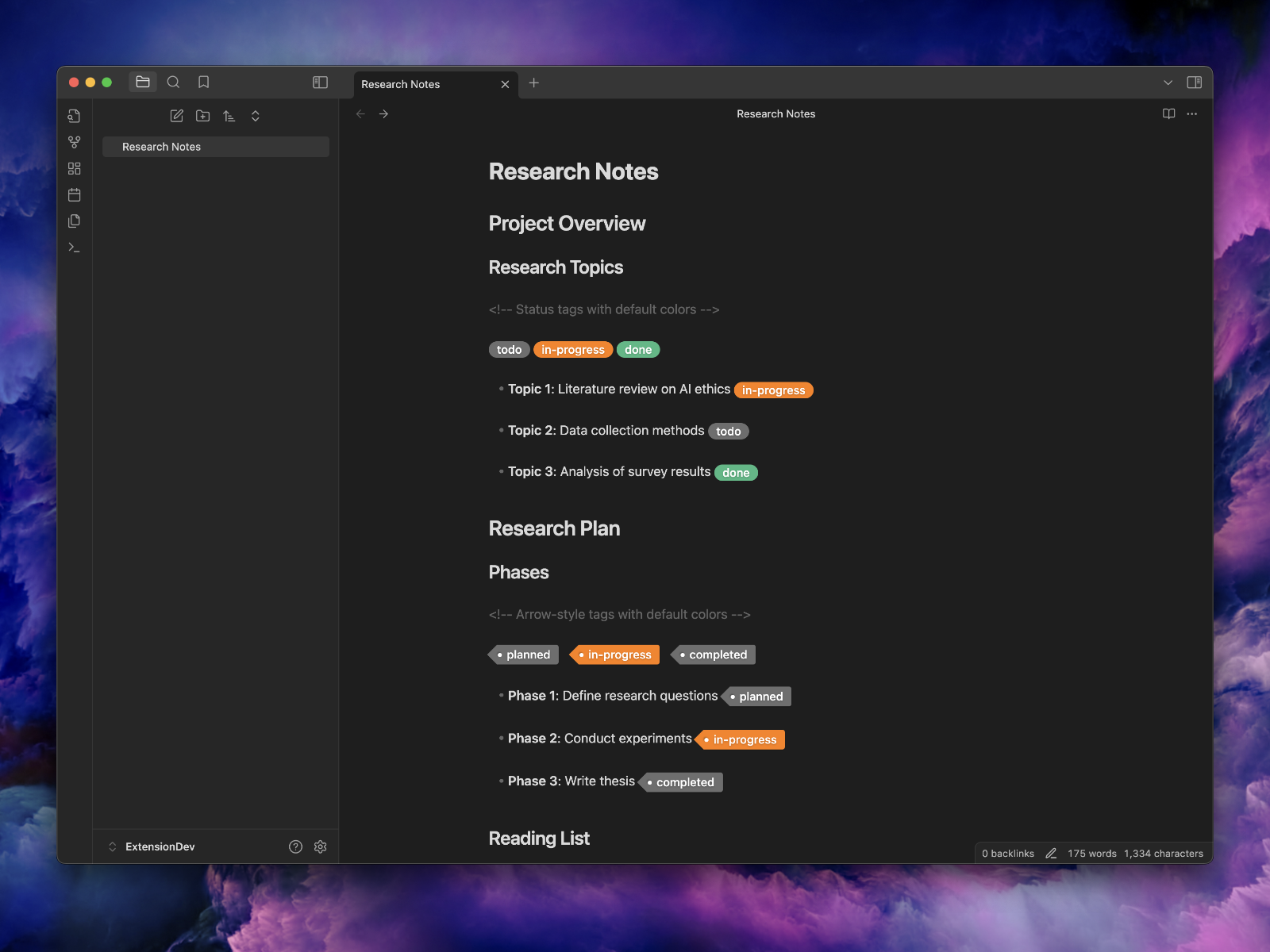
Add visual flair to your Markdown documents with custom tag styles! Tags for Markdown lets you highlight and style labels within Markdown documents using simple syntax, customizable colors, and optional arrow indicators—all within Obsidian.
Also available for VS Code and VitePress.



Features
🎨 Styled Tags
Highlight and style tags with ease using predefined or custom styles.
🖌️ Customizable Colors
Use predefined colors or specify custom hex codes for both background and foreground colors, enabling unlimited styling options.
📄 Flexible Syntax
Simple, flexible syntax options:
You can use either the | (pipe) or / (slash) character as a separator between tag components:
((tag|label))
((tag/label))
((tag|label|background-color))
((tag/label/background-color))
((tag|label|background-color|foreground-color))
((tag/label/background-color/foreground-color))
((<tag|label)) <!-- Adds an arrow to the left -->
((<tag/label)) <!-- Adds an arrow to the left -->
Note: Both
|and/are supported as separators. Use whichever you prefer or fits your workflow. This is especially useful when using tags within markdown tables.
🌈 Supports a Variety of Colors
Choose from predefined colors (grey, green, orange, etc.) or use custom hex codes to suit your design preferences.
Getting Started
- Install the plugin from the Obsidian Community Plugins.
- Enable the plugin in the Obsidian settings.
- Add Tags in your Markdown files using the syntax below.
Basic Syntax Examples
Status Tags
((tag|todo)) ((tag|in-progress|#ffcc00)) ((tag|done|#28a745|#ffffff))
Arrowed Tags
((<tag|planned)) ((<tag|custom test))
Customizing Colors
((tag|background|#ff4500)) ((tag|foreground||#ff6347)) ((tag|both colors|#32cd32|#ffffff))
Tags and Colors
Available supported tags: todo, planned, in-progress, doing, done, tip, on-hold, tbd, proposed, draft, wip, mvp, blocked, canceled, error, warning, warn
For each tag, the following colors are available: grey, green, yellow, orange, blue, purple, red.
See Examples Markdown Documents
Tag Examples
TODO
((tag|todo|grey))((tag|todo|green))((tag|todo|yellow))((tag|todo|orange))((tag|todo|blue))((tag|todo|purple))((tag|todo|red))
PLANNED
((tag|planned|grey))((tag|planned|green))((tag|planned|yellow))((tag|planned|orange))((tag|planned|blue))((tag|planned|purple))((tag|planned|red))
IN-PROGRESS
((tag|in-progress|grey))((tag|in-progress|green))((tag|in-progress|yellow))((tag|in-progress|orange))((tag|in-progress|blue))((tag|in-progress|purple))((tag|in-progress|red))
DOING
((tag|doing|grey))((tag|doing|green))((tag|doing|yellow))((tag|doing|orange))((tag|doing|blue))((tag|doing|purple))((tag|doing|red))
DONE
((tag|done|grey))((tag|done|green))((tag|done|yellow))((tag|done|orange))((tag|done|blue))((tag|done|purple))((tag|done|red))
TIP
((tag|tip|grey))((tag|tip|green))((tag|tip|yellow))((tag|tip|orange))((tag|tip|blue))((tag|tip|purple))((tag|tip|red))
... (repeat as necessary for remaining tags: on-hold, tbd, proposed, draft, mvp, etc.)
With Arrow (using ((<tag|label|bgcolor)))
MVP
((<tag|mvp|grey))((<tag|mvp|green))((<tag|mvp|yellow))((<tag|mvp|orange))((<tag|mvp|blue))((<tag|mvp|purple))((<tag|mvp|red))
... (repeat as necessary for remaining tags: on-hold, tbd, proposed, draft, mvp, etc.)
Advanced Options
CSS Integration
Add custom styles by modifying the style.css file in the plugin folder to match your preferences.
Error Handling
The plugin defaults to grey when invalid colors are detected to ensure a consistent and polished look.
How to install the plugin
- Download the Latest release
- Extract the
obsidian-markdown-tagsfolder from the zip to your vault<vault>/.obsidian/plugins/
Manually installing the plugin
Copy over main.js, styles.css, manifest.json to your vault VaultFolder/.obsidian/plugins/obsidian-markdown-tags/.
Related projects
The same ((tag|label|color)) syntax is available in other tools. The
VS Code extension is the
main project: start there for the syntax reference and to report issues
common to all of them.
| Project | Where it works |
|---|---|
| vscode-markdown-tags | Visual Studio Code |
| obsidian-markdown-tags | Obsidian |
| vitepress-markdown-tags | VitePress 2 sites |
Contributing
Issues, feature requests and pull requests are welcome. See Feedback and support.
Development
npm install
npm run build
cp main.js manifest.json /path/to/your/vault/.obsidian/plugins/obsidian-markdown-tags
Release
Releasing new releases
- Update the changelog with new features and fixes
- Commit all changed files and create a pull request
- Update the
manifest.jsonwith the new version number, such as1.0.1, and the minimum Obsidian version required for your latest release. - Update the
versions.jsonfile with"new-plugin-version": "minimum-obsidian-version"so older versions of Obsidian can download an older version of your plugin that's compatible. - Create new GitHub release using the new version number as the "Tag version". Use the exact version number, don't include a prefix
v. See here for an example: https://github.com/obsidianmd/obsidian-sample-plugin/releases - Upload the files
manifest.json,main.js,styles.cssas binary attachments. Note: The manifest.json file must be in two places, first the root path of your repository and also in the release. - Publish the release.
You can simplify the version bump process by running
npm version patch,npm version minorornpm version majorafter updatingminAppVersionmanually inmanifest.json. The command will bump version inmanifest.jsonandpackage.json, and add the entry for the new version toversions.json
git checkout main
git pull
git tag -a x.y.z -m "x.y.z"
git push --tags
The release will automatically be drafted.
License
MIT License
Feedback and support
Bug reports, feature requests and questions are all welcome. Please open them on this project's GitHub issue tracker:
- Found a bug? Report it. Include your version and the steps to reproduce it.
- Have an idea? Request a feature. Tell us what you are trying to do.
- Something else? Browse open issues to see if it has already been raised.
Pull requests are welcome too.
More from BinaryNoir
Tags for Markdown for Obsidian is one of a family of open-source VitePress plugins, editor extensions and command-line tools from BinaryNoir. Browse them all, with documentation and live demos, at binarynoir.tech.
VitePress plugins
- Auto Sidebar: sidebar built from your folders
- Auto Navbar: navbar built from your folders
- Sidebar Accordion: one open sidebar group at a time
- Markdown Tags: inline status badges
- Reading Time Tag: reading-time estimates
- Glossary Tooltips: hover definitions from one glossary file
- Downloads: downloadable files next to your pages
- Exclude: keep pages out of the build with a
.excludefile - README Index:
README.mdindex pages for VuePress migrations - HTML Escape: stray tags and braces shown as text, not build errors
- Broken Links: dead links shown as text, not build errors
Vite plugins
- Optimize Images: smaller images in the build output
- Image Fallback: a placeholder instead of a failed build
Editor extensions
- Tags for Markdown for VS Code: status badges in the VS Code Markdown preview
Command-line tools
- NoirWatch: get notified when a web page changes
- NoirCon: get notified when a site, server or port goes down
- callrx: amateur radio callsign lookup
Website, docs and demos: binarynoir.tech
Author
John Smith III, BinaryNoir. Thanks to all contributors and users for their support and feedback.