
README file from
Github🔥 LifeOS for Obsidian won the third place 🥉 in the Best Templates category at the 2024 Obsidian Gems of the Year awards!
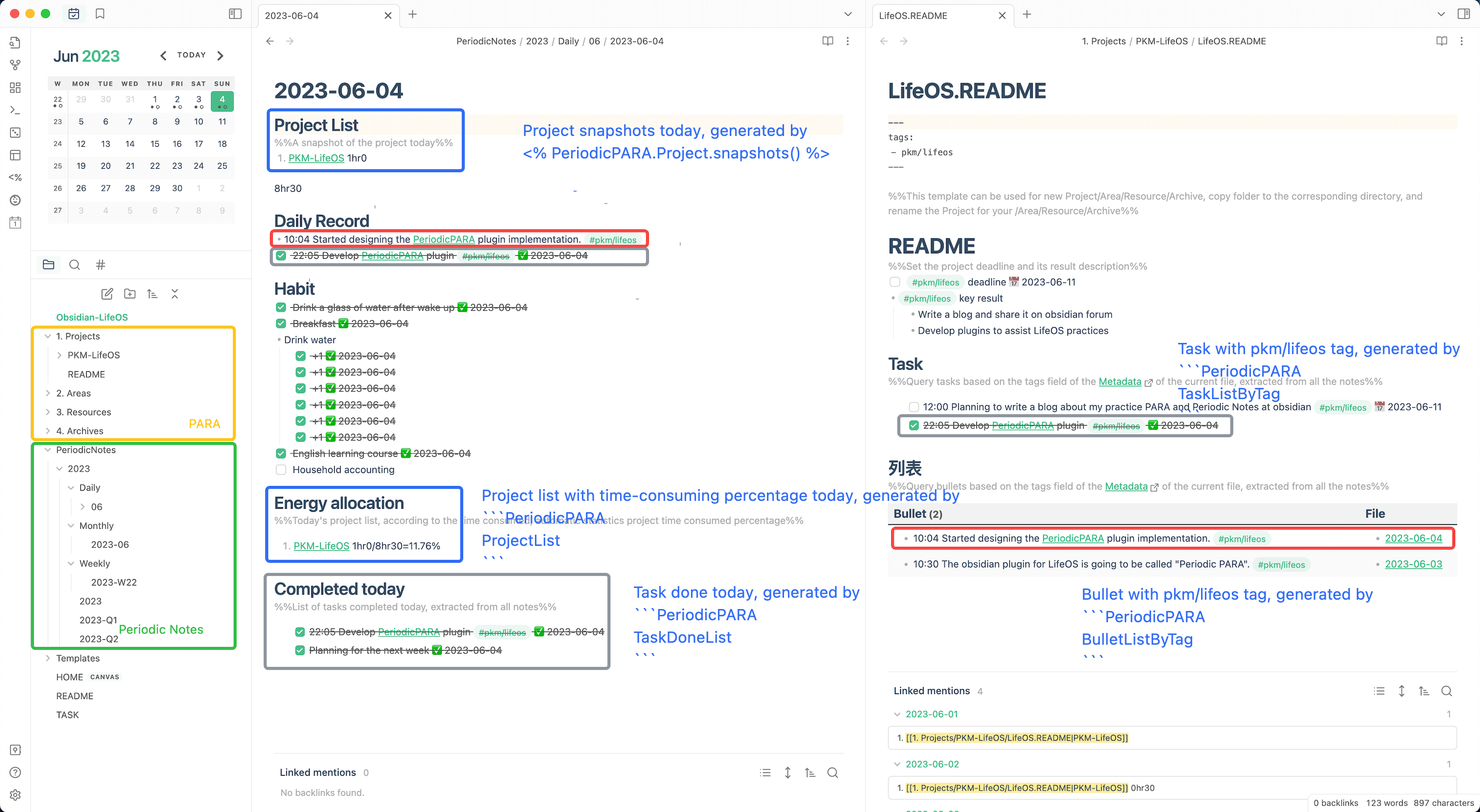
- This is a plugin for LifeOS, which assist in practicing the PARA method with periodic notes and usememos.
- It is recommended to download the LifeOS-example to experience it.
- For more tutorials, please go to LifeOS for Obsidian Official Site
The starter workflow now supports ten languages (English, Simplified and Traditional Chinese, German, Spanish, French, Portuguese, Japanese, Korean, Arabic), including workspace setup, quick capture, templates, and folder settings. See multilingual workspace maintenance.
Get started with the capture guide (中文).
Task, record and resource queries require Dataview to be installed and enabled separately. Quick capture, theme creation and native theme lists work without it. See dependency guidance and query upgrades.
Theme notes, with or without PARA
Enable Theme notes independently of PARA. Create tagged theme folders and index notes, associate quick captures, query tasks, records and files, and generate theme snapshots in daily notes. README and folder-name indexes, templates, list search and optional name synchronization are supported. See the theme guide. The example repository includes plain-theme example and blank vaults in all ten languages. Existing PARA configuration and notes are preserved.
Free tools and the independent Pro plugin
Quick capture, basic task entry, topic links remain fully free. Settings → Usage and upgrade offers shortcuts, a read-only preview of your folder settings, and an optional, collapsed comparison of calendar planning, advanced lists and project workflow scenarios with the independently paid LifeOS Pro plugin. This plugin does not contain paid unlocks or automatically install Pro. Its new promotional section does not fetch remote ads, send telemetry, or upload notes; opening the website is optional and includes only a fixed channel parameter. Existing optional usememos integration is configured separately.
LifeOS Pro alone does not include AI: AI requires the separate DeepAsk plugin and a supported model service or CLI configured by the user. See when Pro helps.
Use the Today’s records command to open today's daily note at the record section. See the handover guide before switching plugins. Pro source code, private configuration and activation data are not part of this repository.
Features
- A first-run setup wizard can create a periodic-notes workspace with or without PARA in any of the ten supported languages. The selected workspace profile is kept for future repairs, and existing files are never overwritten.
- Built-in starter templates cover daily, weekly, monthly, quarterly, yearly, Projects, Areas, Resources, and Archives notes.
- An optional example workflow and a five-minute completion guide help you make the first capture; the example can be removed safely while it remains unchanged.
- Quick record and Quick task support continuous capture, native live preview, images, checklists, PARA theme associations, history, combined filters, and safe editing. Everything stays in daily-note Markdown. See the quick capture guide (Chinese).
- Query views use Dataview. Setup and quick capture work without it.
- LifeOS Basic: https://lifeos.vip/plugin/lifeos/life-os.html
- LifeOS Pro : https://lifeos.vip/plugin/lifeos/life-os-pro.html
- DeepAsk AI for Obsidian : https://lifeos.vip/plugin/deepask/deepask.html
- DeepAsk AI for Chrome : https://chromewebstore.google.com/detail/deepask-ai/abhoenehflglmgbohaibihggedfcpcep
- Multi-language UI: follows your current Obsidian language by default, and can be overridden from the plugin settings page.
Download
Development and contributions
See the contribution guide and community tasks. Requires Obsidian 1.4.0 or newer.
Setup and quick capture work without Dataview. Query views still require Dataview and show installation, enablement, or indexing guidance.
Support
Acknowledgements
Also, I relied on the code from these excellent plugins:
- PARA. Thanks to Tiago Forte for inventing such a great organizational method.
- PARA Starter Kit. Thanks to cotemaxime for creating such a great starter vault.
- obsidian-periodic-notes. Gave me the inspiration to develop this plugin.
- obsidian-dataview. The underlying plugin uses dataview's query interface.
- Templater. Provides decoupled template creation, allowing a very large number of plugins to create files with the help of it.
Donations
If this plugin do help you, please buy me a cup of coffee on buymeacoffee.
In addition, you can also support me in further developing a better LifeOS by purchasing the LifeOS Pro!
Or Alipay
Or WeChat