
README file from
GithubObsidian Title Serial Number Plugin
A powerful Obsidian plugin that automatically adds customizable serial numbers to your markdown headings.
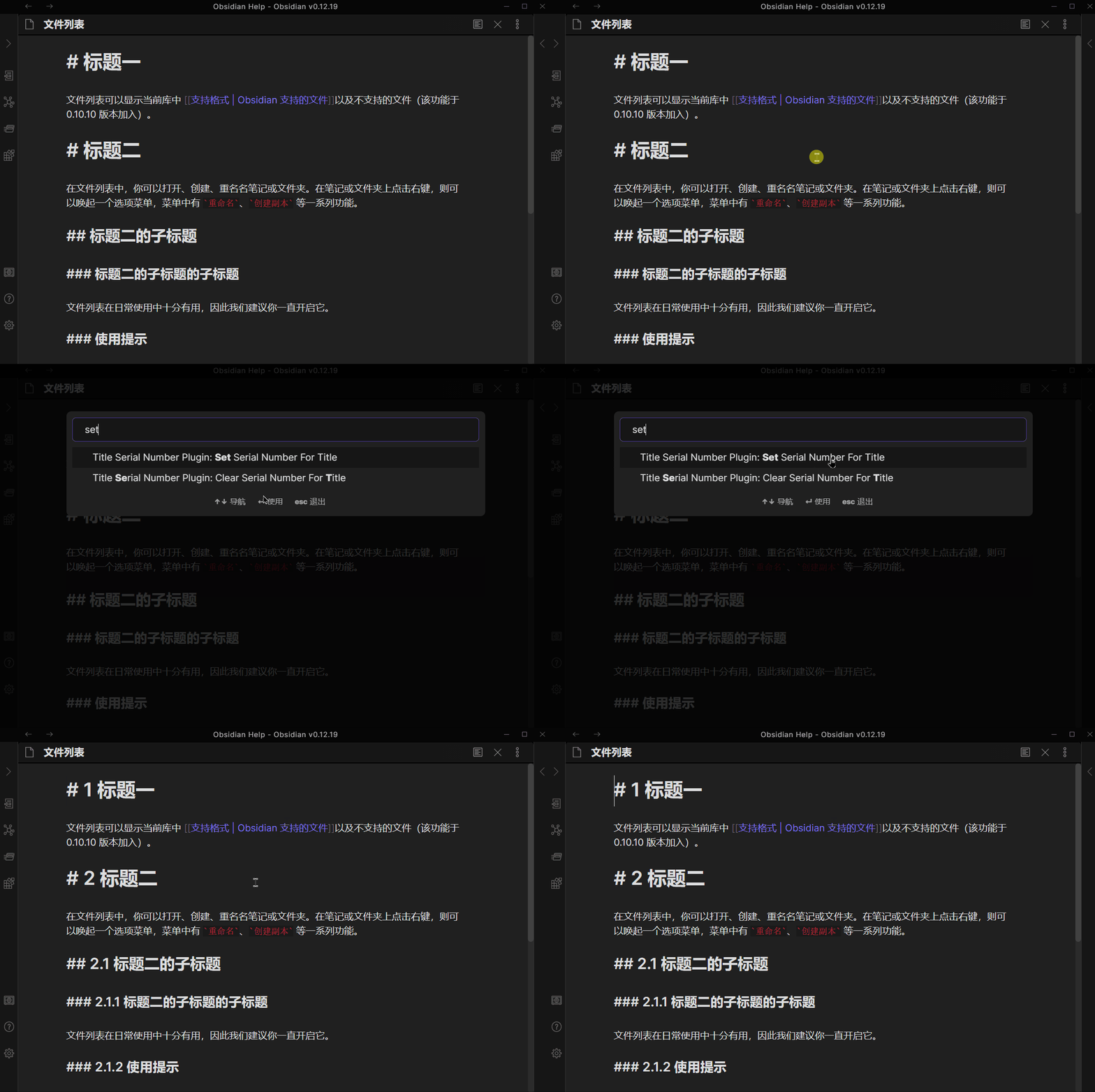
Features
-
Multiple Number Styles: Support for 7 different numbering styles
- Arabic numerals (1, 2, 3...)
- Chinese lowercase (一, 二, 三...)
- Chinese uppercase (壹, 贰, 叁...)
- Roman uppercase (I, II, III...)
- Roman lowercase (i, ii, iii...)
- Alphabetic uppercase (A, B, C...)
- Alphabetic lowercase (a, b, c...)
-
Flexible Level Configuration: Choose which heading levels (H1-H6) to apply numbering
-
Per-Level Style Customization: Set different number styles for each heading level
-
Custom Separator: Configure the separator between numbers (e.g.,
.,-,/) -
Live Preview: See how your serial numbers will look in real-time while configuring
Commands
| Command | Description |
|---|---|
Set Serial Number |
Add serial numbers to all headings in the current document |
Clear Serial Number |
Remove all serial numbers from headings in the current document |
Numbering that contains alphabetic or Roman numerals uses parentheses, such as
(A), (I), or (I.1.a). Arabic and Chinese numbering keep their existing format.
The parentheses distinguish these serial numbers from heading text such as
A guide or I think, so adding or clearing numbers preserves those words.
Existing notes: Unmarked alphabetic or Roman prefixes from earlier versions
are now treated as title text. To update or clear an old serial, first wrap the
whole serial in parentheses (for example, # I Introduction becomes
# (I) Introduction). Otherwise, adding numbers will retain the old prefix as
part of the title. Only mark prefixes that you know are serial numbers.
Configuration
Access the plugin settings through Settings → Community Plugins → Title Serial Number Plugin.
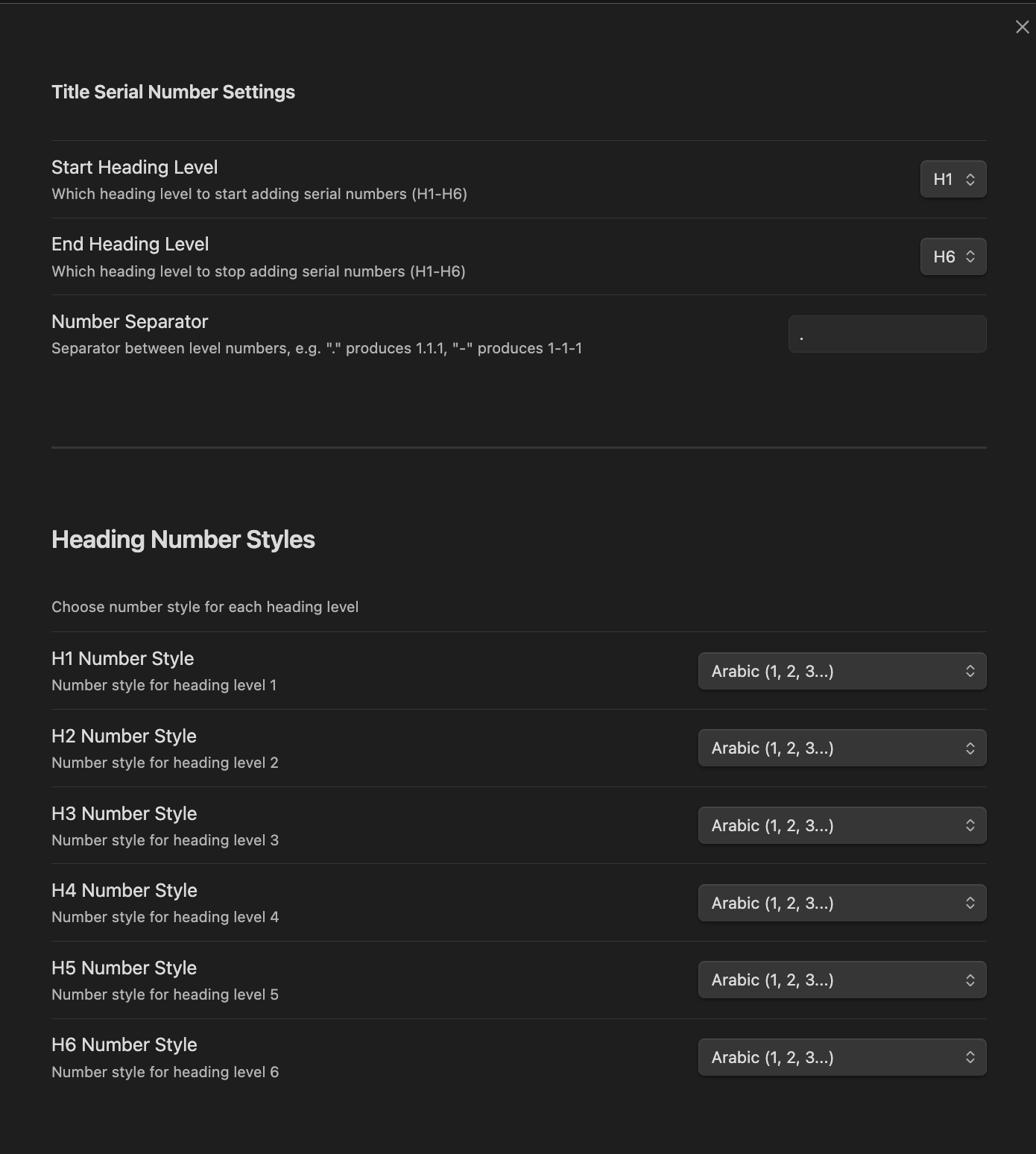
Settings Options
| Option | Description |
|---|---|
| Start Heading Level | Which heading level to start adding serial numbers (H1-H6) |
| End Heading Level | Which heading level to stop adding serial numbers (H1-H6) |
| Number Separator | Separator between level numbers (default: .) |
| H1-H6 Number Style | Choose the numbering style for each heading level |
Example
Input
# Introduction

## Background

### History

### Current State

## Methods

### Approach A

### Approach B

# Conclusion
Output (with default settings: Arabic, separator .)
# 1 Introduction

## 1.1 Background

### 1.1.1 History

### 1.1.2 Current State

## 1.2 Methods

### 1.2.1 Approach A

### 1.2.2 Approach B

# 2 Conclusion
Output (with mixed styles: H1=Roman, H2=Arabic, H3=Alpha lowercase)
# (I) Introduction

## (I.1) Background

### (I.1.a) History

### (I.1.b) Current State

## (I.2) Methods

### (I.2.a) Approach A

### (I.2.b) Approach B

# (II) Conclusion
Installation
From Obsidian Community Plugins
- Open Obsidian Settings
- Go to Community Plugins and disable Safe Mode
- Click Browse and search for "Title Serial Number"
- Install and enable the plugin
Manual Installation
- Download the latest release from GitHub Releases
- Extract the files to your vault's
.obsidian/plugins/obsidian-title-serial-number-plugin/folder - Reload Obsidian and enable the plugin in Community Plugins settings
License
MIT License - see LICENSE for details.