
README file from
Githubbibtex entry view, a plugin for obsidian
requirements
- Obsidian 1.13 or later.
- Desktop only.
what it carries out
renders bibkey codeblock
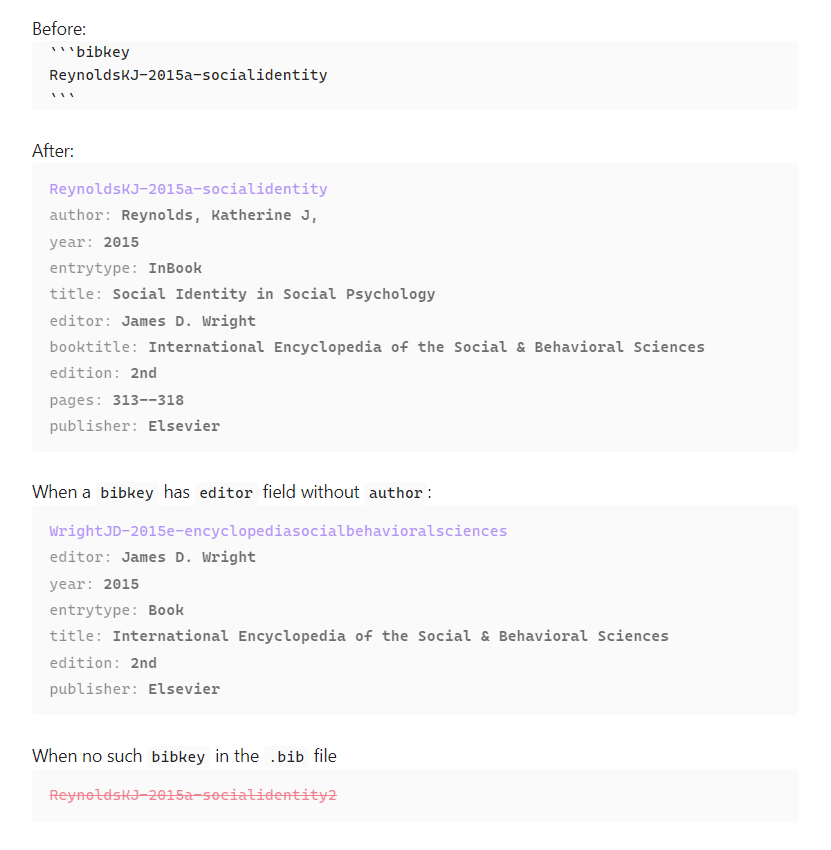
- If the plugin finds the
bibkeyin the.bibfile, the codeblock (first codeblock above) is replaced with the entry view of thebibkey(second codeblock). - If the plugin cannot render the entry, the codeblock is rendered in red colored text and strikethrough (fourth codeblock), with the reason:
(Provide a correct key): the codeblock is empty, or thebibkeyis not in the.bibfile.(No bib file selected): no.bibfile is chosen in thesettings. (v. 0.2.5)(Bib file not found: {path}): the chosen.bibfile is missing, e.g. renamed or deleted. (v. 0.2.5)
suggests the match
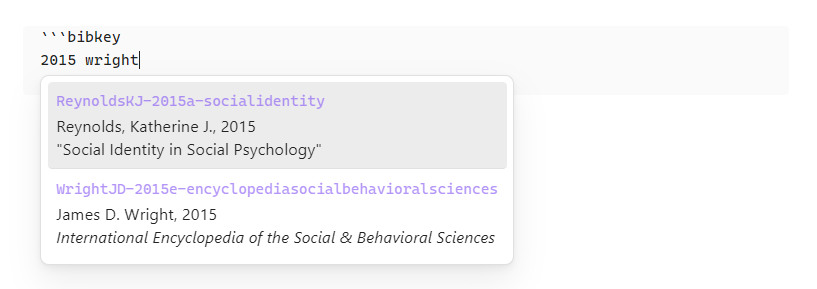
- Suggested list will be shown while typing
{bibkey}as shown above. (v. 0.2.0) - Each keyword should be at least two letters long.
- Separate keywords with spaces. An entry matches when every keyword is part of a word in the entry, e.g.
rey 2015. - The keywords are matched against the
bibkeyand the fields inCustomize search and autocompletein thesettings. (v. 0.2.5)- By default:
author,editor,year,title,subtitle. - This is independent of the rendering order, so a field hidden from the codeblock can still be searched.
- By default:
- Each suggestion shows the
bibkey, the author (or editor) and year, and the title. A long author list is cut with…, but the year always stays visible. (v. 0.2.5)
What's in the .bib file which is generated by jabref.
@InBook{ReynoldsKJ-2015a-socialidentity,
  author           = {Reynolds, Katherine J.},
  booktitle        = {International Encyclopedia of the Social & Behavioral Sciences},
  citationkey      = {ReynoldsKJ-2015a-socialidentity},
  edition          = {2nd},
  editor           = {James D. Wright},
  pages            = {313--318},
  publisher        = {Elsevier},
  title            = {Social Identity in Social Psychology},
  year             = {2015},
  abstract         = { ... },
  creationdate     = {2024-07-22T13:12:48},
  doi              = {10.1016/B978-0-08-097086-8.24064-6},
  modificationdate = {2025-06-23T21:48:18},
}

@Book{WrightJD-2015e-encyclopediasocialbehavioralsciences,
  citationkey      = {WrightJD-2015e-encyclopediasocialbehavioralsciences},
  edition          = {2nd},
  editor           = {James D. Wright},
  publisher        = {Elsevier},
  title            = {International Encyclopedia of the Social & Behavioral Sciences},
  year             = {2015},
  creationdate     = {2025-06-23T18:01:38},
  modificationdate = {2025-06-23T21:48:59},
}
what the plugin renders in the codeblock
- In the first line,
- it shows the
bibkeyin the accent color of obsidian.
- it shows the
- In the second line,
- If the Bibtex entry has
authorfield, it shows the author field name and its value right after thebibkey. - If the Bibtex entry does not have
authorfield but aneditorfield, it shows the editor field name and its value right after thebibkey. - All kinds of name are in "von last, jr, first" format, e.g.
van Beethoven, Ludwig,King, Jr., Martin Luther. Parts a name does not have are left out, e.g.Reynolds, Katherine J.. (v. 0.2.5)
- If the Bibtex entry has
- In the third line and so on,
- it sorts all the other field names and their values by the order of
Customize field rendering orderin thesettingsand shows them. - Fields not in that list are hidden.
- it sorts all the other field names and their values by the order of
so, how a user can use it
before using it
- Put the
.bibfile anywhere in the vault. - Or, import one in the settings. It is saved in the root of the vault.
- Or, make a symbolic link to user's own
.bibfile in the vault.
settings tab example
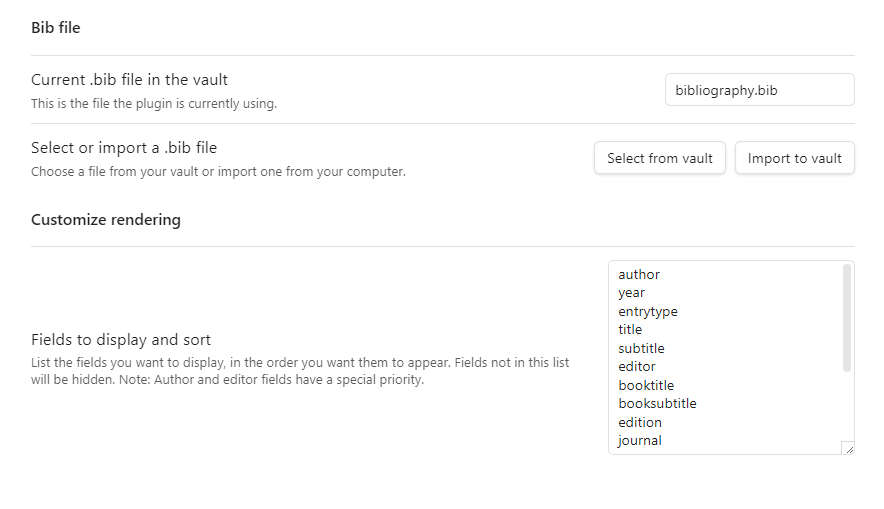
choose a .bib file in the current vault
- Initially, no
.bibfile is selected. - A user needs to choose the
.bibfile or the symbolic link in the vault.
Or, import a .bib file from outside the vault into the vault.
- If a file with the same name is already in the vault, the plugin asks before overwriting it. (v. 0.2.5)
customize rendering
- A user can choose fields and their order to render, one per line.
- Changes are applied to open notes right away.
customize search (0.2.5)
- A user can choose fields to include in search, one per line.
- The
bibkeyis always searched.entrytypecan be added to search by entry type, e.g.book.
in a note
- Write a codeblock in the following format
```bibkey
{bibkey}
```
- Or, type
```bibkeyfollowed by a space and keywords on one line. When a suggestion is chosen, it is rewritten into the format above. (v. 0.2.5)
known bug or malfunctioning
- It seems that the plugin does not show suggestions irregularly when using a plugin
Various Complements. Looking into this problem. (@ v. 0.2.0)
what is planned to add next
- adding a command to manually update the entry indices when updating the target
.bibfile of the symbolic link. - fuzzy search for autocompletion suggestion
support
- If you like this project, please support.

license
MIT