
README file from
GithubElementra




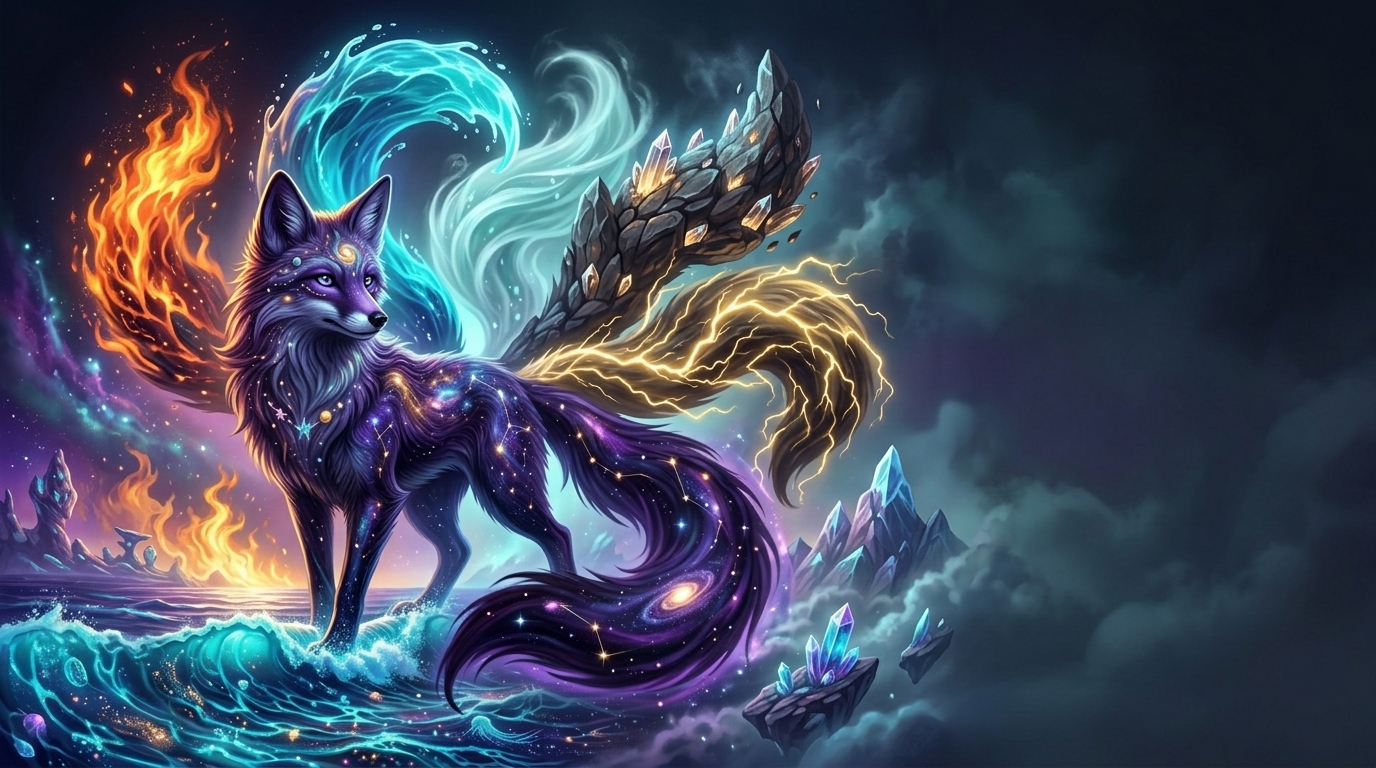
Your vault was never meant to feel ordinary.
Elementra is an atmospheric Obsidian theme built around six elemental worlds.
Open your vault and you don't simply choose a colour.
You choose a world.
🔥 Fire brings heat and energy.
💧 Water moves quietly through the interface.
🌪️ Wind keeps everything in motion.
🪨 Earth gives the workspace weight and structure.
⚡ Lightning brings speed and intensity.
🕳️ Void disappears into darkness and space.
Each element has its own colours, artwork, atmosphere, motion, and visual identity while remaining part of the same design system.
Six elements. One world. Your vault.
Preview
What's New
The latest Elementra update expands the original theme into a more complete elemental system.
| Update | Description |
|---|---|
| Living Atmosphere | Subtle drift, rise, breathe, flicker, gust, and twinkle effects |
| Elemental Sigils | Each element now has its own visual symbol |
| Elemental Motion | Tabs and task completion react differently to each element |
| Design Tokens | New controls for ink, halo, core, ground, masks, and artwork |
| Enhanced Tabs | Elemental sigils, artwork, masking, and motion |
| Enhanced Callouts | Element-aware colours and subtle sigils |
| Animated Tasks | Individual completion effects for each element |
| Refined Graph | Updated elemental colours and atmospheric styling |
| Better Tables | Improved Live Preview and table-editor compatibility |
| More Embeds | Refined image, video, PDF, and file surfaces |
| Accessibility | Focus states, clarity controls, and Still Mode |
| Dark & Light | Dedicated elemental treatment for both modes |
| Obsidian Coverage | Improved styling for Canvas, metadata, menus, CM6, and embeds |
Same six elements. A deeper system.
The Six Elements
Elementra currently contains six distinct elemental environments.
They are not simple colour presets. Each one has its own visual language and atmosphere.
| Element | World | Character |
|---|---|---|
| 🔥 Fire | The Ember | Energy · Heat · Intensity |
| 💧 Water | The Tide | Flow · Memory · Calm |
| 🌪️ Wind | The Sky | Air · Freedom · Movement |
| 🪨 Earth | The Range | Structure · Nature · Stability |
| ⚡ Lightning | The Storm | Speed · Power · Focus |
| 🕳️ Void | The Abyss | Space · Gravity · Mystery |
Screenshots
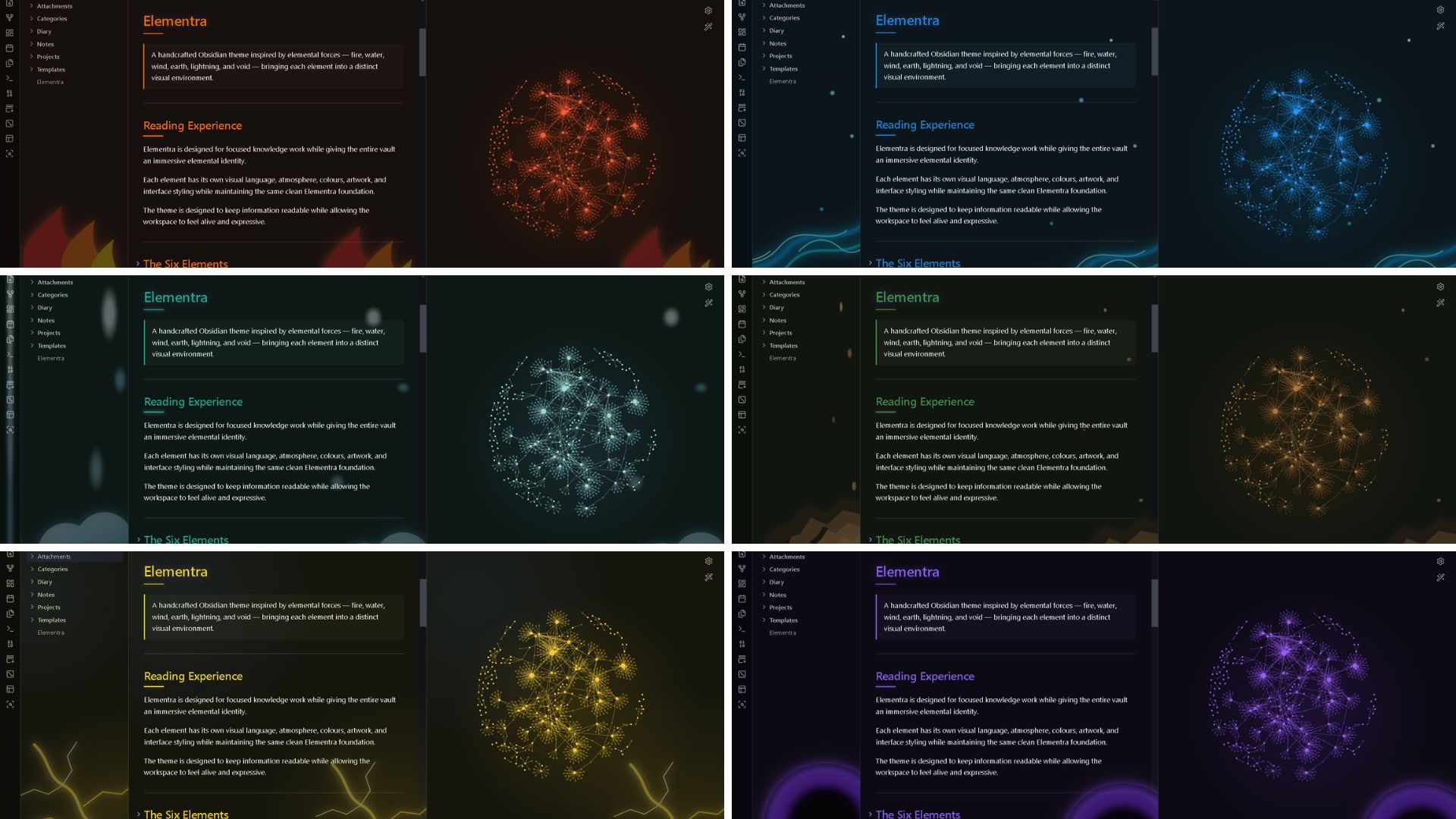
Dark Mode
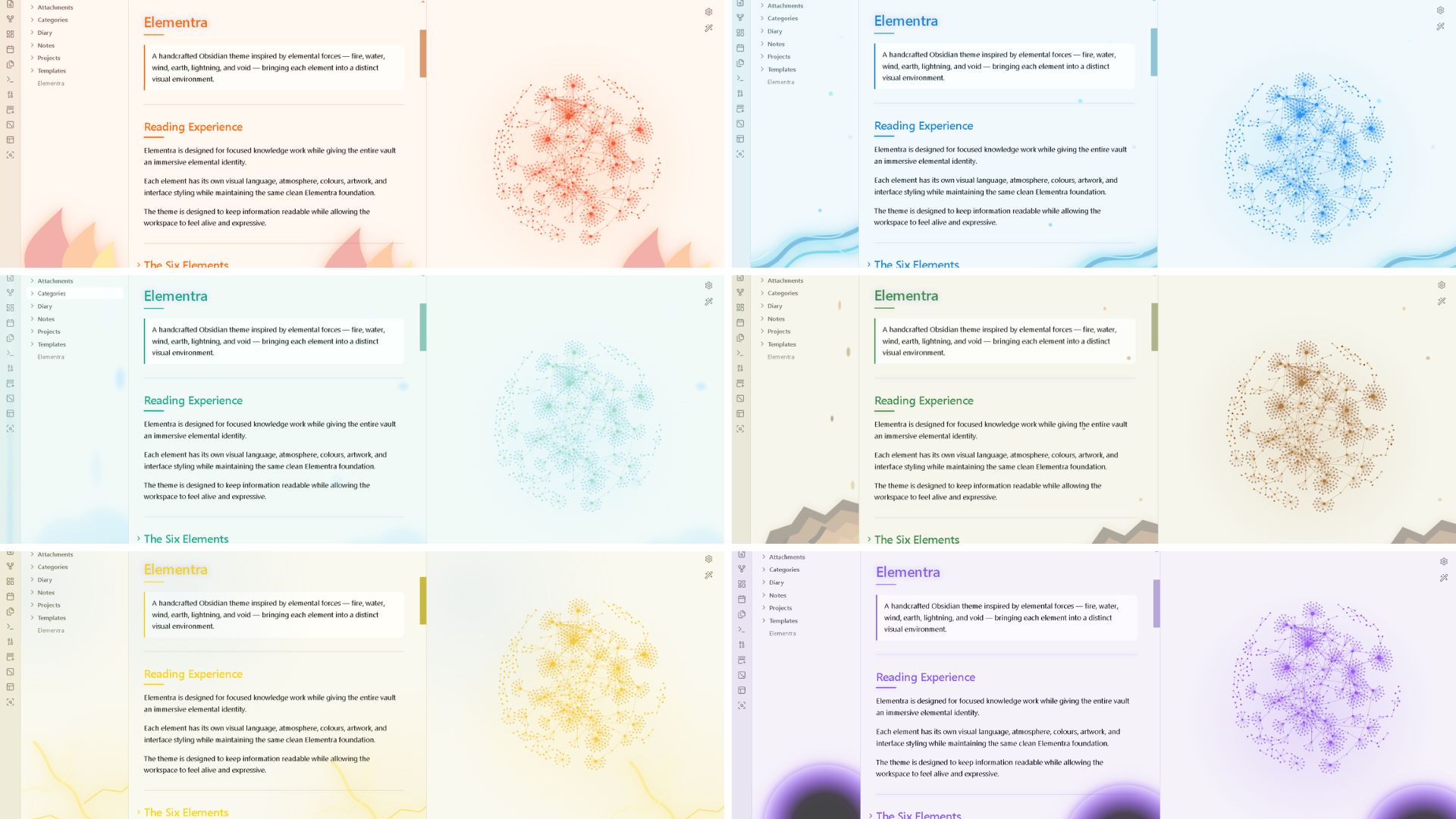
Light Mode
Elemental Atmosphere
The updated version introduces subtle motion to each environment.
| Element | Atmosphere |
|---|---|
| 🔥 Fire | Rising warmth and ember movement |
| 💧 Water | Slow flowing drift |
| 🌪️ Wind | Gusts, haze, and air movement |
| 🪨 Earth | Grounded vertical movement |
| ⚡ Lightning | Electric flicker |
| 🕳️ Void | Cosmic twinkle |
The motion is intentionally restrained so the interface remains practical for everyday work.
Elemental Details
Elementra extends its visual system across the Obsidian interface.
| Surface | Treatment |
|---|---|
| Notes | Clean reading and writing surfaces |
| Links | Elemental accent colours |
| Tags | Compact visual classification |
| Tables | Structured presentation |
| Code | Technical colour system |
| Properties | Clean metadata surfaces |
| Tasks | Element-specific completion effects |
| Callouts | Element colour and sigil |
| Tabs | Sigil, artwork, masking, and atmosphere |
| Menus | Elemental selected states |
| Graph View | Elemental nodes and atmosphere |
| Images | Refined media surfaces |
| Video | Integrated media styling |
| Raised embedded surface | |
| File Embeds | Elemental accent treatment |
| Canvas | Decoration-aware styling |
Elemental Sigils
Each element has its own sigil.
The sigils are used selectively across the interface, including:
- Lists
- Callouts
- Active tabs
- Menus
- Selected suggestions
They are intended to reinforce the identity of the current element without becoming visual clutter.
Elemental Interactions
Small interactions can change depending on the selected element.
| Element | Task Completion |
|---|---|
| 🔥 Fire | Warm pulse |
| 💧 Water | Ripple |
| 🌪️ Wind | Light movement |
| 🪨 Earth | Grounded settle |
| ⚡ Lightning | Electric flash |
| 🕳️ Void | Cosmic pulse |
Dark & Light
Elementra supports both Dark Mode and Light Mode.
Each mode has dedicated treatment for:
- Surfaces
- Elemental ink
- Halos
- Artwork
- Graphs
- Interactive elements
- Reading areas
Same world. Different light.
Changing the Element
Elementra uses the Style Settings community plugin to control the elemental system.
Style Settings is required if you want to switch between the six elements or customize the theme.
Install Style Settings
- Open Obsidian.
- Open Settings.
- Select Community plugins.
- Click Browse.
- Search for Style Settings.
- Install and enable it.
Then:
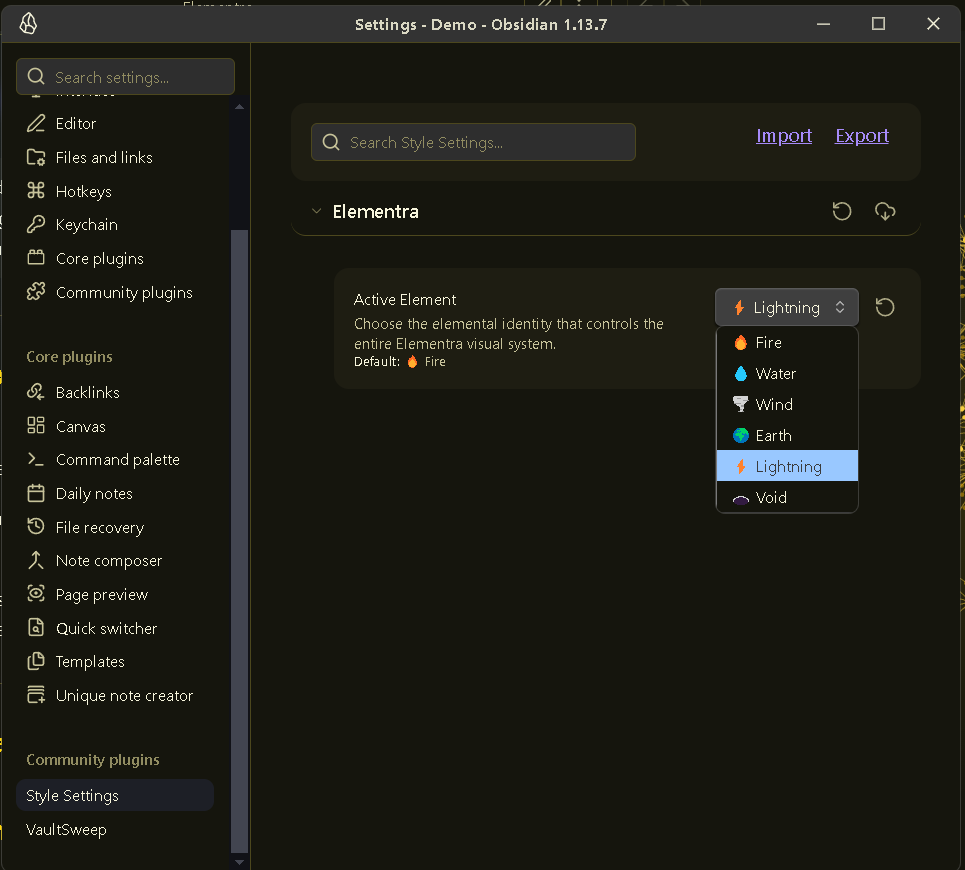
- Open Settings → Style Settings.
- Find Elementra.
- Locate Elementra Element.
- Select your preferred element.
Your notes, files, links, and vault structure remain unchanged.
Only the visual environment changes.
Built for Obsidian
| Feature | Status |
|---|---|
| Desktop | Supported |
| Mobile | Supported |
| Dark Mode | Supported |
| Light Mode | Supported |
| Live Preview | Supported |
| Reading View | Supported |
| Properties | Supported |
| Tables | Supported |
| Code Blocks | Supported |
| Dataview | Supported |
| Tasks | Supported |
| Canvas | Supported |
| Excalidraw | Supported |
| Graph View | Supported |
| File Embeds | Supported |
| PDF Embeds | Supported |
| Images | Supported |
| Video | Supported |
Accessibility
Elementra is designed to balance atmosphere with readability.
Current accessibility-focused features include:
- Visible
:focus-visiblestates - Readability controls
- Artwork opacity controls
- Clarity filters
- Elemental contrast handling
- Reduced-motion support
- Still Mode
Still Mode
For a quieter workspace, Elementra can disable its ambient movement.
elementra-still
The visual system remains while the motion rests.
Typography
| Purpose | Font |
|---|---|
| Body | IBM Plex Sans |
| Headings | IBM Plex Sans |
| Technical | IBM Plex Mono |
Design Philosophy
Your workspace should feel like a world.
Elementra treats the vault as an environment rather than a collection of interface components.
                          ELEMENTRA
                             │
           ┌─────────────────┼─────────────────┐
           │                 │                 │
         FIRE              WATER              WIND
        Ember              Tide                Sky
           │                 │                 │
           └─────────────────┼─────────────────┘
                             │
           ┌─────────────────┼─────────────────┐
           │                 │                 │
         EARTH           LIGHTNING             VOID
        Range              Storm              Abyss
           │                 │                 │
           └─────────────────┼─────────────────┘
                             │
                         ELEMENTRA
                     One visual system
Notes become knowledge.
Folders become territories.
Links become pathways.
Tags become classifications.
Tasks become actions.
The graph becomes a network.
The element becomes the atmosphere around it.
Future
Elementra is designed with room for further expansion.
| Feature | Direction |
|---|---|
| Art Intensity | Adjustable elemental artwork strength |
| Motion Presets | Still, Calm, Ambient, Lively |
| Full Reduced Motion | One setting for all animation |
| High Contrast | Stronger accessibility colour presets |
| Print Mode | Clean exports without atmospheric effects |
| Plugin Compatibility | Deeper support for popular Obsidian plugins |
| Canvas Theming | Elemental nodes, groups, and connections |
| Elemental Explorer | More element-aware navigation |
| Graph Controls | Additional atmosphere and intensity controls |
| Per-Note Elements | Different elemental worlds within one vault |
| Custom Sigils | User-defined elemental symbols |
| New Worlds | Additional elements beyond the original six |
The goal is not simply to add more effects.
The goal is to make the system deeper, more flexible, and more personal.
Who Is Elementra For?
Elementra is designed for:
- Students
- Researchers
- Developers
- Writers
- Designers
- Knowledge managers
- Project planners
- Worldbuilders
- Game designers
- Makers
- Creative thinkers
- Note-taking enthusiasts
Or anyone who wants their Obsidian vault to feel like somewhere.
Installation
Download Elementra and place the theme folder inside:
YourVault/.obsidian/themes/
Then open:
Obsidian → Settings → Appearance → Themes
Select Elementra.
Install and enable Style Settings if you want to change the elemental environment.
Support
If you enjoy Elementra and want to support development:
Credits
Fonts
- IBM Plex Sans
- IBM Plex Mono
Visual Inspiration
Elementra draws inspiration from natural and cosmic phenomena:
- Fire
- Water
- Wind
- Earth
- Lightning
- Black holes
- Space
- Atmospheric formations
- Geological structures
- Energy and natural motion
License
MIT License
Elementra
Six elements. Six worlds. One vault.
Structure meets atmosphere.
🔥 · 💧 · 🌪️ · 🪨 · ⚡ · 🕳️