
README file from
GithubObsidian Noor Plugin
Noor is a plugin for Obsidian.md that brings Islamic inspiration to your notes. Insert Quran verses, authentic Hadith, or build a Dhikr file with just a command. Explore with fast search for both Quran and Hadith, choose your preferred reciter and translation, and even script it from Templates. Best of all, it respects your privacy and works offline when lists are cached.
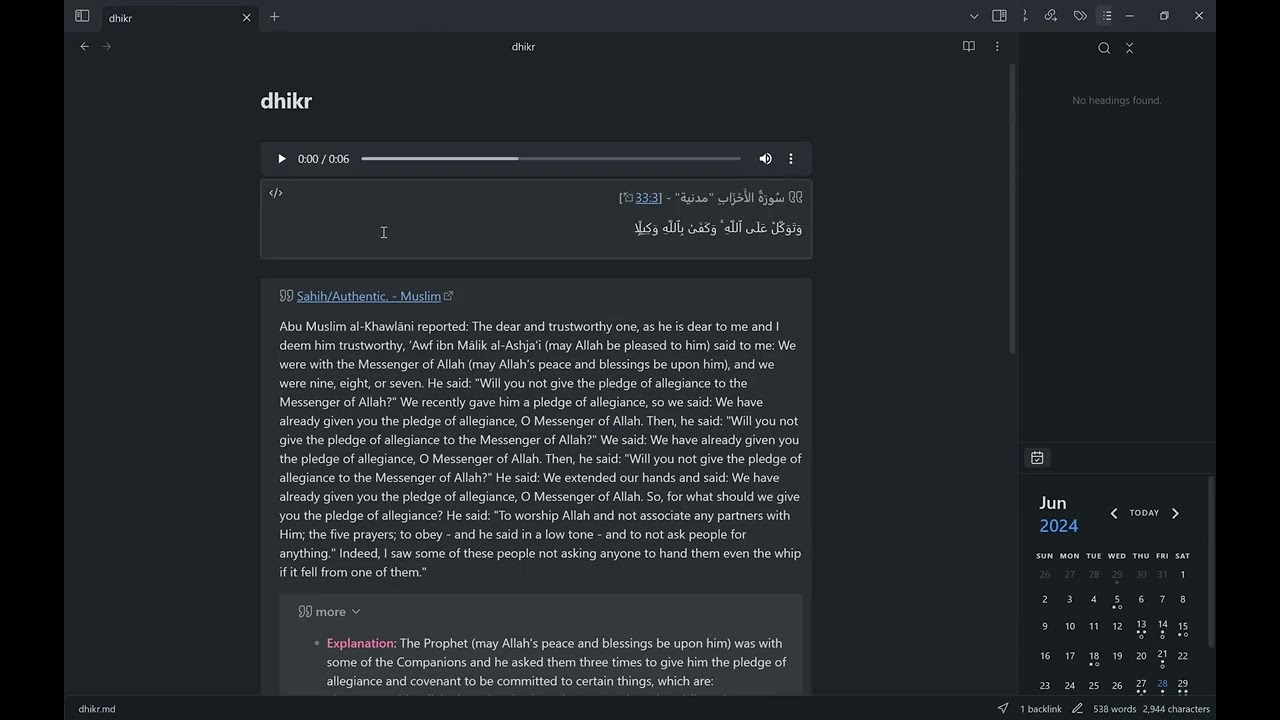
Screenshots
| Quran search | Hadith search |
|---|---|
| Translated Hadith quote | Dhikr file |
Features
- Random Quran quotes — insert Arabic verses with optional audio and translation (choose your reciter and translation).
- Random Hadith quotes — insert authentic Hadith in your preferred language.
- Dhikr file — create or refresh a dedicated Dhikr note with a Quran quote and Hadith; open it in the current pane or a popup.
- Search Quran & Hadith — find verses by Arabic or translation text, or search Hadith by keywords; insert the exact quote, overwrite the Dhikr file with only that quote, or append the quote to the Dhikr file.
- Scriptable — use
noorJS.randomQuranQuote()andnoorJS.randomHadithQuote()from Templater or other scripts. - Customizable — toggle audio, pick reciter/translation, choose Hadith language, and set how many search results appear.
- Privacy-first — offline-friendly (lists are cached after first load), and only contacts Quran/Hadith APIs when needed.
Usage
After enabling the plugin in the settings menu, you should see the added commands and the noorJS object.
- commands:
Noor: Random Quran quote: inserts a quote block at the current editor location containing a Quran QuoteNoor: Random Hadith quote: inserts a quote block at the current editor location containing a Hadith QuoteNoor: Open Dhikr file: creates a Dhikr file at the configured location containing a Quran Quote and a Hadith Quote then opens in current viewNoor: Open Dhikr file popup: creates a Dhikr file at the configured location containing a Quran Quote and a Hadith Quote then opens in popup window viewNoor: Search quran quote: opens a search dialog for the Quran; pick a verse, then insert it or write only that quote to the Dhikr file. A query typed in Arabic searches the Arabic text (quran-uthmani); any other query searches your chosen translationNoor: Search hadith quote: opens a search dialog for Hadith; pick a hadith, then insert it or write only that quote to the Dhikr file. Results come from the Hadith language you selected and need at least 3 characters; a query in a different script than the selected language is flagged in the dialog
- scripting:
noorJS.randomQuranQuote(): this function returns a Quran QuotenoorJS.randomHadithQuote(): this function returns a Hadith Quote
The search commands are UI-only and are not exposed on
noorJS.
Integration with other plugins
obsidian plugins complement each other, here are some ideas
- with templater: use
<% noorJS.randomQuranQuote() %>to insert the Quran quote into your notes (like the daily note to get a daily verse) - with commander: use it to create a button for the
Noor: Random Quran quotecommand
Settings
General settings
- Dhikr file path: configure where to create the Dhikr file
Quran settings
- Reciter: choose your favorite reciter from the drop-down menu (the Arabic reciters that provide per-verse audio come from the API)
- Show audio: toggle to include or hide the audio player in Quran quotes
- Show translation: choose Arabic only or dual language mode
- Translation Language: choose the second language to show next to Arabic
- Translation Options: choose your favorite translation from the ones available in selected Translation Language
Hadith settings
- Hadith language: choose your preferred language to show the hadith in. The list comes from the hadith API and shows each language in its own name.
Search settings
- Search results: how many results the search dialog shows (default 20, maximum 100)
Manually installing the plugin
- Copy over
main.js,manifest.json, andstyles.cssto your vault.obsidian/plugins/noor/. - Reload Obsidian to load the new version of your plugin.
- Enable the plugin in the settings window.
Development
npm run devbuilds the plugin in watch mode, andnpm run buildproduces a production build.
Both build commands automatically copy main.js, manifest.json, and styles.css
into .obsidian/plugins/noor/ of the local test vault located next to this repo
(../dev). Just reload Obsidian (or use the hot-reload
plugin) to pick up the changes.
npm run dev also turns the plugin's console diagnostics on (messages are prefixed with
Noor:); the production build leaves them off, so released builds stay quiet. Reloading is
what switches builds, so stop the watcher (Ctrl+C) before running npm run build — until
then, any source change re-copies a dev build into the vault.
To test against a different vault, set the OBSIDIAN_VAULT environment variable to
the vault path before running the build, for example:
OBSIDIAN_VAULT="/path/to/vault" npm run dev
Releasing
Releases are automated via GitHub Actions: pushing a tag
builds the plugin and attaches main.js, manifest.json, and styles.css to the release.
npm version patch -m "release version %s"   # bumps package.json + manifest.json/versions.json, commits and tags
git push && git push --tags
Attributions
AlQuran Cloud APIs
The Quran verses are retrieved from
- alquran.cloud: An opensource Quran API made by the Islamic Network (github) and respective contributors.
Hadith Encyclopedia APIs
The Hadith quotes are retrieved from
- hadeethenc.com: Encyclopedia of Translated Prophetic Hadiths.
Privacy
Noor is offline-first: it makes no network requests unless you run a quote, Dhikr file, or search command. The exception is a few requests on load for the lists the settings dropdowns need (hadith languages, quran translation languages and reciters); these send no data about you, and their results are cached in the plugin's settings so the dropdowns keep working offline. All requests go only to the Quran/Hadith APIs listed above. When you search, the text you type is sent to the corresponding API as the search phrase; note contents and filenames are never transmitted.
Contributions and suggestions
Please feel free to open a pull request with suggested improvements and new feature requests